Categories
Technology

How to see your mail in Tower of Fantasy

Players are able to communicate back and forth by sending each other mail in Tower of Fantasy.

It is great to talk to friends in chat while playing. However, sometimes, the schedules of two players do not align, and players need to send messages to keep their teammates in the loop. This is where the ToF mail system comes into play.

youtube-cover

The game’s mail system also acts as a channel for players to obtain their rewards. There could be compensation for server issues or log-in rewards waiting in the mailbox. Thus, players should be on the lookout for an envelope at all times.


How to check mail in Tower of Fantasy

Mail in Tower of Fantasy may contain rewards (Image via Perfect World)

If a player is in the middle of a session, they will be immediately notified of any mail. An envelope icon will appear in the top left corner of the screen, next to the minimap.

For those who receive mail while they are logged out of Tower of Fantasy, the envelope icon will be waiting there when they sign back in. Be sure to look for the envelope after logging in to make sure that you are always up to date.

Here is how to open the mailbox and read through the mail sent from friends or the development team:

  • Mobile players can tap on the envelope icon to directly open their mailbox
  • PC players are able to click it with their mouse while holding the Alt key to bring the mailbox screen up
  • If there is no new mail and players want to access the mailbox, they can click on the three hexagons at the top right corner
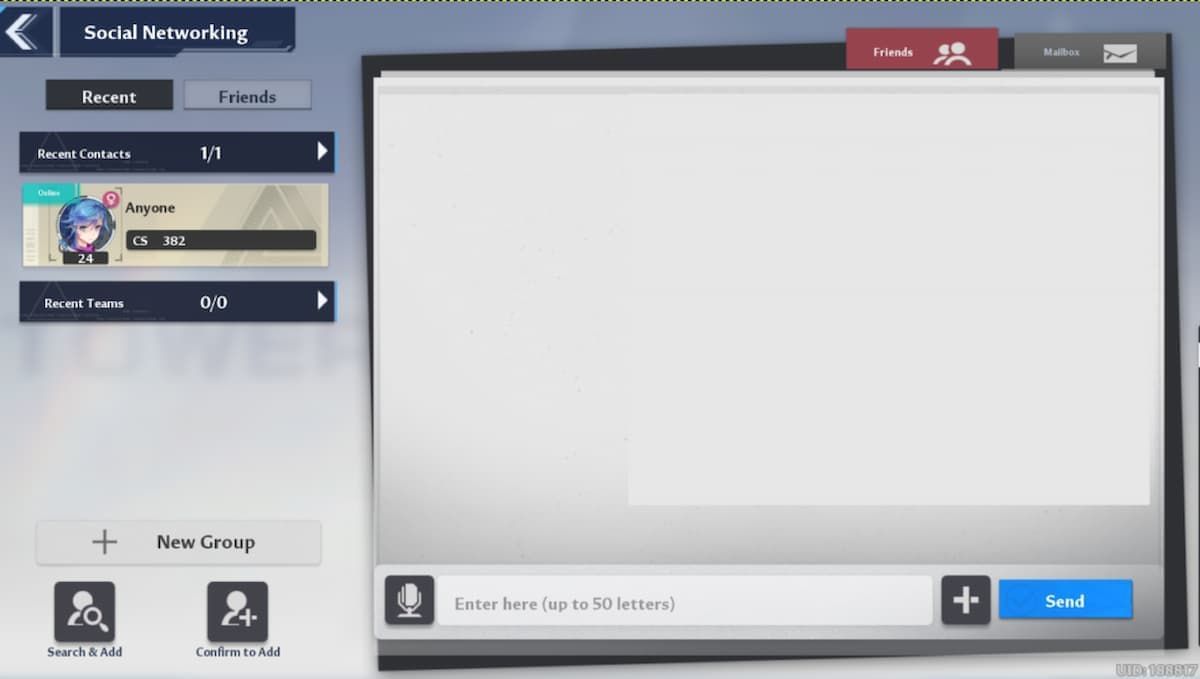
  • Selecting the Friends menu will allow access to the Social Networking section which has a Mailbox tab that can be viewed
  • The left side of the Mailbox tab will hold all of the mail that has been received and not deleted up until that point
  • Click or tap on the mail to see what it says

Players have a 400 mail limit before they run out of space in their inbox. There are also a couple of handy buttons underneath that players should be aware of.

One button is labeled “Claim All.” Pressing that button will automatically claim every reward. The other option is “Delete All,” which will delete all mail and clear up space in the mailbox.


How to send mail in Tower of Fantasy

Players can send letters to friends and recent players (Image via Tower of Fantasy)

Sending mail is a bit different than checking it in Tower of Fantasy. To send mail to their friends, players have to follow the steps listed below:

  • Go to the ‘Friends’ tab.
  • The ‘Recent’ list will contain the names of all players that were recently added, and the ‘Friends’ list will contain a list of all friends. Click on a player’s name from either list.
  • A letter area will appear
  • Type your letter up to 50 characters and send it

Once players get a response, they can follow the aforementioned steps to check their mail and reply.


.

Categories
Technology

The pre-booking of the Samsung Galaxy Buds 2 Pro will start today, know

Pre-order Samsung Galaxy Buds 2 Pro: The pre-order date for Samsung’s flagship Galaxy Buds 2 Pro has been revealed. The company recently launched Galaxy Buds 2 Pro along with Galaxy Fold 4 and Galaxy Flip 4. 360 degree audio is available in Galaxy Buds 2 Pro. Apart from this, Samsung’s ecosystem has also been taken care of with these buds. Galaxy Buds 2 Pro was introduced with 24-bit hi-fi sound quality. Intelligent Audio Noise Cancellation (ANC) has also been provided in these Samsung headphones. Samsung Seamless Codec (SSC) is also supported with the Galaxy Buds 2 Pro.

Prebook Galaxy Buds 2 Pro

Galaxy Buds 2 Pro pre-booking will start from 12pm on August 16th. Apart from Samsung’s online store, its pre-booking can also be done at retail stores. Speaking of pricing, the price of Galaxy Buds 2 Pro is Rs 17,999 but along with that, Rs 3,000 cashback is given with many bank cards after which its effective price will be Rs 14,999. Apart from This, customers who pre-book will be able to purchase Samsung’s wireless charger for a total of Rs 499, down from the original price of Rs 2,999. A trade-in offer of Rs 3,000 is also offered with the Galaxy Buds 2 Pro.

Features of the Galaxy Buds 2 Pro

Galaxy Buds 2 Pro was introduced in Graphite, White and Bora Purple colors. Multichannel Cinematic View Direct with Buds 2 Pro [5.1, 7.1, Dolby Atmos] gave. These Samsung buds also support head tracking response. It has three microphones for calling. As a special feature of the Galaxy Buds 2 Pro, the auto-switch option has been offered, so if you are using the Galaxy Buds 2 Pro with a TV and a call comes in on the phone, then you can switch to and after the call is disconnected, you can turn on the TV again.

VLC Media Player: why Indian government banned VLC Media Player? know the reason

,

Categories
Technology

Here’s The ‘Genshin Impact’ Sumeru Version 3.0 Release Date, 3.1-3.3 Get Dates As Well

Yesterday, Hoyoverse showed off what will be Genshin Impact’s most significant expansion to date, the addition of new continent Sumeru into the game, which unlike Inazuma, also adds a totally new elemental type, Dendro.

In addition to the trailers and features revealed in the special program, we also got a release date for version 3.0 and the addition of Sumeru, along with a schedule for the next few patches after that. So, unless anything changes, we have:

  • Version 3.0 (Sumeru update) – August 24, 2022
  • Version 3.1 – September 28, 2022
  • Version 3.2 – November 2, 2022
  • Version 3.3 – December 7, 2022

What’s interesting to note here is that 3.0, 3.1 and 3.2 will all be five weeks long instead of the usual six, indicating a faster turnaround for updates, so that will mean more new content more quickly, and more new Sumeru characters added faster. We are only getting three new Sumeru characters to start in 3.0, Collei, Tighnari and Dori.

Hoyoverse may be trying to play catch-up, as Shanghai COVID lockdowns delayed past patches and got them off schedule a bit. There are few games in the live service space that add this much content to their games so quickly, and I remain impressed after all this time the pace at which Hoyoverse keeps updating Genshin. Six week patch schedules with usually decently significant additions is one thing, but knocking that down to five weeks now? wow.

What’s clear is that Hoyoverse wants to hit the ground running with Sumeru, and after this, there are three more continents to be added to the game, so presumably the map will be “complete” in another three years once that is fully realized. Another advantage of Genshin Impact is that you can take a long time off and not feel like you’re “behind,” given that you can catch up with key old story quests, and if you had a good roster before, they are not going to be out power-leveled for new content or anything. A good core team can take you through the entire game and all these updates for free, though Genshin has done a good job of making its gacha characters feel like must-haves just because they look cool and are fun to play, even if they are not “necessary” for 99% of any content in the game.

More to come soon, and just 10 days to go until launch.

follow me on Twitter, Youtube, Facebook and Instagram. Subscribe to my free weekly content round-up newsletter, God Rolls.

Pick up my sci-fi novels the hero killer series and The Earthborn Trilogy.

.

Categories
Technology

New Report Shows Apple Mulling Brilliant iPhone Design Upgrade

If you’re a fan of the Apple Watch Edition in its ceramic finish, there could be good news on the horizon. It comes in the form of a new patent that specifies a Zirconia-based ceramic material that could be used in future Watch models. Even more intriguingly, it could be used for the iPhone as well.

MORE FROM FORBESApple Could Release iPhone 14 And iPhone 14 Pro Sooner Than Expected

The patent is called “Electronic Devices with Textured Zirconia-Based Components” and promises a matte finish. It says it can give “a matte appearance to an exterior surface of an electronic device. The texture of the enclosure component may also be configured so that it has one or more tactile properties suitable for use as a wearable device and can be readily cleaned.” It can also be configured to “provide a particular “feel” to the electronic device” and “may be configured so that the zirconia-based component substantially retains its strength and impact resistance.” Although it doesn’t give full details of the material, it specifies that “The zirconia-based component may be formed of a ceramic such as a partially stabilized zirconia ceramic or an alumina toughened zirconia ceramic.”

It could be used as a side surface (such as the case that wraps around the display on an Apple Watch, it seems) or a rear cover for another device. The images suggest that the rear of an iPhone is the focus here and Apple could use this material instead of the toughened glass currently on the back of its phones. Additionally, the matte finish suggests that it could be used for the Pro models in the iPhone range, as the main part of the back of the phone is matte-finish and only the camera panel is gloss.

The image in the patent even shows a central circular panel, perhaps to indicate that the Apple logo would be located there (and would doubtless be as shiny as it is on current phones).

Ceramic has been used on mobile phones before including handsets from Xiaomi and Samsung. It’s a material usually reserved for high-end devices, but has never been used for the iPhone.

As with all patents, there’s no certainty that Apple will implement such a design change soon or even at all. But the prospects of a ceramic iPhone and another ceramic Apple Watch are intriguing.

MORE FROM FORBESApple Watch Series 8: Apple May Have Just Revealed Its Brilliant Upgrade

.

Categories
Technology

Saints Row Pre-Load Date & File Size For PlayStation Consoles Revealed

If you plan on purchasing a copy of the Saints Row reboot on either PlayStation 4 or PlayStation 5, you’ll be pleased to know that both the file size and pre-load date have been revealed.

Saints Row launches for PlayStation 4, PlayStation 5, Xbox One, Xbox Series X|S, and PC on August 23rd. Although this will be the sixth installment to the Saints Row series, Deep Silver has made the decision to reboot the franchise with their upcoming release.

The most recent entries in the Saints Row series have been known for the over-the-top and wacky gameplay, but 2022’s Saints Row will reportedly be a return to the franchise’s roots. Many are hesitant about the reboot, but whether you plan on picking up Saints Row based on excitement or just pure curiosity, here’s everything you need to know about the pre-load date and file size on PlayStation consoles.

DUALSHOCKERS VIDEO OF THE DAY

As confirmed by Twitter user, PlayStation GameSize, the pre-load date for Saints Row on both PlayStation 4 and PlayStation 5 consoles will be Sunday, August 21st 2022. This means anyone who has digitally purchased a copy of Saints Row will be able to pre-load the entire game two days before release. Once the official release date comes around on August 23rd, users who have pre-loaded the game will be able to jump right in and play.

Players will need to ensure they’ve cleared some space on their console storage though, as PlayStation Game Size also confirmed that Saints Row would be a little over 60GB on PlayStation 4 and 53GB on PlayStation 5. It’s worth noting that this file size doesn’t Don’t take into account any possible patches that are released between now and the launch, as this could increase the overall file size for the game.

The file size for PC and Xbox consoles is currently unknown, but players can likely expect it to be around the same size, give or take a few GB.

Saints Row will release on Tuesday, August 23rd 2022 for PlayStation 4, PlayStation 5, Xbox One, Xbox Series X|S, and PC.

Categories
Technology

Chemtech Drake is set to make its return along with League of Legends’ pre-season 2023

Chemtech Drake is arguably one of the most infamous dragon souls within League of Legends. The buff that it provided and the way in which it altered the entire map were so obnoxious that the developers themselves decided to just ban it across the board.

However, it seems that, along with pre-season 2023, the developers are finally ready to introduce Chemtech Drake back into the game. The changes that it is set to receive have been discussed in this article in detail.

youtube-cover

It is tough to predict how fans will react to the Chemtech Drake’s return, as it was quite an issue before. However, the changes to the dragon soul are likely to make it much more balanced this time around.


Chemtech soul will no longer revive champions within League of Legends

The previous version of Chemtech soul is often considered the strongest and most obnoxious in the list for a pretty valid reason. This is because, once the soul was obtained, it provided champions with a sort of ‘last stand’ type ability, where they would revive for a few seconds and were able to deal damage before dying shortly after.

As expected, these vital few seconds made a massive difference in fights as it prevented the team without the Chemtech soul from gaining any substantial gold lead. Besides that, once the Chemtech Drake took over the map, it created camouflage zones everywhere.

Put that chemtech drake back in the basement i’m so serious I can already feel it getting removed again within 2 weeks

This, in turn, made pink ward management a nightmare for players. With the developers failing to find a proper solution to this, they decided to remove it from the game for the time being.


Changes to Chemtech Drake in League of Legends

As it so happens, the developers seem to have found a solution to the issues mentioned earlier, as the new Chemtech Soul will no longer briefly revive champions. Instead, it will now provide additional damage as well as damage reduction when their health is low.

Along with this change, once the Chemtech Drake takes over the map, interactive plants will become mutated. This means that Scryer’s Bloom will now grant movement speed while chasing revealed enemies and Blast Cone will fling players further than before.

Hello @RiotPhroxzon, I’ve just seen the new LoL Pls video, the changes to communication & vision seem really cool, also pretty excited about chemtech drake coming back. I have to admit though, I’m pretty disappointed to here nothing about toplane and seeing jungle changed again.

For clarity, players will be able to travel from the blue buff to the mid lane by simply using the Blast Cone once the Chemtech Drake takes over.


Out of all these changes, the mutation aspect is definitely interesting. However, the increased damage and damage reduction can be problematic, especially if there is a champion like Tryndamere on the team.

Perhaps, this may be something that League of Legends developers will need to balance once the Chemtech Drake returns to Summoner’s Rift.


.

Categories
Technology

LG plans to introduce 20-inch OLED panels this year

A promotional image for LG's larger OLED televisions.
Enlarge / A promotional image for LG’s larger OLED televisions.

LG

LG plans to introduce a 20-inch OLED panel by the end of the year, and unlike most other offerings in this size, it will be used in consumer devices.

LG is the leading manufacturer of OLED panels for several other device categories, and the company has been making panels for watches, TVs, and smartphones—but this will be the first time the company will make OLEDs suitable for computer monitors or smaller televisions.

The news comes from South Korean electronics news site The Elec, which reported details from a speech to the Korea Display Industry Association by LG Display Vice President Kang Won-seok.

The executive also said the company is working on OLEDs for mixed reality devices, a new 77-inch transparent OLED size, and bendable OLEDs where the user can adjust the amount of curve on the fly.

It’s unknown when the 20-inch panels might make their way into devices you can buy, though. The statement that the panels will be ready at the end of 2022 likely means they’ll be available to consumer electronics companies that want to use them in their products, but it could take many months for those new products to reach store shelves.

If the panels have the same qualities as those that LG makes for televisions, though, this development could be big news in the computer monitor business.

Judging from objective testing by Rtings and other display tech reviewers, LG’s OLED TVs far outclass most desktop computer monitors on the market in all sorts of measures of picture quality, from contrast to gray uniformity. And recent LG OLEDs have competitive response times and refresh rates that make them good gaming displays, too.

Currently, most of the market for high-end computer monitors is either focused on color accuracy for creative professionals or ultra-fast response times and refresh rates for dedicated gamers—often at the expense of picture quality, in the latter case. The picture quality and consistency of most computer monitors are quite poor by TV and smartphone display standards.

For example, most computer monitors use LED technology but lack the local dimming tech in high-end LED TVs. This means that contrast ratios are comparatively low, and backlight bleed is a common problem. OLED sidesteps these issues. Further, PC gamers playing on desktop monitors usually miss out on the full effects of HDR (if it’s even supported), as few computer monitors can deliver the bright highlights that LED or OLED TVs can.

There have been some OLED monitors in laptops, and the past year has started to see some OLED desktop displays from others besides LG. The early signs are promising. As of this year, LG ships a 42-inch version of its OLED TV that has been popular with some high-end PC gamers. But that’s still too large to be practical for many people looking for a screen to use in that context.

Compromises may be made to manufacture the panels in these sizes, though, so we’ll have to wait until (likely) sometime next year to see what we’re getting. And this could just be the beginning. While 20-inch OLED panels would be suitable for some users, many will be holding out for large sizes like 23, 24, or 27 inches.

Categories
Technology

Which buds are best for you?

Google recently released its first pair of ANC earbuds in the Pixel Buds Pro. The new buds are being offered alongside, rather than in place of, Google’s last pair of earbuds, the Pixel Buds A-Series. Compared to the $200 Buds Pro, the A-Series are a solid, less-expensive earbud option at just $99. If you couldn’t guess from that price gulf, though, they’re very different products. Interested in trying a pair of Google buds, but not sure which one? We’ve got you covered.

ANDROID POLICE VIDEO OF THE DAY

Google Pixel Buds Pro vs. Google Pixel Buds A-Series: Hardware and battery

The Pixel Buds Pro share an unmistakable resemblance to the Pixel Buds A-Series—they’re both very Google, with no sharp angles to speak of and playful details like the debossed G logo on each earbud. But the Pixel Buds Pro are significantly larger than the lightweight A-Series. In our subjective experience, the Pixel Buds Pro still fit comfortably, but they will stick out of your ears a little farther than the A-Series.

While the Pixel Buds A-Series have what Google calls a spatial vent to help relieve in-ear pressure and let some external sound into your ears, the Pixel Buds Pro ditch that feature for a more closed design. Instead, the Buds Pro have a transparency mode that, using mics on the earbuds, pipes sound from your environment into your ears alongside your media. (Google also says that the Pixel Buds Pro monitor the pressure in your ears to keep it at a comfortable level but hasn’t elaborated on how that process works.) The Pixel Buds Pro also ditch the stabilizing fin the Pixel Buds A-Series have , which could mean the Buds Pro get a less secure fit in some ears.


The Pixel Buds A-Series come in just two colors: Dark Olive and Clearly White. The Pixel Buds Pro come in your choice of Charcoal, Fog, Lemongrass, or Coral.

Battery life on the Pixel Buds A-Series is something of a sore spot, quoted at just five hours of playback at a time—and remember, those earbuds don’t have active noise cancellation. Pixel Buds Pro are an enormous improvement on that front, with a quoted battery life of seven hours on a single charge with ANC and up to 11 hours without. Both pairs of buds can get about two additional charges from their cases. Both cases charge with USB-C, but only the Pixel Buds Pro’s case supports wireless charging.

Google Pixel Buds Pro vs. Google Pixel Buds A-Series: Audio and features

At $99, the Pixel Buds A-Series punch above their weight when it comes to audio quality, with sound that’s clear and full and offers more bass than you’d expect given their slim design. The $200 Pixel Buds Pro also sound very good, but the overall quality isn’t vastly better than the Pixel Buds A-Series. Both pairs support the AAC and SBC codecs but not higher-bitrate standards like aptX or LDAC. That shouldn’t matter much to you if you mostly stream audio through Spotify or YouTube Music, but if you’re in the market for audiophile-grade sound, know that neither of these pairs of buds fit that bill.


There have been reports of shoddy Bluetooth connectivity in the Pixel Buds A-Series, including audio skips, static, and outright disconnects. We also experienced some of this with our review unit. Connectivity in our experience is generally OK, but it might get dicey if you’re listening outside with your phone in a bag or back pocket. And while Google says not everyone will be able to hear the static, if you can, it’s not always easy to ignore. The Pixel Buds Pro don’t seem to have any of these issues.

The Pixel Buds Pro’s big draw, aside from their improved fundamentals like battery life and connectivity, is their feature set. Both the A-Series and the Pro support Fast Pair on Android, and both have optional always-on hey google listening for hands-free Assistant access. But the Buds Pro have a number of desirable features the A-Series don’t, including active noise cancellation and Bluetooth multipoint, which lets you connect them to two audio sources at a time (a phone and a laptop, for example). The Buds Pro’s case can also charge wirelessly, whereas the A-Series’s is USB-C only.

The Pixel Buds A-Series have a feature that can automatically lower their volume when certain sounds are detected, like a barking dog or breaking glass. The Pixel Buds Pro don’t currently have a similar feature. We know Google intends to add additional functionality to the Buds Pro through updates, though, including support for spatial audio, a sort of virtual surround sound.

Google Pixel Buds Pro vs. Google Pixel Buds A-Series: Which should you buy?

Pixel Buds A-Series cost $99; the Pixel Buds Pro go for more than twice as much at $200. Audio quality alone doesn’t justify the price jump; if you only need a pair of decent-sounding earbuds and don’t care much about the bells and whistles, the A-Series might be right for you.

But the Pixel Buds A-Series, thanks to their unique vented hardware, are less universally useful than more conventional true wireless earbuds. The spatial vent design might be good for ear comfort and situational awareness, but it means you’ll get external sound leaking in all the time, rather than just when you want it to. And since the A-Series don’t have ANC, your only option to drown out more of your surroundings is to crank the volume. If you want earbuds specifically to wear in noisy environments, consider the Pixel Buds Pro. Not only do they have ANC and an excellent transparency mode to flip between, but their markedly better battery life, premium features like Bluetooth multipoint, and more stable connectivity really help justify their price.

Buy the Pixel Buds Pro if…

  • You frequently wear your earbuds in noisy environments
  • You wear earbuds for more than a few hours at a time
  • Nice-to-have features like multipoint connectivity are worth money to you

Buy the Pixel Buds A-Series if…

  • $200 is more than you’re willing to spend
  • You wouldn’t get much use out of active noise cancellation
  • You prefer smaller earbuds

Buy Pixel Buds Pro

$200 at Amazon $200 at Google $200 at Best Buy

Buy Pixel Buds A-Series

$99 at Amazon$99 at Google$99 at Best Buy

Categories
Technology

Additional DLC Information Revealed About Soul Hackers 2

The 26 August 2022 release date for Soul Hackers 2 is drawing ever closer, and international publisher ATLUS West has provided further information on some of the downloadable content (DLC) that will be made available for the game – from additional story arcs, to alternate costumes, alternate battle BGMs and more. The list of confirmed DLC includes:

Bonus Story Arc: The Lost Numbers – Grants access to a bonus story arc centered around a new Devil Summoner, Nana, and a new dungeon with a punishing boss.

Costume & BGM pack – Adds themed outfits for your entire party, battle BGM, and accessories from Persona™ 4, Persona™ 5, Shin Megami Tensei™ IV and more.

Bonus Demon Pack – Access 8 powerful demons including Tzitzimitl, Anahita, Armaiti, Zaou-Gongen, Nemissa, Mara ( ͡° ͜ʖ ͡°), Masakado and Satan.

Booster Item Pack – Increases frequency of dropped items from battles to earn in-game currency, boost stats and grant EXP.

Useful Item Set + Extra Difficulty – Adds essential items for your journey and a VERY HARD game mode for ambitious players seeking a thrilling challenge.

Part of the wider Megami Tensei franchise and developed by ATLUS, Soul Hackers 2 will launch on the PlayStation 4, Xbox One, PlayStation 5, Xbox Series X|S and Windows PC starting 26 August 2022. Release dates may vary slightly between regions.


About Soul Hackers 2

Amidst the glimmer of neon lights, technological advancement causes humans to be consumed by commercial convenience. In the shadows, a war between the Yatagarasu and the Phantom Society is brewing, Devil Summoners who harness the otherworldly powers of “Demons”.

Existing in the secret sea of ​​humanity’s data, a digital hivemind has evolved into sentience: Aion. Observing humankind from afar, Aion calculates that a world-ending disaster is imminent and creates two agents to combat against it: Ringo and Figue.

Together, these agents of Aion must investigate and prevent a butterfly effect that will lead to the end of the world.

Promoted Features

  • Investigate the end of the world as Ringo, an agent of Aion tasked with saving humanity from an apocalypse.
  • Explore a supernatural RPG with stylish summoners and dark dangers lurking under the neon lights of a cyberpunk Japan.
  • Amass demons and unlock fusion combinations to create new, stronger demon allies, using their lethal abilities for incredible assaults on your foes.
  • Strengthen the bonds with your teammates and dive deeper into their soul, reliving their last adventures and discovering the truth of their stories and yours.

Categories
Technology

How to Host a Website for Free From Your PC or Laptop

If you’re planning to launch a website but don’t want to pay recurring monthly or annual hosting fees, you can use any old laptop or desktop PC to host a website for free. It’s a great way to utilize your old system instead of throwing it away.

In this guide, we will install and set up services on our 10-year-old laptop to host a WordPress, Joomla, or custom HTML or PHP-based website with a free SSL certificate.


Things You Will Need to Host a Website

Following are the pre-requisites to host a website for free from home with just your computer:

  • An old laptop or PC running Ubuntu Server.
  • A registered domain name for your website
  • Ethernet cable to connect the laptop or PC to router for reliable and fast connection

Step 1: Update and Upgrade the Packages

After installing Ubuntu Server on your computer, execute the following command to update the package list and upgrade existing packages. We recommend you enable SSH and access the server via Terminal or Putty on your macOS or Linux PC.

sudo apt update && Sudo apt upgrade y

This may take a while to finish. So, sit back and relax until the process completes.

Step 2: Install Apache

Apache is a popular open-source web server that works with PHP to host dynamic websites, including WordPress sites. Once the update is complete, execute the following command to install the Apache server.

sudo apt install apache2

When you see a prompt, press Y and then hit the Enter key to continue the installation. You can check the status by running the following command.

systemctl status apache2

It should show active (running) status. To verify, you can visit the IP of your laptop or localhost.

Step 3: Install MySQL Server

MySQL is a database management system (DBMS) that helps organize and provide access to the database for storing the information. To install the MySQL Server, use the following command.

sudo apt install MariaDB-server MariaDB-client

Press Y and then the Enter key to confirm and proceed with the installation.

Next, secure the MySQL installation by running the following command.

sudo mysql_secure_installation

Set root password? Press Y and hit the Enter key. Enter a secure password and keep it safe.

Remove anonymous users? Press Y and then the Enter key.

Disallow root login remotely? Press Y and then the Enter key.

Remove the test database and access it. Press the Y key followed by the Enter keypress.

Reload privilege tables now? Press the Y key and then Enter.

Step 4Install PHP

PHP is required to process code for displaying dynamic content, run scripts, connect to the MySQL database and display the processed content on the web browser. To install PHP, run the following command.

sudo apt install PHP PHP-MySQL

Press the Y key to confirm and proceed with the installation. Create a test.php file using the following command to confirm the installation.


sudo nano /var/www/html/test.php

Now, paste the following code into the Nano editor.

<?php
phpinfo();
?>

Press CTRL+X followed by Y and the Enter key to save the changes. Now, visit the IP of your laptop with /test.php in the URL. This should load the PHP information page, indicating PHP is installed and working.

Step 5: Create a MySQL Database and User

We need to create a database and user account with access to the database with all privileges. The commands are as follows:

sudo MySQL u root -p

Type the password (the one you created while securing the MySQL installation) and press the Enter key. Then execute the following commands in the given order to create a database and user with full access to the database.

CREATE DATABASE mysite;
CREATE USER ravi@localhost IDENTIFIED BY YourPassword;
GRANT ALL ON mysite.* TO ravi@localhost IDENTIFIED BY YourPassword;
FLUSH PRIVILEGES;
EXIT;

This will create a database named “mysite” with user “ravi” having access to the database. Of course, you can use any name you like.

You can now host a custom HTML, PHP-based website, or host CMS-based sites, such as WordPress, PrestaShop, Joomla, etc. However, we will set up and host a WordPress website on our old laptop for this tutorial.

Step 6: Download and Setup WordPress

Navigate to the /var/www/html path and download the latest WordPress package.

cd /var/www/html/
sudo wget "https://wordpress.org/latest.tar.gz">https:

Extract the package contents.

Sudo tar xf latest.tar.gz

This will extract the wordpress directory at /var/www/html location. You can view the directory using the ls command. Next, we will grant permission to www-data:www-data using the following command.

sudo chown -R www-data:www-data /var/www/html/wordpress

Once done, you can visit the IP of your laptop followed by /wordpress. Enter the Database Name, username and Password we created in Step 4. Leave Database Host and Table Prefix to default. Click on Submit.

Now, click on Run the installation.

Enter the Site Title. Also, create a new username and Password for the WordPress backend (wp-admin), and then click Install WordPress. This will install WordPress, after which you can access the WordPress site at http://IP-Address/wordpress (Replace the IP address field with your computer’s IP).

Next, we need to add the domain name and enable SSL for the HTTPS connection. For this, we are going to use the secure Cloudflared Tunnel.

Step 7: Download and Install Cloudflared Service

Sign up and add your domain to your Cloudflare account to get started. After adding the domain, run the following commands to download and install the Cloudflared service on your old laptop or PC-based web server.


sudo wget https:
sudo dpkg I cloudflared-linux-amd64.deb

Step 8: Create Cloudflared Tunnel and Enable HTTPS

Follow the instructions and use the commands below to create a Cloudflared tunnel and enable a secure connection to your website.

Log in and authorize the domain you added to Cloudflare.

Cloudflared tunnel login

Copy the URL displayed and open it in a web browser to authorize the domain.

Once authorized successfully, create a Cloudflared tunnel called “mysite”. You may name it anything but remember that name.

Cloudflared tunnel create mysite

Copy the credentials file path (JSON file path) and the tunnel ID. Keep them safe.

Now, create a configuration file using the command below.

Sudo nano ~/.cloudflared/config.yml

Next, paste the following code into it. Make sure to replace the tunnel ID and credentials-file (JSON file path).

tunnel: a2efc6dg1-2c75-45f8-b529d3ee
credentials-file: /home/pi/.cloudflared/ a2efc6dg1-2c75-45f8-b529d3ee.json
ingress:
- hostname: YourDomain.com
service: http:
- service: http_status:404

Press CTRL+X followed by Y and hit Enter to save the changes.

Now create a DNS entry for the hostname. You can host your WordPress site on the main domain or subdomain based on your requirement. For this tutorial, we will create a subdomain DNS entry to host our WordPress site on the old laptop.

cloudflared tunnel route DNS <Tunnel Name> <YourDomain.com>

Here’s an example:

cloudflared tunnel route DNS mysite mysite.smartghar.org

Once the entry is created successfully, you can start the tunnel by running the following command.


Cloudflared tunnel run mysite

You can open the web browser and visit the hostname (mysite.smartghar.org in this case). You should be able to access the WordPress site. However, you may see CSS has broken and HTTPS disabled.

To fix this, log in to https://yoursite.com/wp-admingo to Settings > General Settingsand update the WordPress Address (URL) and Site Address (URL) fields to YourDomainName.com or YourDomainName.com/wordpress as per your configuration.

Then, log in to Cloudflare, head over to SSL/TLS>Overview from the left pane, and choose either “Flexible” or “Full” for the domain you added.

Once done, visit the URL and access your website. Your site should now load fully with an HTTPS connection.

Is Free DIY Hosting Worth It?

If you’re just getting started with building an online service, portal, or business, a local DIY server on an old PC or laptop can help you. You can use it to showcase your projects to clients or users and host a fully functional website.

Although the hosting is free and secure, remember that you will have to pay for your computer’s electricity usage, which will vary based on its efficiency. Typically, it’s between 30-65W/hour at full load for laptops, but desktop PCs will consume much more power. A cheaper and more power-efficient option would be to use a Raspberry Pi to host your site, as it runs on a 15W power supply.