Categories
Technology

WhatsApp update will stop telling group members you’ve left • The Register

Many years ago, in the bowels of Silicon Valley, some genius realized that people enjoy getting notifications through social media – those little pings of dopamine that make you feel like you matter.

But there was a dark side. Now we get notified of pretty much anything and everything, regardless of relevance. There are new posts in this group. Someone famous has said something. This person has received your message. This person has read your message.

Wait, why haven’t they responded? It’s been five minutes. Do they not like me? oh god.

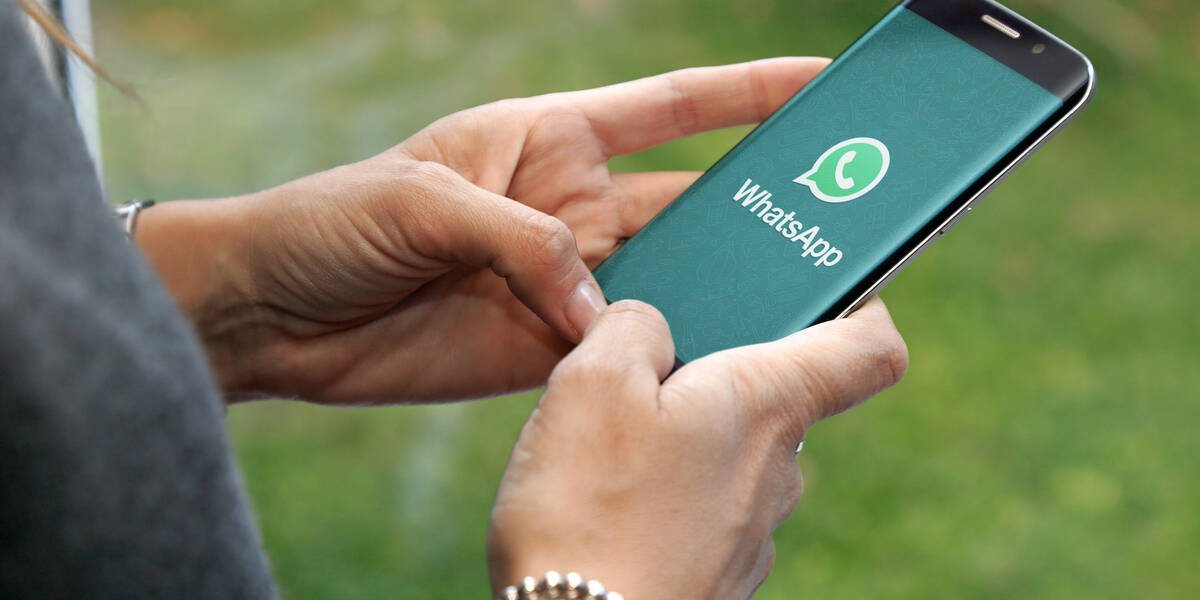
Anyway, one of the most egregious on Meta’s (née Facebook) WhatsApp messaging platform is that if you leave a group chat, everyone is informed of it.

The problem here is that most people in a group chat with others are either allegedly friends or family. When one “ghosts” their social circle – abruptly cutting off contact without warning or explanation – the fallout is delicious.

Direct messages fly between members. What have we done? Is it something we said? Are they OK? And so on.

The fact is that they have probably moved on or are fed up of your bullshit, your toddler photos, your moaning, your first-world problems. Whatever it is, you don’t need to be told that they’ve left – and they would probably prefer to go quietly too.

There are tons of people out there sitting in highly active group chats who barely contribute and end up muting the notifications. But soon they will be able to leave without stirring up drama.

Meta CEO Mark Zuckerberg took to Facebook yesterday to deliver a terse update on new privacy features coming to WhatsApp:

It’s sort of baffling that it wasn’t built like this in the first place, but – like we said – everyone loves a notification. And if they cause drama, all the better, right?

Your correspondent does not have WhatsApp installed so we asked Gen Z-er whether the touted update was newsworthy. They said: “I have loads of group chats with people in that talk all the time but I’m never active, I mute them but there are so many. So I can finally leave without looking like an asshole or getting a message from someone questioning me on why I left.

“It’s so stupid but people take offense to it.”

Now we can look forward to inevitable thinkpieces like “Group ghosting – the new WhatsApp phenomena gaining ground among Gen Z.” ®

Categories
Technology

Samsung Unpacked Event Recap: Every Announcement You May Have Missed

what’s happening

Samsung’s annual August Unpacked, where the company detailed its updated line of foldable phones.

why it matters

In addition to showing if foldables are “there” yet for you in their fourth generation, both the Z Fold 4 and Z Flip 4 features may foreshadow features that we’ll see in potential competing models from companies like Motorola and Google.

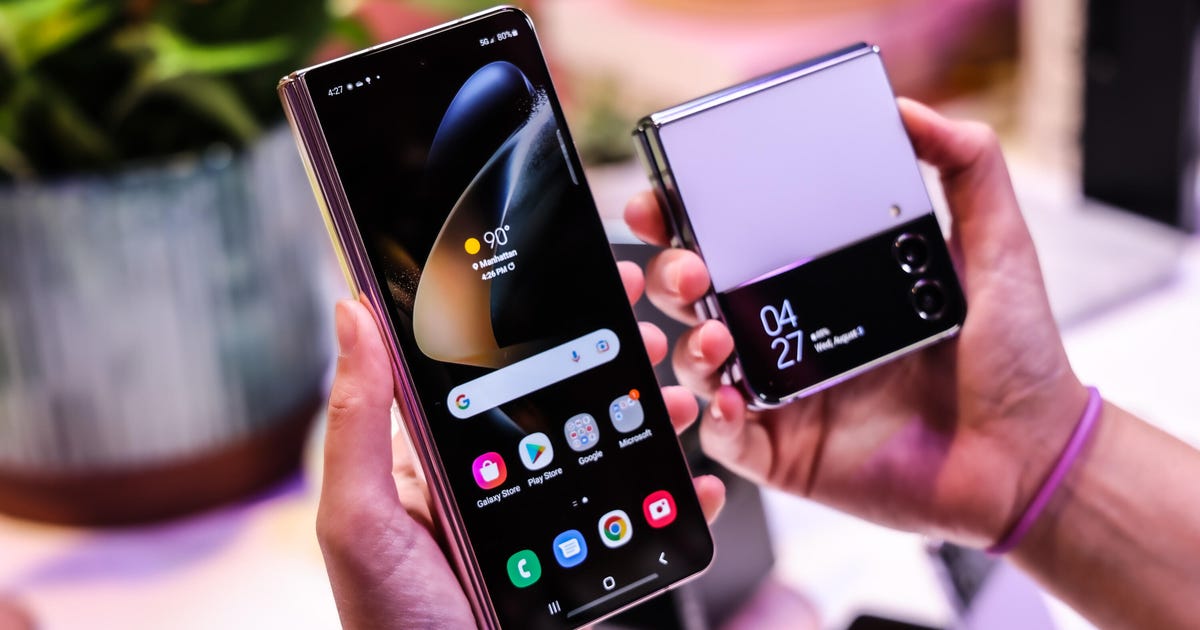
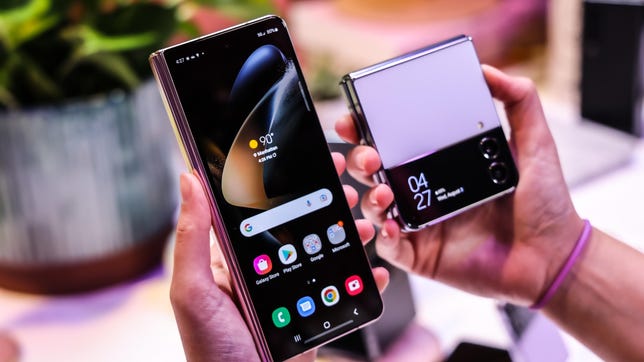
Samsung hosted its semiannual Unpacked event on Wednesday, and as we’ve come to expect from the company, its August 2022 announcements delivered news about its latest phones, watches and earbuds: the Galaxy ZFold 4 and Z-Flip 4, Galaxy Watch 5 and Watch 5 Pro and Galaxy Buds 2 Pro. The Galaxy Z Flip 3 will get one of our favorite last-gen perks, at $100 price cut.

Among its new product announcements, Samsung brought us up to speed on its sustainability initiatives, including incorporating recycled fishing nets in its latest foldables. Plus we got to see a new promo featuring Korea’s other major global star: BTS.

All the products are expected to ship on Aug. 26.

Want a play-by-play, detailed summary? Check out our archived live blog of the event.


Now playing:
Watch this:

Galaxy Z Flip 4: Samsung’s Flip Phone Gets New Software,…


4:23

Lisa Eadicicco/CNET

Like the Z Fold 4, the Flip 4 gets the bottom-screen trackpad feature in its Flex Mode and the nighttime photography improvements that were launched with the S22, including night portrait-mode photos. You’ll also be able to send quick replies to texts, make calls and shoot portrait-mode photos from the cover screen.

You’ll also be able to get a Bespoke Edition like the Flip 3.

Refreshed components include:

  • A brighter wide lens and larger pixels in the 12-megapixel cameras
  • Snapdragon 8 Plus Gen 1 processor
  • Battery boost to 3,700mAh

Readmore:


Now playing:
Watch this:

Samsung Galaxy Z Fold 4 First Take: Bigger Cover Screen,…


5:43

Lisa Eadicicco/CNET

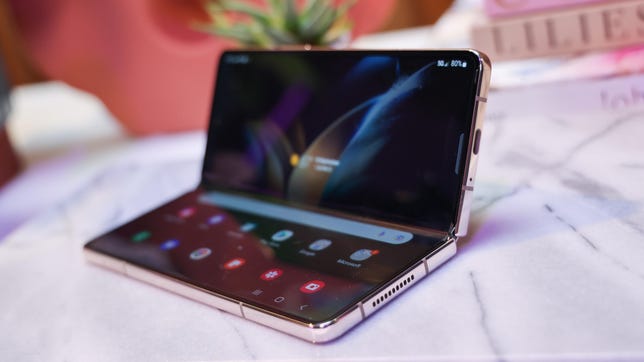
The Galaxy Z Fold 4 has a wider cover screen that makes apps look more like they’re intended and that’s designed to make it look like a typical phone when it’s closed. A new Flex Mode feature, also coming to the Flip 4 lets you use the bottom half of the screen as a trackpad.

Samsung claims it’s more durable than its predecessor, notably the internal tablet-sized display. We were treated to a discourse on the upgraded hinge, the new screen-layer architecture and shock-absorbing sponge. The company also Samsung also says the inner screen is brighter, and will have a less noticeable under-screen camera. It inherits the nighttime photography improvements launched with the S22 line, including night portrait-mode photos.

Samsung says this is the first device with Android 12L, the version of Android optimized for tablets. 12L brings a new task bar for streamlining app switching.

Refreshed components include:

  • 50-megapixel main camera and a telephoto lens with 3x optical zoom in addition to the existing 12-megapixel wide-angle lens
  • Snapdragon 8 Plus Gen 1 processor

Readmore:

Lisa Eadicicco/CNET

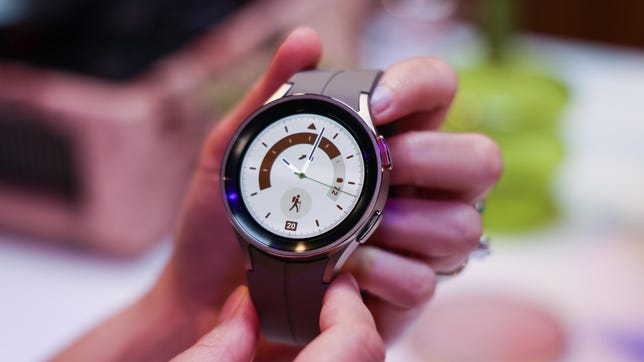
In addition to the existing Watch sizes, there’s a new, larger and heavier Pro model with a more durable titanium build. Samsung says both Watches have longer battery life over earlier models thanks to higher-capacity batteries (590 mAh in the Pro), an infrared skin temperature sensor and a more durable sapphire crystal for the watch face instead of Gorilla Glass. Plus, there will be new faces available.

There’s a larger surface area for sensor contact on your wrist, which Samsung says will provide more accurate results, and a smaller combined sensor size.

Samsung’s offering some trade-in discounts on preorders: $75 off the Watch 5, or $125 off the Pro if an “eligible” watch is traded in, along with a $50 credit for accessories.

Readmore: Samsung’s Galaxy Watch 5 Now Includes a Pro Model and Better Battery Life

Richard Peterson/CNET

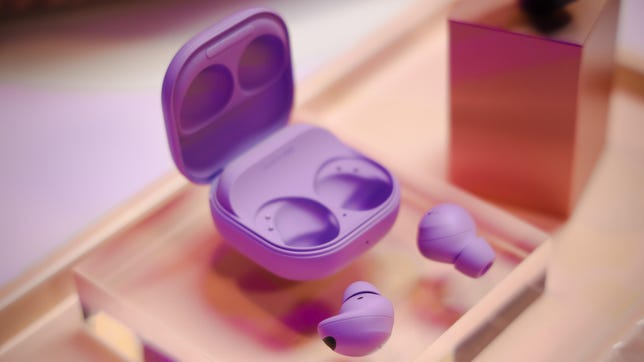
The Galaxy Buds 2 Pro have beefed up surround and hi-fi audio — as long as they’re connected to a Galaxy phone running Samsung’s One UI 4.0 or later. Samsung’s also eked out another two hours from its battery.

Later in the year, Samsung will be updating the Buds 2 Pro with better 360 LE audio.

Readmore:

Categories
Technology

The top 10 worst movie tie-in video games ever

While definitely not as common as they used to be, movie tie-in video games are generally viewed as the absolute bottom of the barrel in terms of video game entertainment.

These are video games created often in short time frames, with limited development cycles, budgets, and anything else that you need in order to make a decent video game.

But, as with anything, some are worse than others.

So here, we have compiled the top 10 (in no particular order) worst of the worst, the rock bottom, the absolute dredge of them all for you to enjoy.

10. E. T. The Extra Terrestrial (1982, Atari)

While older than most people reading this, this game is often credited as having caused the video game market of 1983 to crash. The game itself was boring and bland, featuring awful graphics (even for its time) and repetitive tasks.

Rumor has it that Atari only gave developers five weeks to develop the game for the Christmas season, which would explain the lack of… well, gameplay in the video game. A huge number of these games were returned, Atari fell into bankruptcy, and, as the legend goes, the remainder of the stock was buried in a New Mexico landfill somewhere.

9. Tomorrow Never Dies (1999)

Remember golden eye 64? Remember how much fun it was to stay up late into the night with three of your best friends, getting mad at each other over picking Oddjob, or someone who grabbed the Golden Gun first? Those were good times. What if the next game released in the 007 franchise was worse in every conceivable way?

Tomorrow Never Dies did away with the first-person view, instead choosing a third-person view. The game only featured a story mode, lacking any multiplayer whatsoever. If they had named this game anything else, it probably would have been fine, but coming hot off the heels of the success that golden eye 64 was, it led many to see this as a downgrade in every way.

8. Marvel’s Avengers (2020)

Crystal Dynamics has done some good work in gaming, don’t get me wrong, but avengers fails in a lot of ways that don’t make sense. The launch of avengers had some serious game-breaking bugs tethered to it, and while most of them have been ironed out over its lifespan, one of the game’s core problems hasn’t been – how content dry and unrewarding it is to play.

The game has a decent story mode, but once you complete it, the only way to progress is to complete multiplayer missions, which are the same boring, repetitive missions that every other games-as-a-service game has. The multiplayer is not fun, and that’s the biggest advertising point of the game. Please just make another Legacy of Kain game, Crystal Dynamics.

7. Saw 2: Flesh and Blood (2010)

“Hey, what if we took a movie that was relatively unique in the horror genre for its interesting puzzles and turned it into a boring action video game?” said the developers of Saw 2: Flesh and Blood. I may be paraphrasing.

The puzzles are boring, the dialogue is boring, you’re having to repeat puzzles often because they do not explain how the puzzles work, and the majority of downtime in between puzzles are filled with quick-timed events. Low amounts of checkpoints means that you’re often having to redo several rooms multiple times.

6. Cat Woman (2004)

Not unlike the movie of the same name, cat woman did extremely poorly with critics and players alike.

Genuinely awful voice acting combined with seemingly malfunctioning camera controls and a mash-one-button-until-you-win combat style made this game an easy one to pass up.

5. Street Fighter: The Movie: The Game (1995)

In the games industry, there’s an unfortunate expectation that a video game made to tie in with a movie is gonna suck. So what happens when a movie is made based on a video game – that is then turned into a video game itself? It’s like an inception of bad video games.

This soulless shell of a game lacks even the most basic things that Street Fighter II had, namely its charm. Seeing Dhalsim stretch-punch or Ryu throw Hadoukens is timeless, but seeing digitized versions of the actors playing these characters doing the same is just painful.

4. James Cameron’s Avatar: The Game (2009)

Picture this: you’ve just seen Avatar in theaters, and it was a wondrous journey through what cinematic effects can look like in 2009. You can’t get over how cool the fight scenes were, how beautiful the landscapes were, or how intricate the sex-hair thing was. So you rush to your local store and immediately spy a copy of Avatar: The Game. Surely it must look just as good, right?

While the game does tackle events prior to the movie, expanding the lore of the world a bit, the graphics looked awful – I can think of a few late-gen PS2 games that looked nicer – the gameplay was bland and repetitive, made worse by the linear paths you have to walk in the game.

3. Evil Dead: Hail to the King

I cannot imagine watching Evil Dead 2having a wonderful time, and then picking this game up and trying to play through it. Hail to the King lacks pretty much everything that made Evil Dead 2 or Army of Darkness work, instead attempting to emulate some action-horror games that had come out before it.

Fixed camera angles are fine in some games, but the game has to be built around them for it to work. This game has problems with enemies swarming you, and you are unable to deal with them due to the camera perspectives.

2. Every Shrek Game That Isn’t Shrek SuperSlam

I don’t really have the energy to go into why all but one of the Shrek games are bad. In short, they’re poorly paced, have game-breaking bugs, are boring and feature repetitive gameplay. Instead, I want to focus on why SuperSlam is a great game.

SuperSlam is technically a bad game, in terms of gameplay and execution. It’s a broken platform/arena fighter, with several characters able to commit to ‘infinite’ combos that generally just make it unfun – in theory.

What makes it fun is that an entire competitive esports community has formed around the broken game, figuring out how the game works within how broken it is. To this day, tournaments are held online, with new players joining in to try to win.

1. Aliens: Colonial Marines (2013)

This one is a pain for me, personally. Alien is such a cool series, with a lot of lore and a lot of good horror sequences – Alien: Isolation is arguably my favorite movie tie-in game because of how oppressive and well-done the horror in that game is. Enter Colonial Marines: a game with broken AI, to the point where Aliens will crab-walk right past you while they try to figure out their pathing, or get caught in level geometry because the developers couldn’t figure out hitbox collision. The graphics were extremely bland for their time, especially when you compare it to the alpha footage that leaked before release, which looked incredible.

What’s worse, however, is the vast number of promises that the developers gave prerelease that were simply not true. It was a giant mess from beginning to end, and Alien fans the world over were truly disappointed.

Written by Junior Miyai on behalf of GLHF.

.
Categories
Technology

This Mac hacker’s code is so good, corporations keep stealing it

Patrick Wardle is known for being a Mac malware specialist — but his work has traveled farther than he realized.

A former employee of the NSA and NASA, he is also the founder of the Objective-See Foundation: a nonprofit that creates open-source security tools for macOS. The latter role means that a lot of Wardle’s software code is now freely available to download and decompile — and some of this code has apparently caught the eye of technology companies that are using it without his permission from him.

Wardle will lay out his case in a presentation on Thursday at the Black Hat cybersecurity conference with Tom McGuire, a cybersecurity researcher at Johns Hopkins University. The researchers found that code written by Wardle and released as open source has made its way into a number of commercial products over the years — all without the users crediting him or licensing and paying for the work.

The problem, Wardle says, is that it’s difficult to prove that the code was stolen rather than implemented in a similar way by coincidence. Fortunately, because of Wardle’s skill in reverse-engineering software, he was able to make more progress than most.

“I was only able to figure [the code theft] out because I both write tools and reverse engineer software, which is not super common,” Wardle told TheVerge in a call before the talk. “Because I straddle both of these disciplines I could find it happening to my tools, but other indie developers might not be able to, which is the concern.”

The thefts are a reminder of the precarious status of open-source code, which undergirds enormous portions of the internet. Open-source developers typically make their work available under specific licensing conditions — but since the code is often already public, there are few protections against unscrupulous developers who decide to take advantage. In one recent example, the Donald Trump-backed Social Truth app allegedly lifted significant portions of code from the open-source Mastodon project, resulting in a formal complaint from Mastodon’s founder.

One of the central examples in Wardle’s case is a software tool called OverSight, which Wardle released in 2016. Oversight was developed as a way to monitor whether any macOS applications were surreptitiously accessing the microphone or webcam, with much success: it was effective not only as a way to find Mac malware that was surveilling users but also to uncover the fact that a legitimate application like Shazam was always listening in the background.

Wardle — whose cousin Josh Wardle created the popular Wordle game — says he built OverSight because there wasn’t a simple way for a Mac user to confirm which applications were activating the recording hardware at a given time, especially if the applications were designed to run in secret. To solve this challenge, his software used a combination of analysis techniques that turned out to be unusual and, thus, unique.

But years after Oversight was released, he was surprised to find a number of commercial applications incorporating similar application logic in their own products — even down to replicating the same bugs that Wardle’s code had.

A slide from Wardle and McGuire’s Defcon presentation.
Image: Patrick Wardle

Three different companies were found to be incorporating techniques lifted from Wardle’s work in their own commercially sold software. None of the offending companies are named in the Black Hat talk, as Wardle says that he believes the code theft was likely the work of an individual employee, rather than a top-down strategy.

The companies also reacted positively when confronted about it, Wardle says: all three vendors he approached reportedly acknowledged that his code had been used in their products without authorization, and all eventually paid him directly or donated money to the Objective-See Foundation.

Code theft is an unfortunate reality, but by bringing attention to it, Wardle hopes to help both developers and companies protect their interests. For software developers, he advises that anyone writing code (whether open or closed source) should assume it will be stolen and learn how to apply techniques that can help uncover instances where this has happened.

For corporations, he suggests that they better educate employees on the legal frameworks surrounding reverse engineering another product for commercial gain. And ultimately, I hope they’ll just stop stealing.

Categories
Technology

WhatsApp introduces 3 new privacy features, including option to leave groups silently – News

The new services aim to enhance security


By Web Desk

Published: Thu 11 Aug 2022, 8:14 AM

Last updated: Thu 11 Aug 2022, 9:49 AM

The popular messaging service WhatsApp has introduced three new features that aim to enhance privacy and security for users.

“Your privacy deserves more protection,” said the Meta-owned platform in a post shared on social media.

Mark Zuckerberg, Meta CEO, shared the announcement on his Facebook page as well.

“New privacy features coming to WhatsApp: exit group chats without notifying everyone, control who can see when you’re online, and prevent screenshots on view once messages. We’ll keep building new ways to protect your messages and keep them as private and secure as face-to-face conversations,” the post said.

Here is a dive into what each of the new features mean:

1. Exit group chats without notifying anyone

WhatsApp users are no strangers to group chats. The platform is widely used for group texting. With this new feature, WhatsApp aims to give people a quiet way to exit groups, without drawing the attention of other group members.

Previously when a member of a WhatsApp group exits the chat, all members are notified. After the privacy update, only the group admin will be notified of the departure, while the rest of the members remain unaware.

2. Control who can see you when you’re online

WhatsApp users will be able to pick the contacts that can see them online. If a user does not want a few (or most) of their contacts to know that they are currently using a platform, they can block them from seeing the ‘online’ indicator that appears on the chat.

3. Prevent screenshots on ‘view-once’ messages

View-once messages are texts you can send on WhatsApp that get deleted after they are viewed by the receiver.

With this privacy update, receivers will not be able to take screenshots of videos or photos sent using the view-once feature. Whatsapp says that this new development will be available to users soon.

Earlier this week, WhatsApp announced that users can now delete messages up to 2 days after they are sent – an upgrade from the previous limit. Before the update, users could delete messages for everyone in the chat up to 24 hours after they had been sent. After that, they could only delete messages for themselves but they would still be visible to everyone else in the chat.

ALSO READ:

Categories
Technology

How to conduct a Sticky Keys hack

How is a physical access attack conducted? You’d see one happen — right?

“An attacker could walk into an organization, plug a flash drive with an advanced strain of ransomware into a computer and then walk around pretending to be a phone repairman or someone working with pest control,” said Bryson Payne, author of Go H*ck Yourself.

Such attacks are not always as easy to detect as one might think — nor as easy to defend against. Organizations need to converge cybersecurity and physical security to fully protect their assets. But, before trying to improve the relationship between the two, it’s important to understand how weak physical security affects cybersecurity and puts an organization’s sensitive data at risk.

Physical security, as the name suggests, is the protection of networks, systems or data from physical actions or events. The threat of physical cybersecurity attacks has increased with remote and hybrid work models that have employees working outside the office and on noncompany-sanctioned devices and networks.

“An employee could be working on their laptop in a coffee shop, and a threat actor could be listening for unencrypted traffic on the free Wi-Fi,” said Payne, a professor and founding director of the Center for Cyber ​​Operations Education (now the Institute for Cyber ​​Operations) at the University of North Georgia. “The employee could get up to order another coffee, and the hacker could sit down at the employee’s computer and, in five seconds, gain access to saved passwords on the device’s browser.”

To better help readers understand the dangers of physical cybersecurity attacks, Payne teaches readers how to hack their own devices in his book. These ethical hacker techniques give readers greater insight into cybersecurity and enable them to better protect themselves from threat actors.

In this excerpt from Chapter 2, “Physical Access Hacks,” Payne explains how to conduct a Sticky Keys hack. This walkthrough demonstrates a hack that involves both cybersecurity and physical security vulnerabilities.

Physical access hacks may sound scary because they can be used maliciously by attackers on stolen or unattended computers. However, they also have constructive applications. Ethical hackers at home and at IT help desks use techniques like the Sticky Keys hack or the Mac root hack to recover files that would otherwise be lost due to a forgotten password. If you have an old computer in the garage or attic with family photos or other important documents that you can’t access because no one remembers the computer’s password, these hacks can help.

Warning: do not perform either of these hacks on your main computer, because they could leave your machine vulnerable to attack. You can usually find an old desktop or laptop if you ask around. Get creative, but stay ethical; be sure to get the owner’s permission before trying out these hacks on someone else’s computer. If you can’t find an extra Windows or Mac computer to practice on, you can still read this chapter to understand the dangers of physical access attacks.

The Sticky Keys Hack

Sticky Keys is a Windows feature that makes it easier to issue certain keyboard commands, like CTRL-C to copy or CTRL-V to paste, by allowing you to press the keys one after another instead of all at once. Sticky Keys is triggered by pressing SHIFT five times and can even be turned on from the Windows login screen, before a username or password has been entered.

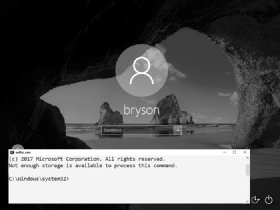
For this hack, we’ll replace the Sticky Keys program file with another file, cmd.exe. That way, instead of launching the usual Sticky Keys assistant, pressing SHIFT five times will launch a command prompt. This is a text-based program that lets us enter commands directly into Windows. By launching a command prompt at the login screen (see Figure 2-1), you’ll be able to add a new username and password, give yourself administrator-level access to the computer, and access the computer’s files, all without knowing the login information on that computer!

Since Windows 10 computers that have been updated in 2019 or later are safe from the Sticky Keys hack, you’ll need an older Windows computer to try out the hack for yourself. You’ll also need a Windows 10 installation disc or USB drive. To create one, follow the instructions in Appendix A.

An image of a lock screen with the message, 'The system cannot find message text for message number 0x2350 in the message file for Application.'
Figure 2-1: The Sticky Keys hack brings up a command prompt window instead of the Sticky Keys assistant.

Booting from a Windows 10 Installation Disc

To replace the Sticky Keys program with the command prompt program, we need to access the hard drive that contains those program files using a Windows 10 installation disc or USB drive. Once you’ve created an installation disc, as described in Appendix A, insert the disc and then restart the computer.

We need to tell the computer to load the operating system (OS) from the disk or USB drive instead of from the computer’s hard drive. To do this, we’ll access either the boot menu or the Basic Input/Output System (BIOS), which contains basic settings that control your computer when it starts up. Different PC manufacturers and different versions of Windows cause the instructions to vary a bit, but the following steps combined with a little web searching will get you into most older Windows computers:

  1. On Windows computers, you press a special key to access the boot menu or BIOS. If your startup screen doesn’t show you which key to press just before the Windows startup logo appears, reboot your computer and quickly press ESC, DELETE, F8, F9, F10, F11, or F12 right as it begins to start up. Search online for “boot menu” and the specific make and model of your computer to find the right key.
  2. If the boot menu appears, select the Boot from DVD or Boot from USB option to boot from the Windows installation disc you inserted, then move on to step 5.
  3. If the boot menu doesn’t appear after a few restarts, try entering the BIOS menu instead: turn the computer off and on again, and press DELETE, F2, F9, F10, F12, or ESC. Search online for “BIOS” and your computer model to find the right key.
  4. Once you’re inside the BIOS, find the boot options and change the order or priority of your boot devices (often by using your arrow keys) to make the USB or DVD the top option. Then save the changes and exit the BIOS.
  5. Reboot the computer again. You should briefly see the message Press any key to boot from CD or DVD or Press any key to boot from USB device. Press any key (such as the spacebar) immediately to boot from your DVD or USB.
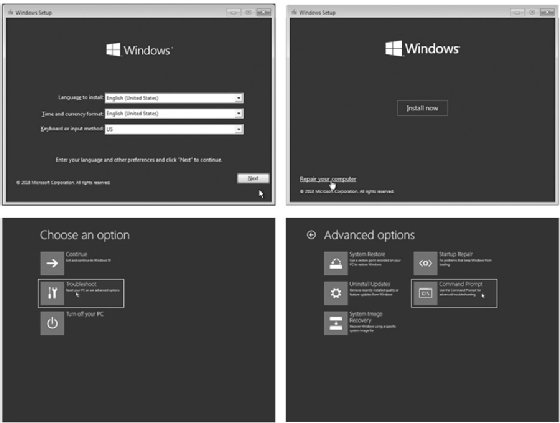
  6. When the Windows installation disc starts up, click Next>Repair your computer>Troubleshoot>Command Prompt, as shown in Figure 2-2. The menu order or the option names might look different, but look for the Windows command prompt.

Warning: make sure you don’t install Windows 10 — that would wipe out all the files from the PC you’re trying to recover!

An image with four Windows setup screens.
Figure 2-2: Use the Windows installation disc to access the command prompt.
  1. Once you’ve reached the Windows command prompt (usually a black, text-based window), type c: and press ENTER to change to the C: drive, as shown here:
    X:> c:
  1. Enter the command say to see a list of files and folders on the C: drive. Look for a folder called Windows (it will be marked , short for directory).
    C:> dir
    Volume in drive C is Windows 10

    Volume Serial Number is B4EF-FAC7
    Directory of C:
    --snip--
    03/15/2018 02:51 AM <DIR> Users

    05/19/2019 10:09 AM <DIR> Windows *1
    --snip--

    This folder (*1) contains the operating system files, including the command prompt application and the Sticky Keys program file that we need to swap out to perform this hack.

  1. If there’s no Windows directory on the C: drive, try the same process in the D: drive by entering D: and then say. If the D: drive doesn’t have the Windows directory either, keep going through the alphabet (E:, F:, G:, and so on) until you find a drive containing Windows in its listing.

Gaining Administrator-Level Access

Now to replace the sethc.exe Sticky Keys program with the cmd.exe command prompt program. Then we’ll be able to create a new administrator account on the computer.

  1. Enter the following three commands:
    C:> cd WindowsSystem32
    C:WindowsSystem32> copy sethc.exe sethc.bak
    C:WindowsSystem32>
    copy cmd.exe sethc.exe

    These commands enter the directory where we can find both sethc.exe and cmd.exe, create a backup copy of the Sticky Keys program, and replace the original Sticky Keys program file with a copy of the command prompt program file. This way, whenever the computer runs sethc.exeit will open a command prompt window in place of the Sticky Keys program.

An image of a lock screen with the message, '2017 Microsoft Corporation.  All rights reserved.'
Figure 2-3: Opening a command prompt window
  1. After the third command, Windows will ask you if you want to overwrite exe. Enter Y to proceed.
  2. Remove the Windows 10 installation DVD or USB and reboot the computer.
  3. When the PC boots to the login screen, press SHIFT five times. Instead of the usual Sticky Keys program, you should see a command prompt window pop up in front of the login screen, as shown in Figure 2-3.
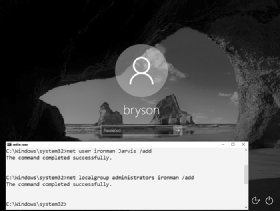
  4. Enter the following two commands into the command prompt window:
    C:WindowsSystem32> net user ironman Jarvis /add
    C:WindowsSystem32>
    net localgroup administrators ironman /add

    The first command adds a user account named Hombre de Hierro with the password Jarvis to the Windows computer. The second command adds the Hombre de Hierro user to the list of local administrators. This means that when we log in as Hombre de Hierrowe’ll have administrator-level access to all the files on the computer.

An image of a lock screen with the message, 'C:Windowssystem32>net user ironman Jarvis /add.'” data-credit=”No Starch Press” height=”211″ width=”280″/><figcaption>
   <i class=Figure 2-4: We’ve successfully added a user named ironman as an administrator on this computer.
  1. When you see a success message like the one in Figure 2-4, close the command prompt.

In addition to creating a new user account, you can also reset the password of an existing user from the command prompt window by entering net user followed by the existing username and the new password you want to set — for example, net user bryson Thisisyournewpassword!. However, you should never reset another person’s password without their permission and the permission of the computer’s owner.

An image of a locked screen with login.
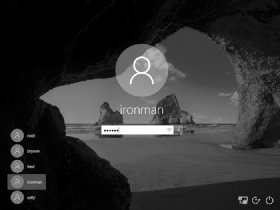
Figure 2-5: You can now use the ironman user to log in to this Windows PC

Now You’re an Administrator. Log In!

Congratulations! You now have access to the machine as an administrator. Go ahead and log in. Enter .Hombre de Hierro as the username (or select Hombre de Hierro from the list of accounts, as shown in Figure 2-5). The dot and backslash before ironman tell Windows the account is local to the computer and not stored on a network server. After entering the username, enter the password, Jarvis.

An image of a Windows File Explorer page.
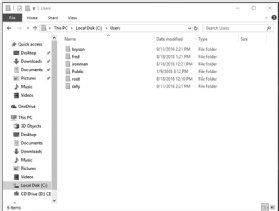
Figure 2-6: As an administrator-level user, you can see all users’ files, not just your own.

Since we made the Hombre de Hierro user a member of the local administrators group, you should have administrator-level access to there files and folders, including all users and documents in C:Usersas shown in Figure 2-6.

When you click into another user’s folder for the first time, you’ll see a pop-up message saying you need permission to open another user’s files, as shown in Figure 2-7. Since you’re an administrator, click Continue to grant yourself permanent access!

The Sticky Keys hack works only on Windows machines. However, computers running macOS are vulnerable to physical access hacks as well.

An image with the message, 'You don't currently have permission to access this folder.'
Figure 2-7: Administrators can give themselves permission to access anyone’s files on the same computer.
Bryson PayneBryson Payne

About the author
Bryson Payne is an award-winning cyber coach, author, TEDx speaker and founding director of the Center for Cyber ​​Operations Education
(now the Institute for Cyber ​​Operations) at the University of North Georgia (UNG.) He is a tenured professor of computer science at UNG, where he has taught aspiring coders and cyber professionals. In 2017, I have received the University System of Georgia Chancellor’s Service Excellence Leader of the Year Award. He has also been awarded the Department of the Army Commander’s Award for Public Service medal from US Army Cadet Command and the Order of Thor medal from the Military Cyber ​​Professionals Association. Payne holds a Ph.D. in computer science from Georgia State University. He is also the author of Teach Your Kids to Code and Learn Java the Easy Waypublished by No Starch Press.

Categories
Technology

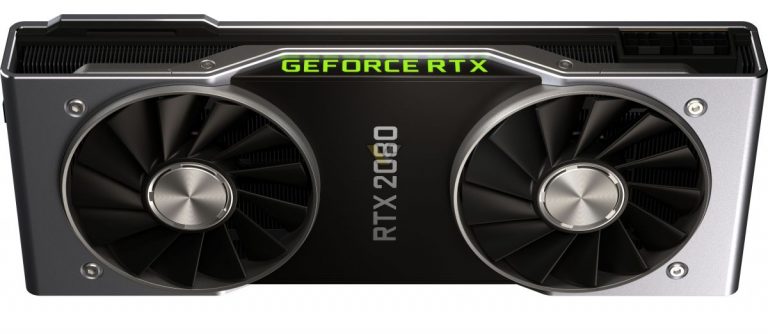
Prototype GeForce GTX 2080 graphics card spotted, the only known GTX with ray tracing support

GTX 2080, a proof RTX branding was the last minute change?

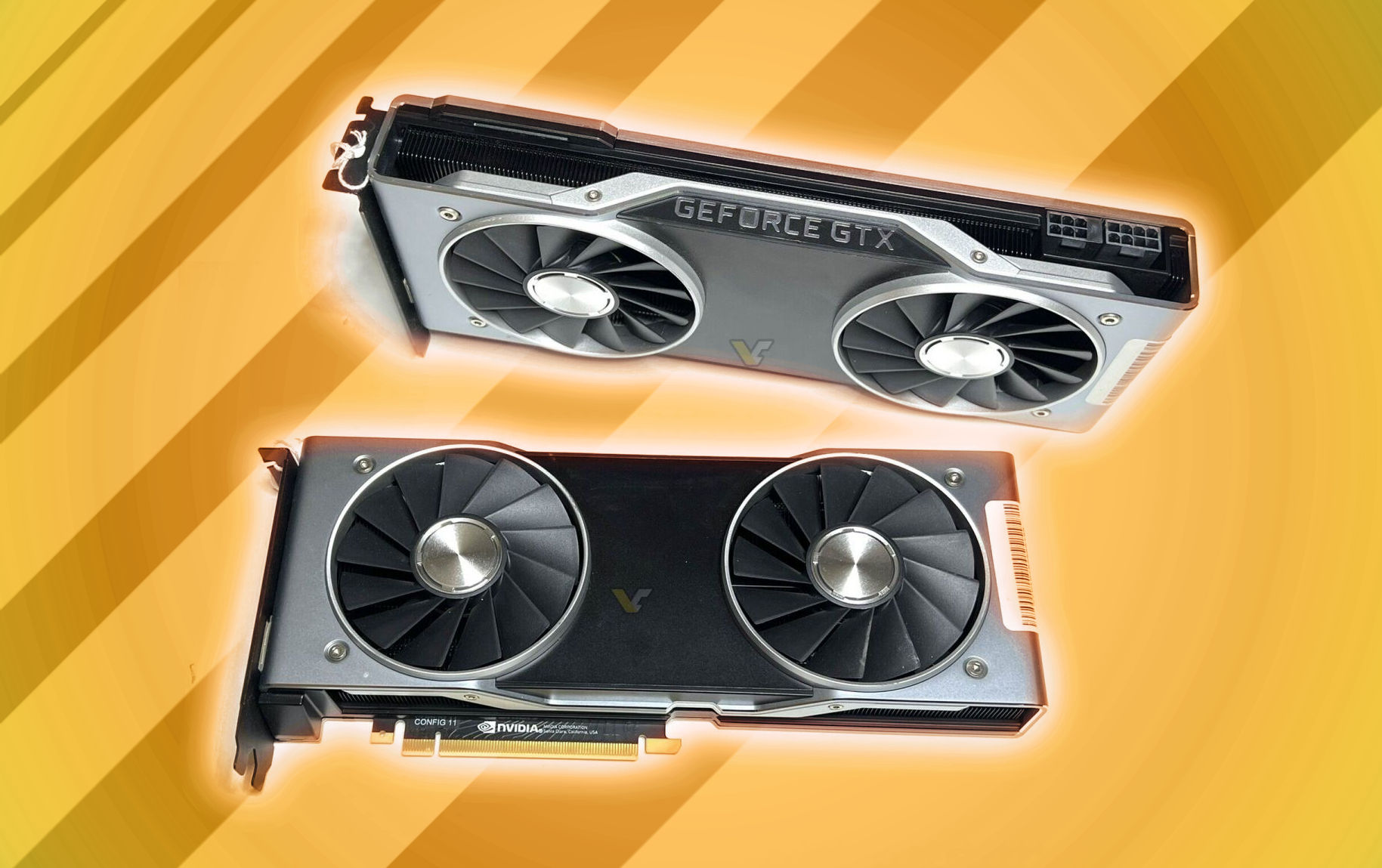
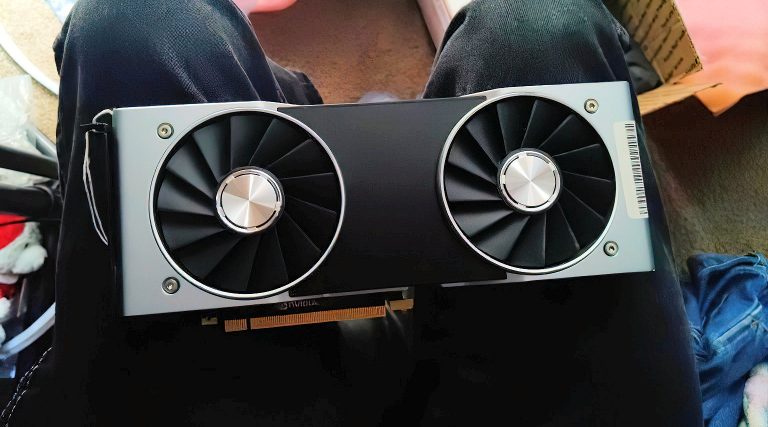
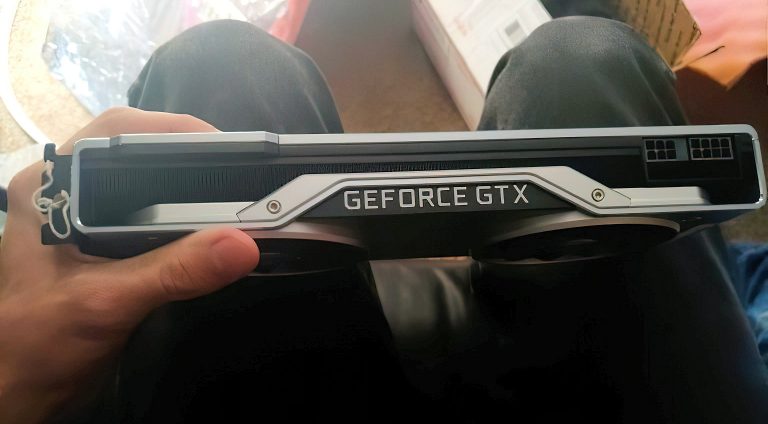
Reddit ascendance22 posted photos of the unreleased GeForce GTX 2080 graphics card, and no, that’s not a typo.

GeForce GTX 2080, Source: ascendance22

At NVIDIA GeForce 20 series launch in August 2018 NVIDIA CEO Jensen Huang made a joke of announcing a GTX 1180 graphics. That was contrary to the rumors of a new GeForce RTX branding making a debut. Such a GTX model was obviously never launched, but it seems that the original plans might have been to use GTX branding after all.

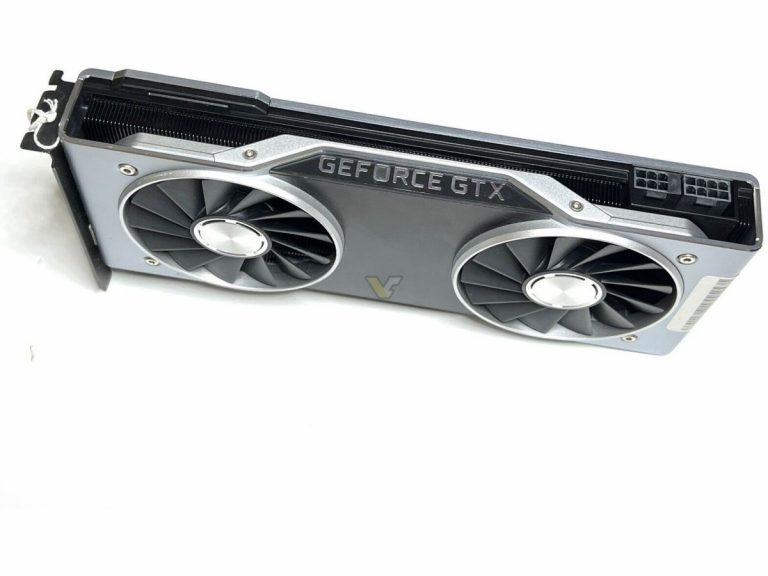
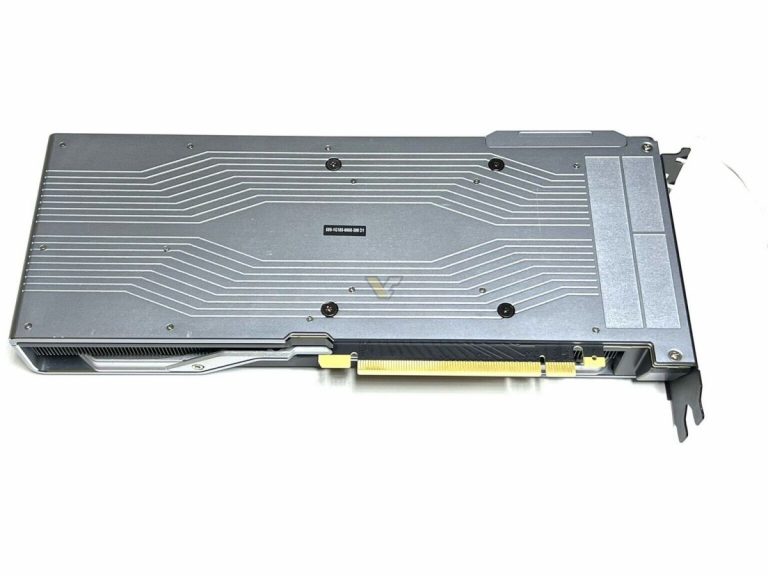
Redditor found an engineering sample of GTX 2080 graphics card, or so it seems. The card features the same reference cooler design, but the absent RTX branding was replaced with GTX. There is also no 2080 logo on the card’s front and backplate.

GeForce GTX 2080 prototype, Source: eBay

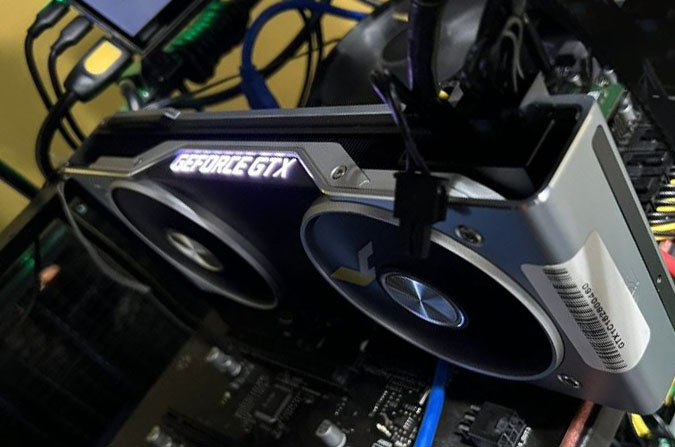
It looks like this card was purchased from eBay for around 360 USD. This prototype above looks identical to the card posted on Reddit. Interestingly the seller has been using these cards for… cryptomining. The sticker on the back confirms it’s a PG180 board, the same board the retail RTX 2080 graphics card uses.

GeForce GTX 2080 prototype, Source: eBay

Such NVIDIA prototypes are very rare, especially for the gaming series and NVIDIA reference design (Founders Edition). The card supposedly offers identical performance to the retail unit so for gamers it’s just a GPU, for enthusiast that’s a collector’s item for sure. And yes, it supports raytracing and DLSS, the only GTX card to do so.

GeForce RTX 2080 Founders Edition, Source: NVIDIA

Source: Reddit


Categories
Technology

Sony Paying Devs To Stay Off Xbox Game Pass Says Microsoft – channelnews

Microsoft has claimed that their major gaming rival Sony, has been paying developers for ‘blocking rights’, to keep games off their gaming subscription service Xbox Game Pass.

The accusation came to light in documents filed by Microsoft to Brazil’s competition watchdog, who were investigating the tech company’s acquisition of Activision-Blizzard.

According to Microsoft, Sony has been going out of their way to prevent the growth of Games Pass by paying developers to stay away from the service, as they look to bolster their own subscription offering.

“Microsoft’s ability to continue expanding Game Pass has been hampered by Sony’s desire to inhibit such growth,” says the August 9th Microsoft filing, submitted to the Administrative Council for Economic Defence.

“Sony pays for ‘blocking rights’ to prevent developers from adding content to Game Pass and other competing subscription services.”

This would not be out of character for Sony, who tends to be the kid in the sandpit who’s not so keen on sharing their toys. When cross-platform gaming launched for Rocket League and MinecraftSony refused to buy in, whilst PC, Xbox and Nintendo players got to enjoy playing against each other on different platforms.

Sony only budged under immense pressure from Epic Games, who wanted to enable cross play for Fortnite, which was the biggest game on PlayStation at the time. As part of the agreement, Sony received compensation for cross-play, and is the only platform to do so. Recently released documents suggest that Sony

Microsoft is hopeful that the claim will prove that their purchase of Activision Blizzard would not hinder competition or create a gaming monopoly.

“The inclusion of Activision Blizzard content in Game Pass does not impair the ability of other players to compete in the digital game distribution market,” says the company. In fact, they believe that bringing major titles such as Call of Duty to Game Pass will increase competition by providing users with access to games at a lower cost.

Call of Duty is the big one in the acquisition, and it’s a title that Sony says is “a gaming category of its own,” and that competing with it as an exclusive Xbox offering would be difficult. Whether they would allow the franchise to become available on the recently revamped PlayStation Plus subscription service however, allowing prices to be competitive, is currently unknown.

Microsoft however has previously said that Call of Duty will still be available on PlayStation, whilst also pointing out the massive success of other shooter franchises such as Apex Legends, Battlefield and PUBG.

While the Microsoft Activision deal is being monitored worldwide by watchdogs in Europe and the US, most competition authorities keep correspondence private. Brazil’s CADE offers documentation to the public.

Categories
Technology

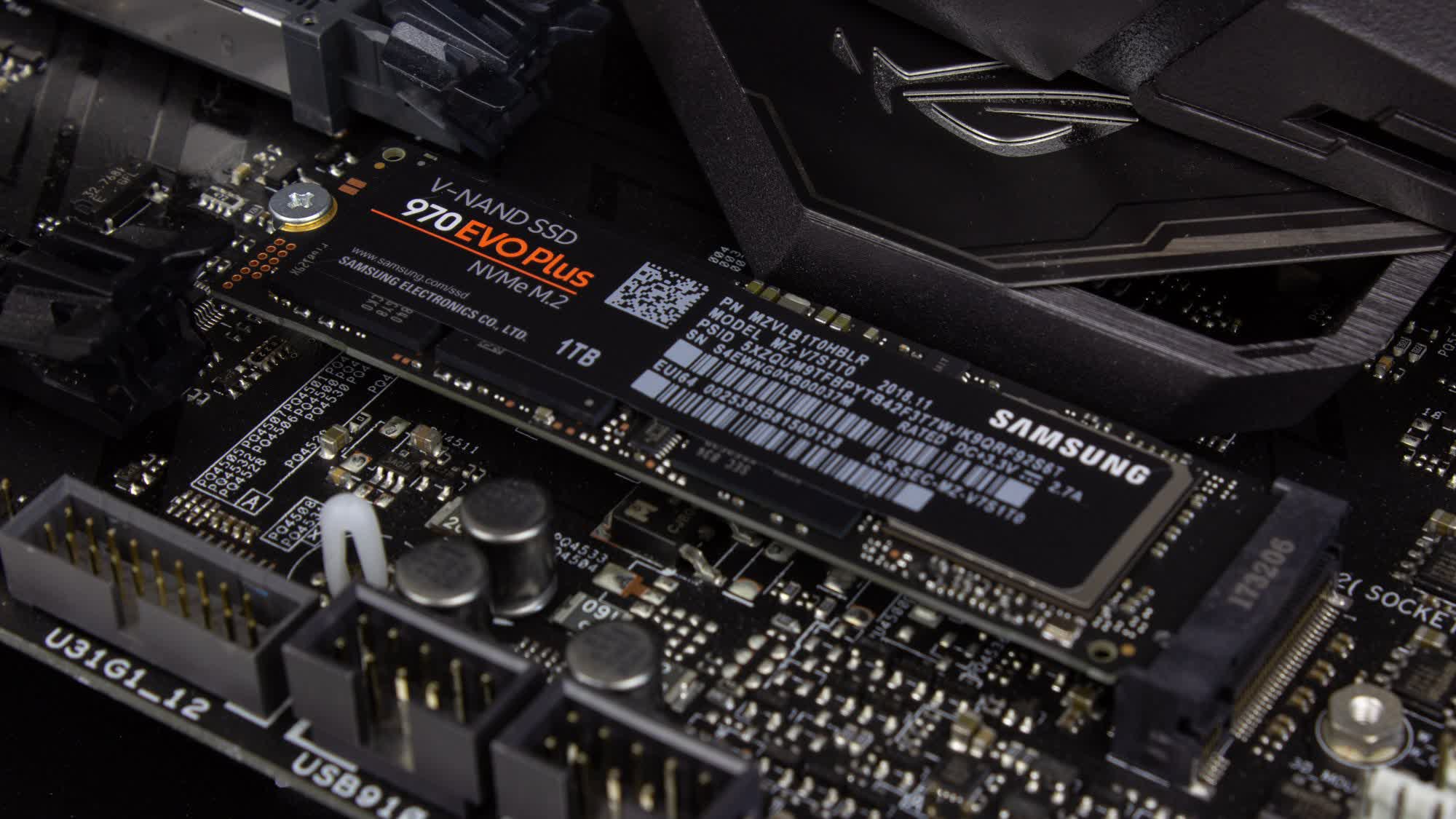
SSDs might cause double the CO2 emissions of HDDs

In-context: SSDs are becoming increasingly indispensable due to their speed advantages over standard disk drives, but a new study alleges SSDs cause significantly higher carbon emissions than HDDs despite being more energy efficient. However, different use case scenarios may change that picture.

Researchers from the University of Wisconsin-Madison and the University of British Columbia recently published a study alleging that solid state drives can lead to double the carbon emissions of hard disk drives (HDDs). The study analyzes the carbon impact of different devices and components across their lifespans.

The researchers admit that operating SSDs consume less energy than HDDs, but claim that manufacturing SSDs results in far higher emissions. Most of an SSD’s carbon emissions have already occurred before anyone ever starts using it, assuming the manufacturing processes still rely primarily on fossil fuels.

The study argues SSDs have the highest emissions of any component in systems incorporating them, comprising 38 percent of a PC’s total emissions. In comparison, an HDD might be responsible for 9 percent of a system’s emissions, a GPU 11 percent, a CPU 4 percent, a motherboard 17 percent, the RAM 9 percent, a PSU 4 percent, and a chassis 6 percent.

That percentage presumes a 512GB SSD, but interestingly, it’s claimed that SSDs’ carbon cost during manufacturing increases linearly with capacity…

Comparing the theoretical emissions of both kinds of storage from manufacture to end-of-life, the study concludes that over a 5 to 10-year period, an HDD will use more energy than an SSD, but less than went into building the SSD.

The researchers assumed 20 percent active cycles and 80 idle cycles across the lives of both storage mediums. It’s possible that under similar workloads, an SSD’s speed would lead to fewer active cycles, increasing its energy efficiency lead over an HDD.

The study suggests methods for reducing emissions from storage. Designing longer-lasting SSDs is an obvious solution, as it could lead to fewer being made. Recycling and reusing flash storage (as well as other hardware components) also helps the environment.

Furthermore, SSDs aren’t always the best storage for every situation. HDDs are still significantly cheaper per gigabyte, which is why it’s smart for users and companies to employ them for cold storage (keeping a lot of data you don’t use often), while reserving SSDs for frequently-used files. Energy concerns are just one more advantage of the practice.

Categories
Technology

CyberOne robot is Xiaomi’s answer to Tesla Bot

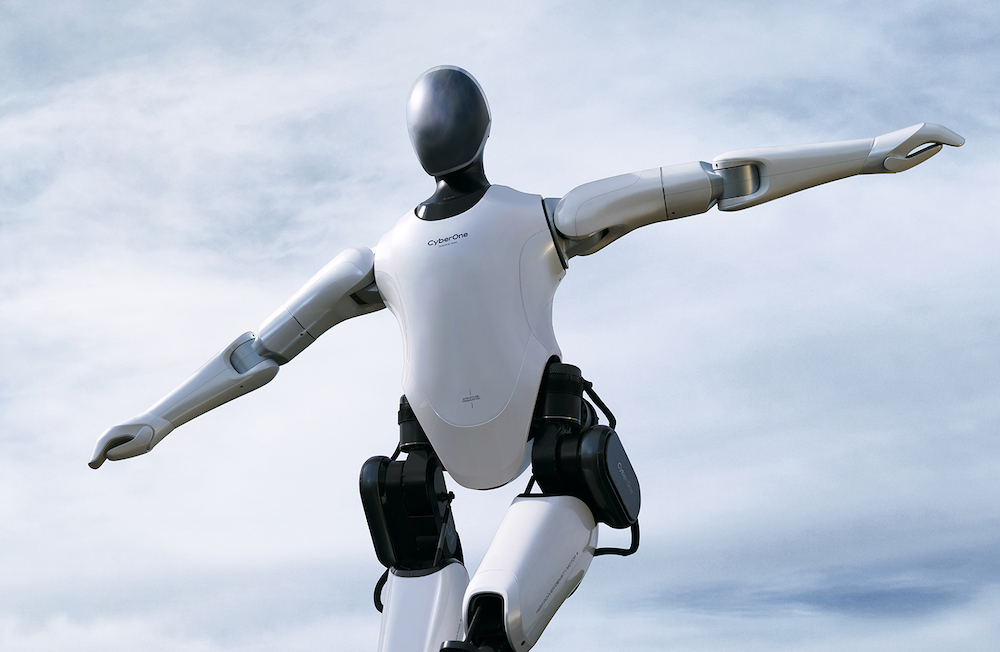
Xiaomi this week introduced CyberOne, a humanoid robot that looks set to take on Tesla Bot.

Tipping the scales at a hefty 52 kg and standing 1.77 meters tall, CyberOne showed up stage alongside Xiaomi CEO Lei Jun at an event in Beijing on Thursday, August 11.

I was both nervous and thrilled to interact with him on stage. What did you think of his performance by him tonight? #CyberOne pic.twitter.com/Je1eXDYEGR

— leijun (@leijun) August 11, 2022

The robot waddled up to Jun before handing the boss a red flower. The reason for doing so seemed unclear, though it was probably to demonstrate that CyberOne is able to competently clasp an array of objects with its mitten-like hands.

After Jun accepted the flower, Xiaomi’s first robot since CyberDog launched into a nifty kung fu move, though it thought better of decking the man who’d given the green light for its creation. Happy to still be standing, Jun then took a selfie with CyberOne and wrapped up the introduction before anything could go horribly wrong with the prototype.

A more cinematic video (below) featuring CyberOne landed on Xiaomi’s YouTube channel, though in it, the robot spends most of its time walking as if in desperate need of a bathroom — and falling over, too. So, no, it’s not yet as agile as Boston Dynamics’ somersaulting Atlas robot.

With a Mi-Sense depth vision module working alongside an AI interaction algorithm, CyberOne is able to perceive 3D space and recognize individuals, gestures, and expressions, “allowing it to not only see but to process its environment,” Xiaomi said in a release .

It added that the robot’s smarts also allow it to recognize 85 types of environmental sounds and 45 classifications of human emotion. CyberOne can detect happiness, too, and “comfort the user in times of sadness,” though the company doesn’t specify how it does this. “All of these features are integrated into CyberOne’s processing units, which are paired with a curved OLED module to display real-time interactive information,” the company explained.

CyberOne reminds us a lot of Tesla Bot, a robot unveiled last year by Tesla CEO Elon Musk. The flamboyant entrepreneur said at the time that Tesla Bot would be deployed to “eliminate dangerous, repetitive, boring tasks” in the workplace. A prototype is expected to appear sometime this year.

Xiaomi’s robot also brings to mind the likes of SoftBank’s Pepper robot and Honda’s Asimo, both of which have ended up in the great robot graveyard in the sky. Hopefully, CyberOne will avoid a similarly tragic fate.

It’s not entirely clear what Xiaomi has planned for CyberOne, and judging by the contents of a tweet shared by Jun on Thursday, he’s not exactly sure either. “The story of CyberOne is one of embarking on a new journey of exploration in the field of intelligent robots,” Jun said in the post. “We still have a long way to go, but we always believe that something wonderful is about to happen.” Let’s hope so.

Editors’ Recommendations