Categories
Technology

WhatsApp privacy updates: Silently leave group chats, appear offline, screenshot blocking

WhatsApp users will soon be able to “silently” slip out of group chats without everyone making a “big deal” out of it.

The update, which will start to roll out this month, is one of several new privacy features for the popular messaging app announced by parent company Meta on Tuesday.

Currently, leaving a group chat can be slightly awkward as everyone receives a notification.

“We love our group chats but some are not forever,” Meta said in a blog post.

“We’re making it possible to exit a group privately without making it a big deal to everyone. Now, instead of notifying the full group when you are leaving, only the admins will be notified.”

In another change rolling out this month, users will be able to choose who can see when they are online.

“Seeing when friends or family are online helps us feel connected to one another, but we’ve all had times when we wanted to check our WhatsApp privately,” Meta said.

“For the moments you want to keep your online presence private, we’re introducing the ability to select who can and can’t see when you’re online.”

A third new feature coming soon will allow screenshot blocking for “View Once” disappearing messages.

“View Once is already an incredibly popular way to share photos or media that don’t need to have a permanent digital record,” Meta said.

“Now we’re enabling screenshot blocking for View Once messages for an added layer of protection. We’re testing this feature now and are excited to roll it out to users soon.”

The updates build on WhatsApp’s existing privacy features including default end-to-end encryption for calls and messages, encrypted backups for chat history, two-step verification and the ability to block and report unwanted chats.

“We’ll keep building new ways to protect your messages and keep them as private and secure as face-to-face conversations,” Meta founder and chief executive Mark Zuckerberg said in a Facebook post.

Stream more tech news live & on demand with Flash. 25+ news channels in 1 place. New to Flash? Try 1 month free. Offer ends October 31, 2022 >

Ami Vora, head of product at WhatsApp, said in a statement the company was “focused on building product features that empower people to have more control and privacy over their messages”.

“Over the years, we’ve added interlocking layers of protection to help keep their conversations secure, and the new features are one way we continue to deliver on our commitment to keep messages private,” he said.

It comes as Meta makes a series of changes to Facebook and Instagram in order to win over younger users increasingly abandoning its platforms for Chinese rival TikTok.

Facebook recently launched a new “Feeds” feature allowing users to see the latest posts from their family and friends, separate to the main “Home” news feed which delivers content based on a recommendation algorithm.

“One of the most requested features for Facebook is to make sure people don’t miss friends’ posts,” Mr Zuckerberg wrote in a Facebook post. “So today we’re launching a Feeds tab where you can see posts from your friends, groups, Pages and more, separately in chronological order.”

More recently, Instagram was forced to roll back a series of controversial changes that boosted the appearance of recommended video content in news feeds, after backlash from high-profile users including Kim Kardashian and Kylie Jenner who accused the platform of “trying to be TikTok” .

Amid mounting criticism, Meta said last month it would be reducing the number of recommended posts and videos from accounts users don’t follow that they see in their feeds, as it works to improve its personalization algorithms.

“I’m glad we took a risk. If we’re not failing every once in a while, we’re not thinking big enough or bold enough,” Instagram head Adam Mosseri told TheVerge.

“But we definitely need to take a big step back and regroup. [When] we’ve learned a lot, then we come back with some sort of new idea or iteration. So we’re going to work through that.”

Meta last month posted its first ever quarterly revenue decline, following a privacy change from Apple allowing iOS users to opt out of data tracking, and growing competition from TikTok.

Revenue was down 1 per cent to $US28.8 billion ($A41.4 billion), while profit fell 36 per cent to $US6.6 billion ($A9.5 billion).

[email protected]

.

Categories
Technology

Modern Warfare 2 Features A Formula 1 Map

Nothing between heaven and earth is immune from Formula 1 frenzy, not even the upcoming Call of Duty: Modern Warfare 2 Beta, which will feature a multiplayer map based on Singapore’s Marina Bay Circuit (try to keep it in your pants).

“We understand that, with our agreement, Infinity Ward have announced they designed a Grand Prix Map as part of the #MWII Beta,” reads a post from Call of Duty’s Twitter accounts; clearly taking the piss out of the viral statement issued by Oscar Piastri in relation to Alpine F1 last week.

RELATED: ‘Call Of Duty – Modern Warfare 2’ Finally Has An Explosive Gameplay Trailer


“This is right, and the map will be playable for the 2022 Beta. We will be playing on Grand Prix in #MWII this year.”

At this stage, while there’s zero real-life Formula 1 branding to be seen in the early promo materials for the hit reboot’s sequel – or even Formula 1 team-based branding, for that matter – you can definitely fill in the gaps with a bit of imagination. Once you get past the fact the cars appear to be a strange fusion of the 2017 race rigs and recent F2 cars, of course. Still, it’s more than a passing resemblance.

Based on the footage previewed today, most of the combat will take place in the pits, where we’ve caught glimpses of certain machinery on fire (there’s your Ferrari). The F1 cars themselves also appear to be actively competing against one another. But whether this element of the Call of Duty: Modern Warfare 2 map – officially dubbed “Marina Bay Grand Prix” – will be purely ornamental or something players may actually interact with is currently unclear.

RELATED: Sweet Jesus… ‘Skate 4’ Will Be Free-To-Play On All Platforms

As per Activision Blizzard and Infinity Ward’s confirmation two months prior, the Call of Duty: Modern Warfare 2 remake has locked in an October 28th, 2022 release date. The open beta, on the other hand, will be open for all platforms from September 24th to 26th of 2022 (cross-play enabled).

Check out the Call of Duty: Modern Warfare 2 Formula 1 map’s epic reveal trailer via the Twitter post above.


Call of Duty Modern Warfare 2 Formula 1 Map

Side notes: there’s a joke about missile strikes somewhere here.

Categories
Technology

Razer offering Williams Esports edition of Enki Pro Chair

Razer offering Williams Esports edition of Enki Pro Gaming Chair


If you or a sim racer you know is in the market for a lavish gaming chair, Team Razer might have what you’re looking for. The “Ultimate Comfortable Gaming Chair” per the Razer website, or the “Throne for Esports Racing” as the promotional video puts it, the Razer Enki Pro now comes in the famous blue and black found on the Williams Esports liveries.

Retailing for £1,299, the Williams Esports Edition of the Razer Enki Pro claims to have that luxurious feeling when it’s time to sit down and game. The seat itself is a mix of Alcantara plush with leatherette-type of lining. It has 110 degrees of extended shoulder arches and a 21-inch ultra-wide seat base.

Inside and around the Enki Pro, there’s a built in lumbar arch for the back, adjustable seat positioning with up to 152 degrees of recline, and there’s also a piece of memory foam disguised as a head cushion for head and neck comfort and support.

This particular gaming chair comes in two other variants if the Williams Esports branding isn’t what you’re looking for. There is a Koenigsegg Edition that also costs £1,299, decked out in bright yellow and black Alcantara upholstery. Also, for only £999, the same Enki Pro chair comes in all black with the green Razer trim and logo.

There are wheels on the bottom of the seat, so unless you’ve got a rig that holds the wheels down, like the Next Level Racing Wheel Stand 2.0 does, or you opt to not install the wheels for whatever reason, this is going to be most useful for desk gaming/racing or casual chilling in your gaming room.

Either way, it’s quite luxurious in the pricing. What do you think about this new gaming chair, is it a must have for Williams Racing or Esports fans? Let us know your thoughts in the comments below!


Categories
Technology

Microsoft celebrates 15 years of OneDrive with a redesign and new features

Microsoft’s marking OneDrive’s 15th anniversary with a new landing page, called OneDrive Home, and it should make it easier to keep tabs on your work. Instead of arriving on the My files tab when you first open OneDrive, you’ll find yourself on the new Home page that resembles that dashboard in the online version of Office.

Like the Office web app, OneDrive Home contains a list of your files, organized by how recently you accessed them. Above the list are filters that let you sort your documents by Word, Excel, PowerPoint, and PDF file types.

It’s easier to understand the new changes once you see them.
Image: Microsoft

There’s also a new “Activity” column to the right of the “Owner” file field that tells you when someone leaves a comment, @mentions another user, or assigns you a task within a shared document. On the left side of the Home view, Microsoft’s adding a new Quick access section, where (just like on Windows) you can find and pin your most frequently accessed spaces.

Unfortunately, these changes aren’t live right now — Microsoft says OneDrive Home will be available in “the coming months.” From what it looks like, though, the new Home page could serve as a central hub that should help you stay organized while collaborating remotely.

Aside from its OneDrive web app, Microsoft is also rolling out its photo story feature for the OneDrive mobile app (essentially OneDrive’s equivalent to Instagram stories) to users in Australia. The feature’s not reaching users in the US or other regions until later this year.

Categories
Technology

Repco Roars Into 100th Birthday With New Campaign Via Thinkerbell

To celebrate 100 laps around the sun, Repco has filled its “Driven by Passion for 100 Years” campaign to the brim with hidden car history, via Thinkerbell.

Whether it’s finding Brian’s ’94 Supra, the fabled Peter Brock Energy Polarizer, the rock that ended DJ’s Bathurst, or Brabham’s legendary engine – every asset is a game of ‘I-SPY’ for any and every car lover.

This celebration of iconic bits of car history, racing moments, and pop culture has been carefully crafted to remind Australia and New Zealand of Repco’s deep connection to auto culture. From winning F1 championships to helping you fix your first car – Repco’s been riding shotgun through it all.

The hidden references are loaded throughout all campaign assets across TV, Print, Radio, Social and Instore – which culminate in an interactive game – challenging enthusiasts to test their skills with an online experience.

Jim Ingram, national chief creative tinker at Thinkerbell, said: “Whether you’re buying an air freshener for your new car, or a replacement four-barrel carby for your old one, anyone who shops at Repco shares a passion for all things auto . And it’s been fun creating a centenary campaign that’s riddled with hidden moments of passion, some obvious and some that will challenge even the most rusted on car nut.”

Kym Sutherland, general manager, marketing at Repco, said: “Repco’s been there for all car enthusiasts for a hundred years now. Whether it’s yours, or someone else’s that you’re working on, we understand that passion – it’s how we got started in the first place.”

CREDITS

Client: Repco

Scott Whiteley – Executive General Manager Marketing and CX, Automotive
Kym Sutherland – General Manager, Marketing
Priscilla Sugrue – Brand Manager

Creative Agency: Thinker Bell
Matias Reyes – Creative Tinker
Julia Keller – Thinker
Cale Berry – Creative Tinker
Gideon Nedas – Lead Thinker
Jess Evernden – Lead Production Tinker
Jaime Morgan – General Manager – South
Dom Counahan – Exec Brand Thinker
Jim Ingram – National Chief Creative Tinker
Sam Whatley – Lead Creative Tinker
Josh Parmenter – Lead Creative Tinker
Adam Ferrier – Chief Thinker

Media Agency: Initiative

Aaron Farrelly – Group Director
Bec Olsson – Partnerships Manager

Production Co: The Producers

Mitch Kennedy – Director
Victoria Conners – Exec Producer

Original Composition: Ack Kinmonth

Sound: BangBang

Digital Agency: Kojo

Categories
Technology

Sennheiser’s Momentum 4 Wireless Headphones Promise 60 Hour Battery Life, But Forgettable Style

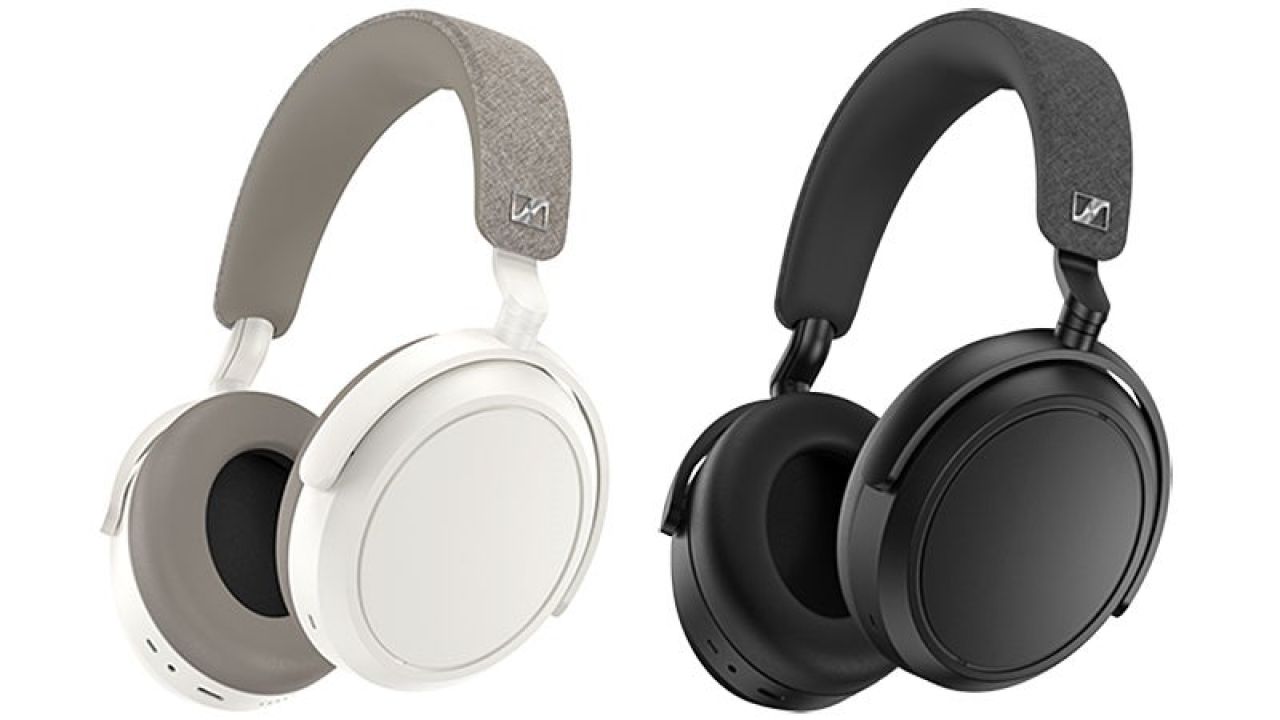
Not only is Sennheiser known for its excellent sounding audio gear, it’s also known for its distinct styling, particularly with headphones like its wireless over-ear Momentum line. In past iterations, the line featured an exposed metal headband strap that aesthetically stood out against the competition, but for the new Momentum 4, Sennheiser is introducing a complete redesign that promises more comfort and better performance, but with uninspired looks.

When the Sennheiser Momentum 3 wireless headphones were released back in 2019, we raved about not only their sound quality and ANC performance, but also their retro-inspired design. Given how generic most wireless earbuds are, larger wireless on-ear headphones are one of the few ways consumers can express their style through their gear, but it’s hard to imagine anyone buying the Sennheiser Momentum 4 for its looks. The distinctive metal headband strap is now gone, replaced with a more generic but articulated structure that makes these $AU549 cans look like the cheaper alternatives to the rest of Sennheiser’s headphone lineup.

Image: SennheiserImage: Sennheiser

Also gone are the hinged earcups that fold in on themselves. Like recent Sony and Apple offerings, the new Momentum 4 wireless headphones feature a fold-flat design instead, so while the included carrying case has a larger footprint, it’s also much slimmer and potentially easier to slide into a bag. With the headband now connecting to pivot points on the edges, the featureless sides of the Momentum 4 earcups are now large touchpads for activating playback, function, and volume shortcuts through taps and swipe gestures. All physical buttons have been removed from the Momentum 4, except for a single power/Bluetooth pairing button.

Image: SennheiserImage: Sennheiser

So, what do the Momentum 4 wireless headphones do? Sennheiser promises the redesigned headband has increased padding, while the added articulation on each slightly angled earcup allows the headphones to stay on the head with less pressure, making them more comfortable to wear. The lambskin covering the padding on each earcup has also been replaced with a synthetic leather, which is another step in the right direction.

The headphone’s touch-sensitive controls might not be an improvement as far as functionality is concerned, but while the Sennheiser Momentum 3 headphones offered around 17 hours of battery life at most, the Momentum 4 promise a staggering 60 hours. That’s twice the battery life that Sony promises with its recent WH-1000XM5, and even if hitting 60 hours requires some power-saving techniques (like keeping the volume pumping through its 42mm transducers low) that’s still an impressive achievement. When they do die, a quick 10 minute charge provides an extra six hours of runtime.

Sennheiser is also promising improved active noise cancellation performance, and added customization and personalization through an accompanying mobile app. But the most compelling reason for the extreme redesign is the $AU549 price tag (available for pre-order starting today and officially on sale starting on August 23). If you prioritize function over form, there’s undoubtedly a lot to like here, but if you care more about how your headphones look, it might be time to move on.

Categories
Technology

WhatsApp Now Lets You Unsend Messages Sent More Than 2 Days Ago

On the heels of Apple announcing its new software iOS 16 will let you edit or unsend messages, WhatsApp has shared that it’s upped the timing on its own unsend message feature. You used to be able to unsend messages on WhatsApp within an hour, but now you’ll have a little more time to question your words — with the limit upped to two days.

To use the feature, open up the WhatsApp chat where you want to delete the message. Tap and hold the content you’d like gone, and then either hit ‘Delete for everyone’ or ‘Delete for me’. If you’ve passed the time limit, meaning it’s been longer than two days, you’ll only see the option to ‘Delete for me’.

There is one catch to be aware of, though: all recipients must have the most recent version of WhatsApp for it to work. If they haven’t updated their app, you can hit ‘Delete for everyone’ all you want, but it won’t actually delete it from their app. Even worse, you won’t ever know.

Related: Apple Announces Mobile Software Update iOS 16 With “One of the Most Requested Features”

Related: Is Apple’s HomePod Making a Comeback? These Clues Say Yes

Interestingly, while Apple had previously said its yet-to-be-released iOS would give you 15 minutes to unsend a message, its latest betas (testing versions of the app) have seen this limit reduced to only two minutes. No word yet on what the decided time limit will be on the final version.

The new iOS 16, which is expected to be released in the coming weeks, will also let you edit messages, as well as mark read messages as unread.

Screenshots from the iOS 16 public beta.

Other new features include more customizable lock screens, live texting working on video, the Mail app allowing for email scheduling and a new iCloud Shared Photo Library that lets up to six users easily share photos. Apple’s senior vice president of Software Engineering, Craig Federighi said its updates “will change the way you experience iPhone”.

Read more stories from The Latch and subscribe to our email newsletter.


Categories
Technology

OtterBox now offers $150 toward iPhone screen replacements

OtterBox is trying to differentiate itself from its rivals by offering up to $150 toward the repair of your iPhone screen if it breaks while using the Amplify or Alpha OtterBox screen protectors, the company said in a press release spotted by 9to5Mac. It’s available with the updated OtterBox Protection Program that also covers the case and screen protector, for a price bump of around $5 over the same product with Antimicrobial protection only.

“Our robust limited lifetime warranty program already covers your case and screen protector, and the OtterBox Protection Program extends that protection to your device screen as well,” said OtterBox CEO Jim Parke.

The extra protection is valid up to 12 months after purchase, and Otterbox promises that you can “easily activate and track coverage, and file a claim through the OtterProtect app.” The eligible Amplify and Alpha screen protectors with the coverage range from $40 to $55 — just choose the “Antimicrobial + OtterBox Protection Program” when checking out.

The insurance won’t cover the full cost of an iPhone screen replacement, but it’ll certainly make it less painful if you don’t have AppleCare. As far as I can see, there aren’t many other (if any), screen protectors with similar coverage, other than a few niche offerings. The execution will also be key, but we should see soon enough if filing a claim and receiving payment is as easy as OtterBox says.

Categories
Technology

Overwatch loot box sales close on 30 August

So buy up and unlock ’em all before Overwatch 2 if you’re so inclined!

Overwatch loot box sales will conclude on 30 August, Activision Blizzard has proclaimed today.

“Loot Boxes will no longer be available for sale after the end of the Anniversary Remix Vol. 3 event on August 30,” the publisher said in a blog post. “However, you will still be able to earn standard loot boxes after the end of the event.”

Said loot boxes will automatically open in the shift between Overwatch and its sequel Overwatch 2which will fully replace the team-based hero shooter from 5 October.

Overwatch 2 won’t have loot boxes of any kind, though a recent survey sent to players suggested that some of its cosmetic items may set players back up to $45 USD.

original Overwatch‘s Anniversary Remix Vol. 3 event is on now and runs until the end of the month.

Overwatch 2 goes free-to-play on Windows PC, Xbox One, Xbox Series S, Xbox Series X, PS4, PS5 and Switch on 5 October 2022 here in Australia. We went in depth on what to expect from it here.

This article may contain affiliate links, meaning we could earn a small commission if you click-through and make a purchase. Stevivor is an independent outlet and our journalism is in no way influenced by any advertiser or commercial initiative.

Categories
Technology

TeamViewer – Review 2022 – PCMag Australia

If you’re providing remote access support, it’s crucial that the software is easy to download and set up, because the person on the other end isn’t necessarily tech savvy. And if you’re primarily interested in accessing specific machines, you want software you can sign into securely and leave running in the background. TeamViewer does both of these things extremely well, in addition to offering some of the smoothest remote controls on the market. It also works across platforms and is free for noncommercial use. It’s a bit pricey for business use, but that doesn’t prevent TeamViewer from earning our Editors’ Choice award for remote access software.


How Much Does TeamViewer Cost?

TeamViewer is completely free for personal use. The free version isn’t a gimmick or a demo. I used it for the bulk of my testing, then I tried out the business version. There’s no difference, feature-wise. Home users get everything TeamViewer has to offer, which is great if you, like many of our readers, provide volunteer tech support for friends and family.

Paid plans for businesses start at $418.80 per year. With that license a single user can manage up to 200 computers. The next plan, which costs $1,234.80 per year, allows up to four users to control up to 300 computers. These plans aren’t available on a month-to-month basis.

TeamViewer’s business prices are toward the top of the market. RemotePC, which offers a similar feature set, doesn’t have a free version, but paid plans start at $19.50 a year. The cheapest business plan starts at $59.50 a year. Like TeamViewer, GoToMyPC primarily targets businesses and starts at $420 per year (or $44 per month if you prefer to pay monthly), which is still higher than TeamViewer despite the lack of a free version.

Canceling a TeamViewer plan is a bit of a pain because you can’t do it on the website. Users are instead told to email the support team.


Is TeamViewer Really Free?

The free version of TeamViewer is enforced by an AI designed to detect commercial activity that cuts off access for users it deems suspicious. Some legitimate home users are caught by the AI ​​and cut off, and plenty of negative reviews on Google Play or the App Store complain of accounts being disabled automatically and without warning. Such instances tend to be extreme, however. One such reviewer claims to have been using TeamViewer to play PC games on their Mac, and I find it understandable that the bandwidth required would look like commercial use to an algorithm. (Virtualization software would serve them better anyway.) In any case, users can appeal, so this is more of an annoyance than a dealbreaker.


TeamViewer Platform Support

TeamViewer offers clients for macOS, Linux, and mobile platforms. I tested the software on computers running Windows 10, Windows 11, and macOS 12, and found that all of these versions support all of the features I’d expected. The macOS version of TeamViewer is feature-complete—there’s nothing missing or not working.


Is TeamViewer Dangerous?

According to the company, TeamViewer is secured by end-to-end 256-bit AES encryption, multi-factor authentication (which you should absolutely use), and other industry-grade security features. The company is certified according to SOC2, HIPAA/HITECH, ISO/IEC 27001, and ISO 9001:2015.

Still, some amount of security is up to you. The most important security measure is to never install remote access software if someone you don’t know tells you to do it. It is a common hacking technique people use to remotely steal your information and access financial accounts. For example, if someone claiming to be tech support calls you, out of the blue, to “diagnose a problem” or “fix your bank account,” then asks you to install a remote access app, hang up—you’re talking to to scammer Call the dedicated phone number for the company in question instead and ask if there are any issues you need to address.


Getting Started With Teamviewer

Remote access software, by nature, needs to be installed on at least two machines: the computer you want to access remotely and the computer you have in front of you (or the machine you want to access the other computer from). It’s best if this process is straightforward, in particular if you’re talking to someone through the installation over the phone.

If you’re offering support, having a simple setup process is crucial because it means the people you’re supporting can quickly download and install TeamViewer and give you their information to connect. To get started, you head to TeamViewer.com and click the download button—you get an installer for your system. Follow the installation instructions and you will eventually see the main TeamViewer window.

TeamViewer at initial startup

TeamViewer automatically gives every computer an ID and password, which is shown when you open the application, as seen above. You can use that code to connect to the current machine. This same window has a box where you enter an ID in to connect to another machine, though this method is only just one option for connecting.

If you’d rather not enter an ID and password to access certain machines, however, the other option is to set up an account and sign into it on all systems. If you then check the “Grant easy access” button, you can connect to your own computers in just a couple clicks.

Running TeamViewer on a Windows PC


Smooth Controls

I tested TeamViewer both on my local home network and outside near a Portland, Oregon, food cart pod that doesn’t have particularly great Wi-Fi. I connected to a Windows 10 machine from a Macbook, an iPad, and a laptop running Windows 11. TeamViewer worked great in all of these combinations.

On my local network I barely notice when I’m using remote access software. Everything feels more-or-less in real time. I can browse the web, write a document, and even edit images over the network with only the occasional problems caused by lag. The results aren’t quite this smooth farther from my home, but I still don’t have any trouble accessing the other machine. Lag isn’t an issue. By contrast, another PCMag writer mentioned that in Zoom Meetings, which includes a remote access feature, the lag time is noticeable.

TeamViewer supports sharing system audio, which in my tests worked flawlessly. I could listen to music without much disruption. On my local network I could even watch a video with sound this way, albeit with a little bit of stuttering. It worked better than other apps I tested, including Remote PC and GoToMyPC. TeamViewer offers audio sharing on Windows and macOS computers, unlike GotoMyPC which can only share audio from Windows.


Sharing Files (and Your Face)

TeamViewer offers a file-transfer mode for any device you’re connected to. It shows a two-pane file browser, with all files on both computers available to send and receive, allowing you to transfer files directly from a folder on one device to a folder on another.

TeamViewer file transfer window

TeamViewer also offers audio and video chat, so you can see and talk with whoever is sitting at the computer you’re helping control. A whiteboarding feature lets you draw on the screen so that you can point things out, which is very handy if you’re using TeamViewer to offer support. With the audio/video chat and whiteboard features, you can talk out loud, emphasize areas of the screen by drawing them, and even look the person you’re working with in the eye. The only other remote management app we reviewed that offers whiteboarding is Remote PC. TeamViewer also offers the ability to record a remote session.

TeamViewer window as shown on macOS while accessing a Windows PC


Nearly Flawless Remote Access

Remote access software is borderline magic when it works well, letting you see and control one computer from another. TeamViewer has been providing this practical magic since 2005, and it shows. Every potential stumbling block seems to have been anticipated, whether you’re offering tech support for someone else or want access to your own computer from the road. That makes TeamViewer an Editors’ Choice winner for remote access software, particularly for free personal use, and our go-to app for remotely driving our own computers from afar.

.