Categories
Technology

Forspoken trailer gets the meme treatment

A new Forspoken trailer is getting the meme treatment, with the internet latching onto what many believe are some seriously cringy vibes. Check out the trailer for the upcoming Square Enix action RPG below, and read on for the memeifcation.

See more

The trailer, which dropped on Twitter midday on August 8, features the protagonist Frey describing her rather unique situation in which she’s been inexplicably transported to another world. We see her fighting bizarre fantasy creatures aided by a magical cuff that she talks to, and it all looks pretty cool – it’s the voiceover that the internet is fixing on.

Categories
Technology

Watch A Rusty Honda CR250 Clean Up Beautifully In Under Half An Hour

There’s something enormously satisfying about taking an old, worn-out thing and making it almost like new again, isn’t there? It’s a thing that requires time, patience, and of course money—all three of which seem to sadly be luxuries in these times. Still, if you have enough of all three things, it matters less that you already know what you’re doing, and more that you’re willing to learn what you don’t know.

That’s part of why RRC Restoration’s videos on YouTube are so satisfying to watch. While the guy behind the channel clearly knows what he’s doing, the fact that he’s willing to show so much of his particular processes in his well-edited ASMR workshop videos is both brilliant and soothing. Grab a cup of your favorite beverage of choice, and maybe a snack, and settle in for his paring over 2,000 hours of work down to just 25 minutes—for our amusement.

The subject is a 1986 Honda CR250 dirt bike, and it’s definitely seen better days. It’s full of all the kinds of things you’d expect on a bike of this age: Rust, sun-faded plastics, gunked-up internals, past-it steering head bearing, perished rubbers—and more. For a bike that’s nearly 40 years old, it’s not particularly surprising that it’s in this shape, if we’re honest.

With seemingly endless hours of careful and attentive restoration, though, you can see it slowly start to come back to life over the course of this video. While this particular composition is an overview of the entire project, RRC has handily assembled a playlist of all the individual, longer-form videos that concentrate on individual parts of this bike. We’ll link it in our Sources if you want to bookmark it and work your way through as you have time.

Meticulous attention to detail is evident with every step. Whether it’s media blasting surfaces to get them cleaned up and ready to go back together (possibly with paint, possibly not), replacing gaskets, relacing and truing the rims, cleaning up the plastics, or pretty much anything else—the sheer amount of care that goes into this work is impressive. If you’re not based in the UK, as RRC is, you may find yourself looking up some of the chemicals he uses (Hint: Deox-C is apparently similar to what Americans know as Evaporust), but that’s also how you know you ‘re really into it.

While none of us are at the stage where a restoration like this can truly happen in under half an hour, it’s still cool to see, and maybe view it as a sort of video mood board to get you hyped for your own next project. If it’s your first project, so much the better—and welcome to the club!

Categories
Technology

Should You Buy a Foldable Phone? – Phandroid

The introduction and integration of foldable devices into the general smartphone landscape is nothing short of impressive. What was once considered a very specific niche product has slowly gotten the attention of both “casual” and “hardcore” smartphone users, and has resulted in several major Android brands like Samsung, Motorola, and even Microsoft putting their own spin on foldable phone technology. .

The recent launch of the new Samsung Galaxy Z Flip 4 and Z Fold 4 proves that there’s definitely a market for this kind of hardware. But is it for everyone? As smartphones are a very personal piece of kit that we use daily, a lot goes into how we choose and eventually decide which kind of phone is the best for us.

Maybe you’re on the fence about getting a foldable smartphone, or maybe you’re finally dead-set on purchasing one for yourself – either way, we’d like to discuss some points of consideration about this particular topic. And given that these devices don’t come cheap (often ranging in the thousand-dollar price range), there’s definitely room for discussion on this matter.

With that said, you should definitely get a foldable if:

You’re After a New Look

Right off the bat, the thing that stands out the most with foldable devices is their design. Whether you’re after the “flip phone” stylings of the Motorola Razr 5G or the more tablet-esque form factor of the Samsung Galaxy Z Fold series, it goes without saying that foldables have definitely set themselves apart in terms of looks and styling.

We understand that sometimes things can get boring, whether it be hobbies, careers, or daily life, and some folks are after new experiences – the same can be said for smartphones. Maybe you crave a handset that evokes a 180-degree approach away from the years and years of established handset design principles, in which case a foldable might be the best option for you to go with.

You Want Something High-End

It’s also no secret that foldable phones often feature high-end internals in addition to the fancy-looking design. Take the new Galaxy Z fold 4 for example – inside the phone you’ll find the latest Qualcomm Snapdragon 8+ Gen 1 chipset, 12GB of RAM with up to 1TB of internal storage, and a triple-array camera, to name a few. As far as performance is concerned, this is a fast phone with some serious hardware.

That’s not to say that “standard” smartphones don’t have stellar hardware, though – after all, it’s clear that Samsung’s main flagship is still the Galaxy S22 Ultra. But in going with a foldable device, you get not only a unique design, but great performance as well, in addition to software features that are exclusive to a foldable display.

You Want a Bigger, Portable Screen

We suppose this last point is somewhat related to the first one we made, although this leans towards the likes of the Z Fold 4 and the Oppo Find N. One major advantage of a foldable device is that you get a bigger screen in a more portable form factor. There are times when some of us would rather browse or watch content on a larger display like a tablet for example, although carrying a device of such size with you all the time does pose some issues with overall pocket-friendliness.

With a foldable though, you can enjoy having a large-screened device that goes into your pocket afterwards, once you don’t need it anymore. Since a lot of them come with second screens, you can also treat them as a “regular” smartphone for operations that merely require a smaller display.

Final Thoughts

Of course, in the grander scheme of all things to do with smartphones, foldables aren’t the “be-all, end-all” – it all boils down to factors like personal preference, usage scenarios, and a budget to match. In addition to the points we mentioned above, we’re certain that there are a lot of more specific reasons to get a foldable smartphone (or reasons NOT to get one), which will no doubt be a personal matter.

Whatever the case may be, folding phones are most likely here to stay, and are always ready to provide a unique alternative for people willing to take the plunge.

Categories
Technology

Here’s Why the iPhone Battery Status Icon in iOS 16 Is So Controversial

In the latest iOS 16 beta, Apple has updated the status bar battery icon on iPhones with Face ID to display the exact percentage remaining rather than just a visual representation of battery level, and while the change has been largely welcomed, some users are unhappy with the way it has been implemented.

lock screen
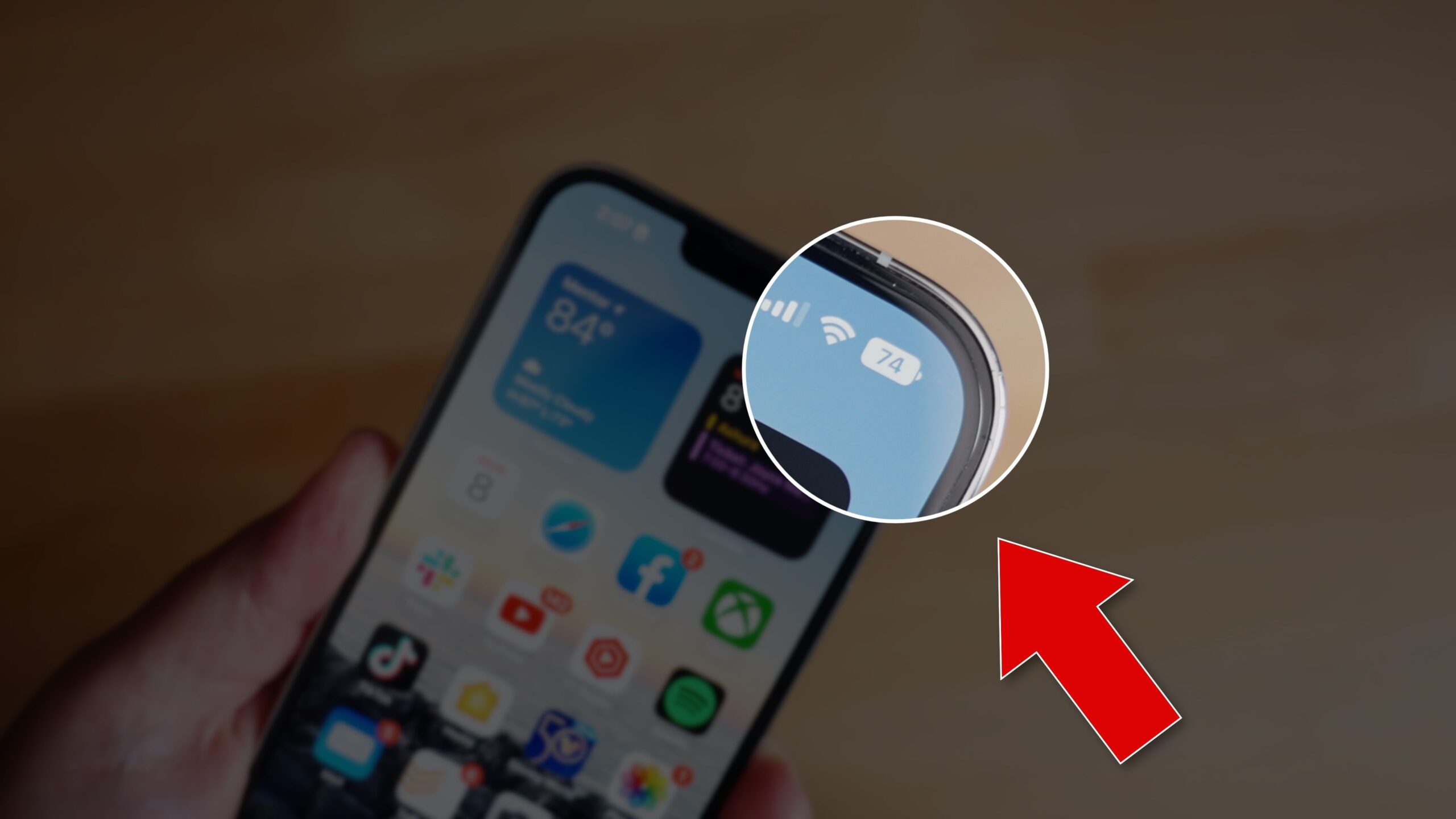
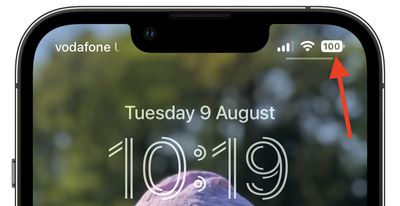
In iOS 15 and earlier, battery percent has not been present on iPhones that have ‌Face ID‌ because of the lack of space on either side of the notch that houses the TrueDepth camera hardware. The new design adds the specific battery level to the battery icon, providing a better idea of ​​battery status at a glance.

In Apple’s latest design, the white battery icon remains completely filled in as the battery level gradually depletes. When the semi-transparent percentage reaches 20% or lower, a fifth of the battery icon turns red and the rest of the icon becomes semi-transparent, while the percentage inverts to white.

Apple appears to have chosen this abrupt change in styling to ensure that the central percentage number remains legible as the battery level depletes – if a white bar depleted behind the number then it would be harder to make out at a glance, Apple’s UI designers likely concluded .

Some users disagree with this approach, while others have suggested their own alternative designs for a battery status indicator with percentage level.

Perhaps Apple didn’t anticipate that such a small design change would be so controversial, or that some users have a very clear idea of ​​how they want their iPhone’s battery level to be represented.

For some, it’s simply a case of calling out what they consider to be poorly thought-out UI design. For others, it plays into low-battery anxiety, a major trigger of nomophobia. Either way, it’s become a surprisingly heated topic, while it’s easy to forget that the percentage display is optional (caveat: It’s enforced when in Low Power Mode.)

Of course, the battery level indicator design isn’t set in stone, and Apple could well change it in a later beta of iOS 16 or the final release. Whether you’re testing the latest public beta or not, what do you think about the way it’s been implemented? Let us know in the comments.

.

Categories
Technology

The Samsung Z Fold 4 still doesn’t give a good reason to buy a foldable phone

Folding phones seem, intuitively, like a great idea. Phones are good! Tablets are good! Put them both together, fold it in half, and presto: you’ve made the best of both worlds. Credit to Samsung, too, for willingly subjecting itself to all the growing pains of figuring out how to make a good foldable phone. Last year’s Galaxy Z Fold 3 was a good foldable, and the new Z Fold 4 looks to be even better, if ever so slightly. (I have lots of thoughts about the new era of flip phones, like the Z Flip 4, but we’ll save those for another day.)

What Samsung hasn’t done — what no one has done yet, really — is make the case for why you’d actually want a foldable phone. And until it can explain why it’s worth all the extra cost and tradeoffs, I’m having a hard time figuring out why you’d be willing to give up the phone you know and love to get one.

What Samsung needs to do with the Galaxy Fold (and the rest of the industry will eventually need to do with their own foldables) is convincing people that it’s worth buying a phone that’s more expensive, more fragile, and takes up more room in your pocket .

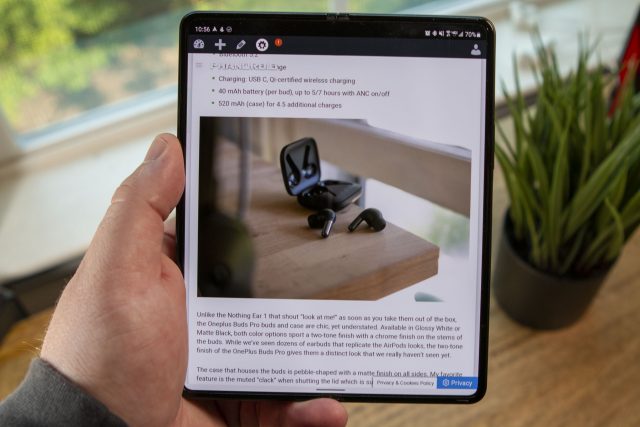
The Z Fold 4 is a big, big phone.
Photo by Allison Johnson/The Verge

Right now, the worst thing about foldables is that they force you to make significant sacrifices on the most important device you own: your smartphone. The new Fold 4 is a little shorter, about an ounce heavier, and about twice as thick as the Galaxy S22 Ultra. It’s also $600 more expensive. The Ultra has a bigger battery, better camera specs, and a 6.8-inch screen that supports an S Pen. The Fold 4, when opened, is noticeably larger, but the candy bar phones still get plenty big. And Fold makes a lot of sacrifices for some more real estate.

It’s not even clear to me that Samsung knows why you should make all of those sacrifices. On its website, one of the first selling points the company offers is that you can prop up the screen on a table by opening it halfway for watching or taking videos hands-free. Here in reality, we call that a kickstand, and this is an awfully expensive one. In this mode, you’re also only using half the screen, which sort of defeats the whole purpose.

So far, multitasking seems to be the foldable’s one actual advantage. Open up your Galaxy Fold, and you can run two apps side by side or even three or four on the screen at once! This, I agree, is a delightful thing. Being able to use my browser and my notes app side by side or see my calendar and my email together is much better than constantly swiping between two full-screen apps. And seeing two pages at a time in the Kindle app is the best. And you know what? Big screens are just good — good for games, good for reading, good for watching Netflix.

But these aren’t just arguments for foldables; they’re arguments for tablets. And so far, the arguments for Android tablets don’t seem to be convincing many users. While Android has gotten better as a large-screen operating system, and the Fold 4’s software being based on Android 12L is a good sign, too many apps that are “optimized” for foldables are actually just sticking a giant sidebar onto one side, which doesn’t accomplish much. Others just streeeetch everything to fit the larger screen. Don’t even get me started on how the vast majority of apps deal with Microsoft’s approach of two separate screens attached with a hinge.

The Z Fold 4 wrangles Android pretty well, but it’s still mostly just a big phone screen.
Photo by Allison Johnson/The Verge

Samsung has done an admirable job of wrangling all of Android’s weirdness onto the Fold’s screen, and in general, it’s not that the Fold doesn’t work; it’s that there’s nothing about the Fold that is dramatically better than the phone or tablet you might already be carrying around. And shoving them into a single device actually makes them both a little worse.

Over the years, I have been taken in by a number of attempts to make a device that can be and do everything. There were the modular devices, such as Google’s Project Ara and the Asus PadFone. There were the extensible phones from Essential and Motorola and others. In every case, they ended up being mediocre versions of everything that somehow added up to less than the sum of their parts. Right now, foldables are stuck in the same place: big, unwieldy, expensive phones that unfurl into small tablets that die — both in terms of battery life and durability — too quickly.

The other approach to the many-screened future is to try and build the best version of every device, let users choose which they want to use at any given time, and make sure their software, settings, and data flow seamlessly around the ecosystem. This is, roughly, the Apple approach: it will happily sell you a Mac, an iPad, and an iPhone based on the idea that they’re all for different things and then use iCloud and the App Store to make everything work across those devices . It might end up more expensive — though you can buy an iPhone 13 and an iPad Mini for less than the Fold 4 — but it comes with fewer tradeoffs.

Still, I say all this and yet can’t help myself: I want the tweener devices to work. I want a touchscreen Mac, and I want a foldable phone that is actually both a great phone and a great tablet. It would mean fewer things to charge, fewer things to update, and fewer things to carry around. But I’m not going to downgrade my phone just to get a half-decent tablet attached, and that still feels like the state of the foldable.

Categories
Technology

Tower of Fantasy, a New Free-to-Play Shared Open-World MMORPG, Is Now Available

Tower of Fantasy is a light sci-fi shared open-world MMORPG with cross-play that is now available from the official site, Apple’s App Store, and the Google Play Store. This new action-adventure MMORPG send players to the alien world of Aida and will task them with saving what is left of humankind. But fret not, as Tower of Fantasy includes a deep combat system, the unique Simulacrum system that lets players embody heroes of the past, and a world filled to the brim with treasures waiting to be discovered.

Tower of Fantasy has also announced that four million global pre-registrations have been reached, and more rewards have been added for players to enjoy in-game.

In anticipation of the launch of Tower of Fantasy, we wanted to share six reasons why this is an adventure you and your friends won’t want to miss. Also, players can get 59 free draws max, 1 SSR selector, 1 SSR relic, and 10 limited cosmetics. For more details, please check out the official event page.

A Shared Open-World MMORPG Set in the Far Future

A lack of resources and energy have forced humankind to leave Earth, Aida – a lush and habitable alien world – was decided as the best place to build a new life. After they arrived, the comet Mara was spotted and led to humanity discovering an unknown but powerful energy called Omnium in it. They built Omnium Tower to capture the comet, but Omnium’s radiation led to a catastrophic disaster that changed everything forever. Now, it’s up to you and your friends to save humanity from destruction.

Bring Your Friends With You On This Grand Adventure

Tower of Fantasy can be played alone, but it becomes an even more grand adventure when you bring your friends along for the ride. Gather your crew to take on Tower of Fantasy’s greatest challenges and to show off your characters and the gear and weapons you have acquired throughout your respective journeys.

Freeform Character Customization Lets You Create the Avatar of Your Dreams

One of the aspects of living in a virtual world is creating a character you can call your own. Tower of Fantasy has taken this notion to heart and is giving players an expansive set of tools to craft the Wanderer of their dreams by customizing outfits, body type, skin color, eye shadow and color, and so much more. Tower of Fantasy is a free-to-play adventure that will continue to get updates and expansions, and you’ll be able to experience all it has to offer with a Wanderer that shows the world who you truly are.

A Deep and Flexible Combat System

Tower of Fantasy’s combat will be familiar to anyone who has played a hack-and-slash RPG in the past, but it has many unique aspects to it that will make it feel fresh, exciting, and rewarding. In combat, you will have access to three different weapons, and using one will charge up the other two. When the charge on the other weapons has reached a certain level, you can unleash a devastating discharge attack that can turn the tide of battle. Furthermore, if you can pull off a perfectly timed dodge, you will activate Phantasia, an ability that will not only charge your weapons, but one that will slow the enemies near you.

Gain the Weapons and Abilities of Heroes With the Simulacrum System

One of the most important aspects of the combat system and Tower of Fantasy as a whole is the Simulacrum system. These Simulacrum are described as ancient heroes preserved as AI and can be obtained through the gameplay and by unlocking them using real-world money. These Simulacrum can be equipped by the player and doing so will give them access to their special weapon and abilities. You can also choose to look like them if you want, but those who love their own Wanderer can turn that function off. This system allows you to equip different Simulacrum to your different weapon slots to suit your playstyle, whether that be long-range, close combat, magic, or a mix of all of them.

Explore Tower of Fantasy’s Alien World with Motorcycles, Robotic Horses, Mechs, Jetpacks, and More

Exploration is as big a part of Tower of Fantasy as combat is, and players will have the ability to discover many different areas in the world of Aida. To help with that mission, players will gain access to different mounts like motorcycles, robotic horses, mechs, and more. However, that’s not all, as Relics will also play a huge part in the game and will open up parts of the world that were previously inaccessible. For example, the Jetpack Relic will let you fly higher into the air than before and reach treasures that were just out of reach. The Missile Barrage Relic can break up rock formations to open up caves, and it has the benefit of also being a tool to use in battle.

Publisher Level Infinite and developer Hotta Studio have officially released Tower of Fantasy and players were able to preload the game and enjoy character customization ahead of the opening of the servers.

Categories
Technology

Resident Evil Humble Bundles is a great deal with 11 games for $30

Humble’s latest bundle is probably the cheapest way to experience the Resident Evil saga. Just $30 gets you 11 games redeemable on Steam — and a coupon for Resident Evil Village — plus a chance to donate to a good cause. Capcom and Humble’s Resident Evil Decades of Horror game bundle is now live and includes some of the survival horror series’ best (and resident Evil 6).

The Resident Evil franchise has gotten truly enormous, sprawling across multiple titles and spinoffs. For players who just want a taste, and only have a dollar, there’s a three-item bundle featuring the resident Evil remake, Resident Evil Revelationsand Resident Evil Revelations 2 Episode 1. Humble also has a seven-item bundle for $10, which includes the aforementioned games as well as Resident Evil 0, Resident Evil 5 Gold Edition, resident Evil 6and Resident Evil Revelations 2: Deluxe Edition.

Those who pay $30 or more get the above games, as well as the Resident Evil 2 and 3 remakes and Resident Evil 7 biohazard. There’s also a 50% off coupon for Resident Evil Village, the eighth game in the mainline series, in the Humble Store. (That’s a separate $30 purchase.) This tier is a good way to catch up on the franchise’s greatest hits. 7 and Village are both very solid survival horror games, while Resident Evil 2 and 3 are more faithful third-person tributes that manage to capture the spirit of the original classics.

All the games in the Resident Evil Decades of Horror game bundle are for Windows PC.

Humble is partnering with Direct Relief for its latest cost-effective bundle full of gaming goodies. Direct Relief is a nonprofit organization that provides medical relief and health services to those who could not access them otherwise.

Categories
Technology

Meta’s Portal smart displays gain support for Duet Display and get a new companion app for Macs

As the corporate world embraces its work-from-home future, Meta is doubling down on turning its line of smart displays into ultimate video calling devices. This week, the company announced its $349 Portal Plus (second-gen) and $199 Portal Go can now do extra work as a second display for your Mac or PC thanks to new support for the Duet Display app.

Meta is also launching the Meta Portal Companion app for Mac so you can share your computer screen while on a video call and more easily access controls to raise your hand, mute yourself, and adjust the volume.

The 10-inch Portal Go and the 15-inch Portal Plus are the newest — and likely last — additions to the company’s foray into consumer smart displays. Meta has reportedly decided it won’t be making any more for consumers and is shifting its focus to using Portals in the business world, which, in today’s landscape, translates to support for work from home as well.

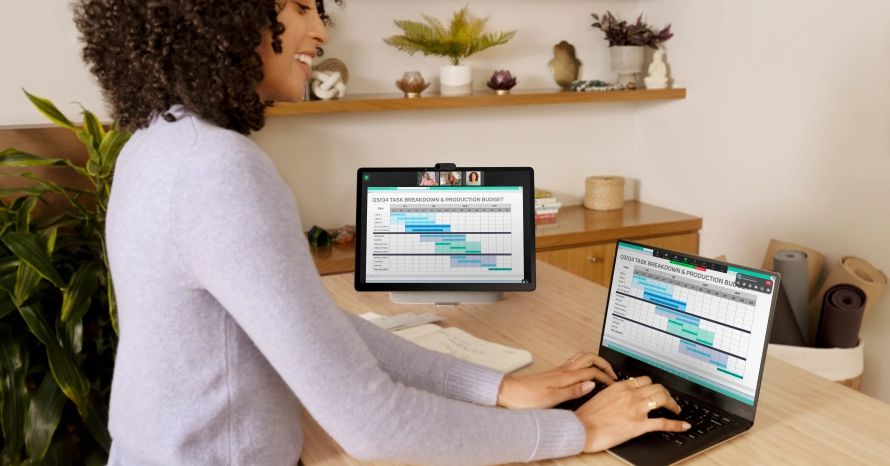
Duet Display is a third-party app that turns an Android tablet or iPad into a second display for a PC or Mac for a more modest-sized alternative to adding an extra monitor to your desk. Now, it will work with Meta’s Portal Go and Portal Plus, allowing you to drag open windows to your Portal and multitask to your heart’s content.

The new macOS Meta Portal Companion app connects the Portal to your Mac, showing video calling controls on the computer as well as the smart display and making it easy to share your computer screen during a call.

New app support turns a Portal into a second screen.
Image: Goal

Both the Go and the Plus are still available to buy (and are currently $50 off at Amazon), and Meta has said it will continue to support them. I tested the Go, which is the smaller and more portable of the two thanks to a built-in battery, and found it to be an excellent dedicated video calling gadget — if a lackluster smart display. This added functionality could make it a good second or third (or, okay, fourth) screen in your home office, especially if you do a lot of video calling.

Both Portals work with almost every video calling system available — Zoom, Cisco’s Webex, BlueJeans, GoTo Meeting, Workplace, and Microsoft Teams — and, of course, Facebook’s own Messenger calling. They also sync with Outlook or Google calendars for quick access to meetings and support Bluetooth for adding a keyboard and headset.

Duet Display is available now in the Meta app store for the Portal Plus and Go in the US, the UK, Canada, France, Spain, and Italy (and only for the Plus in Australia and New Zealand). You also need to download the app to the computer you want to link with the Portal by visiting duetdisplay.com. The Meta Portal Companion app is a free download at portal.facebook.com/companion for the US and UK only.

Categories
Technology

Read Along by Google is now available as a web application

Google used to sell a Frozen II-themed Google Home Mini that came bundled with a few bedtime stories that you could activate via a kid and family-friendly service called ‘Read Along’. Truly, this was available for all Home speakers, but having the brand partnership with Disney helped the company sell more units, naturally. Still, it came in an ice blue color and featured Anna and Elsa on the packaging.

Sadly, back in February of last year, Disney pulled its books off of the Read Along service, likely to do to a failed license renewal, and Frozen II, Peter Pan, Mulan, Moana, Toy Story 3 and so many other audible titles were no longer able to be used to lull your little ones to sleep.

We received some good news today though, in the form of a Google Keyword blog where the company revealed that it has now made ‘Read Along’ available in beta as a web application that can be accessed by anyone on their Chromebooks or desktops.

Google states that over the past 3 years, more than 30 million kids have learned to read more than 120 million stories on Read Along, and that the assistance and correctional tools and encouragement for young readers being built in have contributed to helping them read independently.

These same tools are now available by visiting the brand new Read Along Website. Don’t forget to turn the site into an icon on your desktop or ChromeOS device so you can get to it with one click! Additionally, you can still install the Google Play version of the app below using the Play Store button.

With the web version of Read Along, parents can let their kids read on larger screens with a more appropriate visual layout than the app would have on tablets or tablet-style Chromebooks. Speech recognition still occurs in the browser, and your child’s voice data remains private as it’s not sent to any Google servers. My son loved the app, and now that it’s available as a PWA, I’m sure going to sit him in front of it and see what he thinks later this week.

Let me know in the comments if your kids have enjoyed Read Along, or if you were even aware it existed. Sadly, the Disney stories are still unavailable, and to be honest, I doubt they will ever return to the service, but there are still a load of stories that can be read or read out loud even without the Mouse House contributing to the mix.

Read Along by Google

Categories
Technology

VALORANT Patch 5.03: Full notes and updates

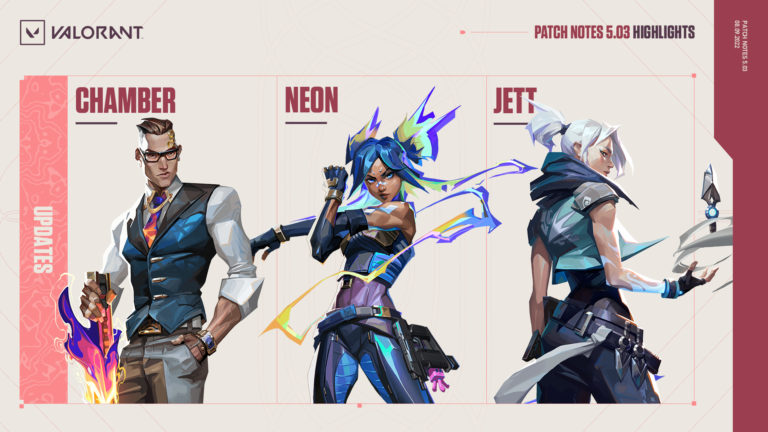
a new VALORANT patch is set to hit the live servers today. Patch 5.03 comes after a programmed delay of updates as the developers needed more time to update the game engine and work on balancing agents like Chamber, Neon, and Jett.

VALORANT‘s engine has been updated to Unreal Engine 4.26, which will “improve the tool set” available for the developers in “many ways.” This change will likely go unnoticed by most players, but Riot Games has warned beforehand that it is aware of some issues with the game’s UI. The devs are working on fixing it as quickly as possible, but players may experience some “funkiness” in the game and in the main menu.

As for agent changes, the most noticeable balance update is how Chamber will work moving forward. The French sentinel has been substantially nerfed because his strengths have started to overshadow his weaknesses, according to Riot. The developers most notably increased the base cooldown and recall cooldown of the Rendevouz ability, reduced the slow of the Trademark ability, reduced the slow of his Ultimate Tour De Force, and increased the Ultimate Points required to activate Tour de Force.

In addition to the Chamber nerfs, Riot has also tweaked the ultimates of Neon and Jett, while fixing bugs that were happening with Jett, Reyna, and Killjoy. As usual, the developers shipped some general qualify of life updates in this latest patch as well.

Here are the full notes for VALORANT Patch 5.03.

General updates

  • Engine update to Unreal Engine 4.26.
    • This update improves the toolset available to our developers in many ways, however, this change will likely go unnoticed by you, as the goal of any Engine update is to happen under the radar.
    • There are some known issues this time around though, mostly the UI is misbehaving. We’re fixing these as quickly as we can, but expect some funkiness in the game and in the Main Menu. If anything interrupts your gameplay, please submit a bug report.
  • Agent Browser visual design refresh
    • Just thought we should leverage some of the cool Agent art and lean more into our VALORANT style.

agent updates

Chamber

As players in both ranked and pro play have mastered Chamber, his strengths have started to overshadow his weaknesses, making the counterplay to Rendezvous and his arsenal not as effective as Riot hoped. Chamber’s overall strength from him has also felt outsized, and the devs believe that they can reduce the complete power of his kit while still keeping him competitive with the rest of the roster.

Rendezvous (E)

  • Base cooldown increased 20 seconds > 30 seconds
  • Recall cooldown increased 20 seconds > 30 seconds
  • Cooldown set to 45 seconds whenever a Rendezvous anchor is destroyed
  • Diameter size of the “ring” Chamber can stand that allows him to activate Rendezvous decreased 21m > 15m
    • Chamber’s Rendezvous is intended to be powerful at holding space, but the generous radius allowed him to take that space with more aggression than intended. This change should require Chamber to exert more effort to access off-angles.
    • We hope that a harsher punishment for destroyed Rendezvous anchors and the reduced radius will demand Chamber mains to be more careful in their use. This change also brings the counterplay of Chamber’s destructible objects more in line with the behavior of other destructible objects in the game.

Trademark (C)

  • Slow Duration decreased 9.5 > six seconds

Tour de Force (X)

  • Ultimate points required increased seven > eight
  • Slow duration decreased 9.5 > six seconds

Headhunter (Q)

  • Bullet cost increased 100 > 150
    • It’s important that Headhunter is a powerful sidearm for Chamber but at its current price point Chamber doesn’t have to engage in making difficult economic decisions as meaningfully as other Agents. This should most noticeably impact Chamber’s decision-making on pistol rounds and save rounds. The ultimate point change to Tour De Force is also working towards this goal.

Ability regional damage breakup

The devs are updating the ultimates for the following Agent so that they follow similar regional damage rules to our weapons—where hitting the head and legs of an enemy applies different damage multipliers. The intent is to reward precision and create intuitive consistency across damage in VALORANT.

For Neon specifically, it also gives the devs more tuning levers for balancing her across different skill levels. This change should also add depth to the mastery needed when tracking while sprinting that her ult demands.

Neon

Overdrive(X)

⦁ Damage per shot reduced 22 > 18
⦁ Killzone increased 15m > 20m
⦁ Leg shot multiplier reduced 1.0 > 0.85
⦁ Headshot multiplier increased one > three

Chamber

Tour de Force (X)

⦁ Leg shot multiplier reduced 1.0 > 0.85

Jett

Bladestorm (X)

⦁ Leg shot multiplier reduced 1.0 > 0.85

Gameplay system updates

  • Added ability to change “Ghost” keybind outside of Custom Games
    • This option is listed under Settings >> Controls >> Actions

bugs

Agents

⦁ Fixed an issue with Jett’s Tailwind where switching weapons in the middle of the dash would cause the weapon pull-out animation to take longer than desired.

Gameplay systems

⦁ Fixed a bug where some Reyna/Killjoy HUD elements were still visible after enabling Hide User Interface.
⦁ Fixed a bug where defuse animation wouldn’t consistently play if the orb is tapped in rapid succession.

Known issue

⦁ Changing crosshair opacity settings in-game causes crosshair preview visual to flicker
⦁ Spike Announcements UI displaying incorrectly