Apple’s release of iOS 16 this fall won’t only introduce new features, but also bring back an old one. You’ll once again be able to check out your iPhone’s battery percentage in the status bar — from anywhere on your device.
After the release of the iPhone X, which introduced the notch — the black bar at the top of your device that houses a speaker and camera — there wasn’t enough screen real estate left to keep the battery percentage up there, so Apple nixed the feature from iOS.
Read more: The Fastest Way to Charge Your iPhone if You’re Low on Time
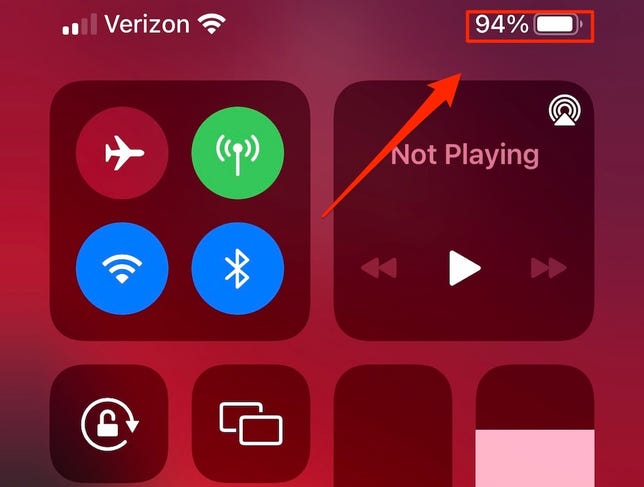
You can view the battery percentage in the Control Center.
Screenshot by Lisa Eadicicco/CNET
Sure, you can swipe down from the top right of your iPhone to view the exact percentage in the Control Center, but it just isn’t the same. You can’t glance at the battery percentage from within any apps or the home screen. And it’s nearly impossible to gauge the exact percentage from just the battery icon, which is not good if your iPhone is close to dying.
Thankfully, the latest developer beta (5th) and public beta (3rd) releases of iOS 16 reintroduces the battery percentage number back in the status bar, inside of the existing battery icon. Here’s what you need to know about the new feature.
And if you want to get your hands on iOS 16 right now, here’s how to download the third public beta, which features the new battery percentage feature. the fifth developer beta also has the feature, but we don’t quite recommend downloading itunless you’re an Apple developer.
How to get the battery percentage back in the status bar on iOS 16
To view your battery percentage in the status bar on iOS 16, all you need to do is be on the latest iOS 16 public beta (3rd) or developer beta (5th).
Once you update, you should see the percentage in the battery icon in the top-right corner of your screen — from anywhere on your iPhone. That way you can keep a close eye on when your iPhone is topped off or close to running out of battery, and when you should starting charging it.
Although the setting is turned on by default, you can go to Settings > Battery and toggle on the Battery Percentage option to make sure it works. When your device is charging, the battery icon will turn completely green, showing you the percentage, while being in Low Power Mode will turn the battery icon completely yellow, but again with the percentage inside.
If you toggle the Battery Percentage feature off, you’ll remove the numbers from the status bar and revert back to the old battery icon design.
Nelson Aguilar/CNET
Unfortunately, the battery percentage option is not available on all iPhone models — for now, it’s not on the iPhone XR, iPhone 11, iPhone 12 Mini and iPhone 13 Mini.
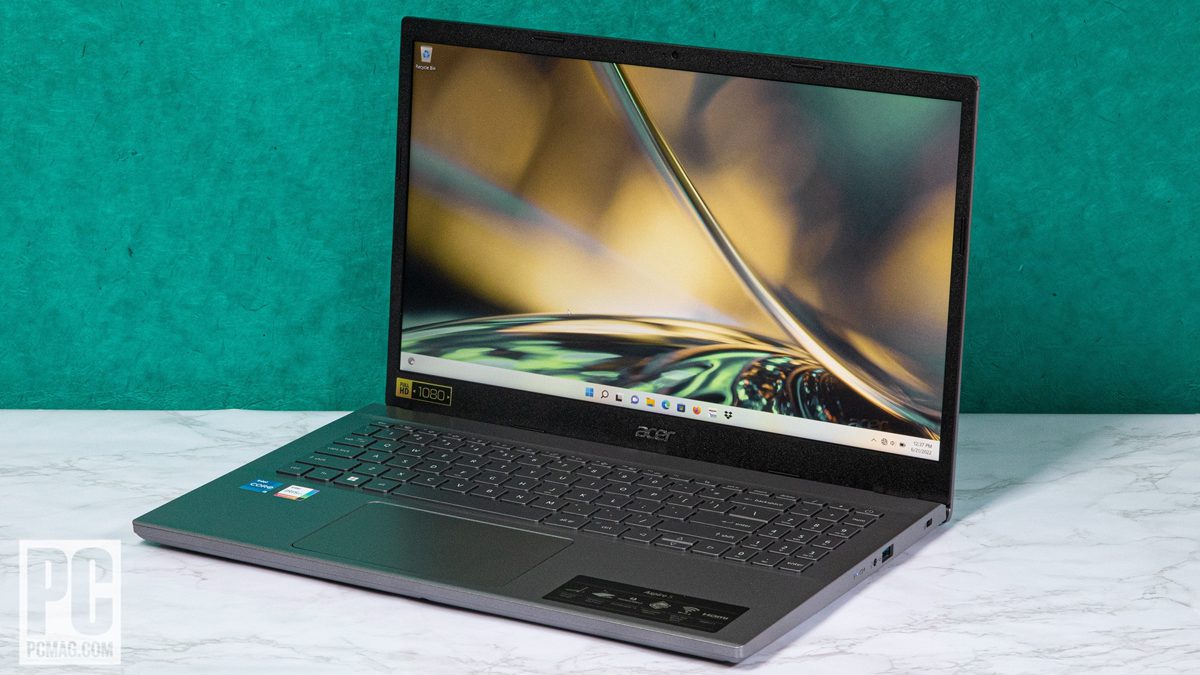
The Acer Aspire name has always been a bit of smart branding, since the series is positioned as a better-than-average pick among budget laptops—a notebook you can afford, but with the features and performance you aspire to. It hasn’t always hit the mark, but the company has managed to produce solid economy choices year after year. The latest Aspire 5 (starts at $369.99; $599.99 as tested) offers a 12th Generation Intel processor and reasonable RAM and storage. It delivers pretty good performance and battery life, though as you’d expect, some features are kept basic for the sake of affordability.
The Design: Just the Fundamentals
For 2022, the 15.6-inch Aspire 5 line starts at $369.99 with an 11th Gen Core i3 laptop processor and Windows 11 Home in S mode. Our $599.99 model A515-57-56UV features a Core i5-1235U chip (two Performance cores, eight Efficient cores, 12 threads) with Intel Iris Xe integrated graphics, 16GB of memory, and a 512GB solid-state drive, as well as a full HD (1,920-by-1,080-pixel) non-touch display. It’s built to offer just-good-enough levels of quality in all but a few choice areas, and that’s reflected in the design, from the materials used to the connections and components inside.
Measuring 0.7 by 14.3 by 9.4 inches and weighing 3.9 pounds, the Acer is far from featherweight, but it’s not too bulky to throw in a laptop bag or backpack. The Asus VivoBook 15 is a little trimmer at 0.78 by 14.1 by 9.1 inches and 3.75 pounds. The Aspire’s construction combines metal and plastic, with a uniform finish that makes it hard to tell where one ends and the other begins. The lid is covered in aluminum, but the rest of the chassis is fairly sturdy plastic. The laptop is large enough for a full-size keyboard with numeric keypad, though the latter has half-width keys.
The keyboard is backlit for visibility in dim rooms, and the tiled keys are reasonably comfortable to type on. The narrower keys of the keypad aren’t as comfortable, but any number pad is better than none if you’re doing a lot of data entry in spreadsheets. The touchpad is extra-wide, giving you a spacious surface for gesture controls as well as basic clicking and scrolling.
The Aspire 5 doesn’t skimp on connectivity, with plenty of ports that’ll free you from having to bring along a hub or adapter. On the laptop’s left side are three USB 3.2 ports (one Type-C and two Type-A), along with an HDMI video output and a compact Ethernet jack.
On the right, you’ll find a third USB-A port and a 3.5mm audio jack, plus a Kensington lock slot for physically securing the machine. Wi-Fi 6 handles your networking needs (assuming you don’t use the Ethernet port), and Bluetooth is available for wirelessly connecting headsets, keyboards, and mice.
No Feast for the Eyes and Ears
The built-in webcam is a bit pedestrian, meaning it’s your typical generic cam with 720p resolution and no face recognition support for Windows Hello logins. Nor is there a fingerprint reader, so you’ll be typing passwords the old-fashioned way.
The 1080p IPS screen is a little underwhelming in an era when higher-resolution and even 4K displays are offered on many laptops, but they’re not common at this price point, and full HD at least beats some ultra-cheap notebooks’ 1,366 by 768. The 15.6-inch size is adequate for everyday tasks like schoolwork, web browsing, and streaming videos and movies, but in this segment you shouldn’t expect dazzling brightness or better-than-bland colors. Touch screens are scarce in this price range, too.
The Aspire 5 is outfitted with a pair of downward-facing speakers. The clarity of the sound isn’t bad, but the speakers are surprisingly quiet. Watching YouTube videos online, I had to crank the volume to the maximum to get adequate audio.
Testing the 2022 Aspire 5: Performance in Line With Price
For this review, we compared the Aspire 5 to other budget-friendly systems, ranging from the affordable Asus VivoBook 15 to the AMD-powered Lenovo IdeaPad 3 14 and Intel-based Lenovo IdeaPad Flex 5i 14, two of the best models in this price range that we’ve seen in the last year. We also included the Dell Inspiron 15 3000 and the Gateway 15.6-inch Ultra Slim, two rock-bottom budget machines with less-capable hardware and limited specs.
Our primary productivity test is UL’s PCMark 10, which simulates routine workloads with such everyday staples as word processing, spreadsheet analysis, web browsing, and videoconferencing. We also use PCMark 10’s Full System Drive test to assess the access time and throughput of the system’s boot drive. Geekbench 5 also simulates popular apps like PDF rendering and speech recognition, with a little more emphasis on processing power.
Two other CPU tests that stress all available cores and threads are Maxon’s Cinebench, which uses that company’s Cinema 4D engine to render a complex scene, and the open-source HandBrake, which we time as it encodes a 12-minute clip of 4K video ( the Blender Foundation short film Tears of Steel) to 1080p resolution. Our final productivity test is workstation vendor Puget Systems’ PugetBench for Photoshop, which uses the Creative Cloud 22 version of Adobe’s popular image editor to measure a PC’s suitability for multimedia and digital content creation.
The Aspire 5’s up-to-date Intel Core i5 CPU is well suited to everyday applications, whether in the classroom, home, or office. Our test unit handily beat the bottom-feeding Inspiron and even topped the capable IdeaPad Flex 5i 14 in most tests.
We test PCs’ graphics capabilities with two game-like animations a piece from two benchmark suites. UL’s 3DMark provides the DirectX 12 tests Night Raid (less challenging, suited for laptops with integrated graphics) and Time Spy (more demanding, suited for gaming rigs with discrete GPUs). GFXBench is a cross-platform GPU performance test that uses both low-level routines like texturing and high-level image rendering. Its 1440p Aztec Ruins and 1080p Car Chase subtests are rendered off-screen to accommodate different display resolutions.
Because the Aspire 5 relies on integrated graphics instead of an AMD or Nvidia dedicated GPU, it’s naturally limited in graphics performance. It’s fine for office productivity, streaming media, and even light photo editing, but if you’re looking to play the latest games, you’ll have to look elsewhere. That said, its graphics are quicker than those of most economy models, often leading the pack in our tests.
Finally, we test laptops’ battery life by looping a locally stored 720p video at 50% screen brightness and 100% audio volume, with Wi-Fi and keyboard backlighting turned off, until the system quits. We also use a Datacolor SpyderX Elite monitor calibration sensor and software to measure the screen’s coverage of popular color gamuts or palettes and its brightness in nits (candelas per square meter).
With an unplugged runtime of 11 and a half hours, the Acer shows pretty good stamina for the price. Its screen, however, didn’t wow us—it’s a typical economy panel with limited color reproduction and barely adequate brightness, falling just short of the 300 nits we consider a baseline, let alone the 400 nits we prefer. To be honest, however, you won’t find much better in this class.
Verdict: A Budget Compromise, But Not a Bad One
Made to tread the line between budget and midrange laptops, the Acer Aspire 5 has a tightrope to walk, balancing an affordable price and capable features. The latest version handles that balance fairly well, though there are some rough spots that are hard to ignore, like the lackluster display and missing biometric and touch-screen features. But on the whole, it delivers what the Aspire line has always promised, a better-than-bare-bones laptop for consumers on tight budgets.
Whether you’re looking for performance that edges out other economy laptops or a port selection that lets you leave the hubs and dongles at home, the 2022 Aspire 5 hits those marks. It’s a strong option for a solid laptop that won’t cost you a fortune.
SpaceX has launched more than 3,000 of its internet satellites to low Earth orbit. illustration: GDAPHOTO (AP)
A researcher from Belgium created a $25 hacking tool that could glitch Starlink’s internet terminals, and he is reportedly going to make this tool available for others to copy. Lennert Wouters, a security researcher at KU Leuven, demonstrated how he was able to hack into Elon Musk’s satellite dishes at the Black Hat Security Conference being held this week in Las Vegas, Wired reported.
During his presentation at the conference on Wednesday, Wouters went through the hardware vulnerabilities that allowed him to access the Starlink satellite terminal and create his own custom code. “The widespread availability of Starlink User Terminals (UT) exposes them to hardware hackers and opens the door for an attacker to freely explore the network,” Wouters wrote in the description of Wednesday’s briefing.
SpaceX has launched a total of 3,009 satellites to low Earth orbit, building out a megaconstellation designed to beam down connectivity to even the most distant parts of the world. Starlink customers get a 19-inch wide Dishy McFlatface (a clever name bestowed upon the company’s satellite dish) to install on their homes, or even carry with them on the road.
G/O Media may get a commission
Save up to $300
Galaxy ZFold4
Today, Samsung unveiled everything new in its lineup of Galaxy products. Bundle a pair of Buds 2 Pro with either a Watch5 or Watch5 Pro with the Z Fold4 to receive $300 in Samsung credit.
In order to hack the Starlink dish, Wouters created a modchip, or a custom circuit board that can be attached to the satellite dish, according to Wired. The modchip was put together using off-the-shelf parts that cost about $25 in total, and Wouters has reportedly made the details of the modchip available for download on Github. The small device can be used to access McFlatface’s software, launching an attack that causes a glitch and opens up previously locked parts of the Starlink system. “Our attack results in an unfixable compromise of the Starlink [user terminal] and allows us to execute arbitrary code,” Wouters wrote. “The ability to obtain root access on the Starlink [user terminal] is a prerequisite to freely explore the Starlink network.”
Wouters has previously warned SpaceX of flaws in their system. SpaceX did respond by updating the system, but Wouters argues that the only sure way to avoid this attack is to create a new version of the main chip, Wired reported.
In the process of building out its Starlink constellation, SpaceX has made some enemies along the way that make it vulnerable to potential attacks. The use of Starlink satellites to provide connectivity in Ukraine has angered the Russian government, which allegedly launched a cyberattack against American satellite company Viasat in February. A military researcher from China has also expressed a desire to destroy Starlink satellites, publishing a paper in May on “soft and hard kill methods” to counteract any threat posed by the internet constellation.
And though it may seem like it, but Wouters doesn’t actually want to bring down Starlink, instead he hopes his research can serve as a warning to better fortify the satellite dishes.
If Apple’s AirPods Pro are the benchmark for measuring the quality of any new pair of wireless earbuds, then Google has them beat with its new Pixel Buds Pro. Not only do they sound better than Apple’s flagship earbuds, but they also cost $50 less, have better battery life , and come in cuter colors.
These earbuds work fine with iPhone devices, but their full suite of features shines through when you pair them with an Android device. For starters, they pair quickly. You can also easily connect them to multiple devices and swap between them, so if you have the buds in your ears while watching a movie on your laptop and a call comes through, you can just answer your phone without having to fiddle with anything. More importantly, these buds never fell out during my plodding runs, they feature wireless charging, and did I mention the cute egg-like case? What more could you need for podcasts and Beyoncé?
Form-Fitting Buds
The best part about the Pixel Buds Pro is how comfortably they fit in your ears. The medium-sized buds have a form-fitting peanut shape that sticks right in my medium-sized ear canals with ease, but never loses grip. I’ve tried to headbang these buggers out of my ears. I’ve taken them on 7-mile runs in the woods. I’ve showered with them in after said runs. They stay in there perfectly despite the lack of ear fins—they use the same standard silicone ear tips you’ll find on most earbuds, but the overall ergonomics just make them hug my ear holes.
The exterior of each bud comes in a few colors. My favorite is the tangerine orange (or what Google calls Coral), but my review unit was a discreet gray, which looks handsome but isn’t as fun. Frankly, part of the reason to get these instead of AirPods is the aesthetic difference between Apple’s monolithic white and Google’s playful pastels.
Google Pixel Buds Pro
Photography: Google
Using them is just as easy as using AirPods. The outside of each bud is touch-sensitive, with intuitive controls. Tap once to play or pause, twice to skip songs, and long-press to turn the active noise cancellation on or off, depending on whether you want to hear the world. I also like that swiping left or right adjusts the volume—oftentimes earbuds with touch sensors forgo volume controls for playback controls.
These buds are also plugged into Google Assistant, so you can shout “Hey Google” and demand it set timers or play a certain song. It’s useful for the few times I didn’t want to touch my phone, but it’s still a novelty in public, where you might not want to look like you’re yelling at yourself. To each their own, I guess.
Like the controls, the case the buds come in is smartly designed. It’s harder to put an earbud into the wrong slot, and I like how flat it lays on my wireless charging pad between listening sessions. It’s also just nice to hold. Like a little tick tock.
into the music
A single 11-mm dynamic driver inside each Pixel Buds Pro delivers a surprisingly robust soundstage, made possible in large part by Google’s excellent digital signal processing and noise canceling.
Music comes through with presence and personality, especially in the bass, which tends to have more punch and separation than what I’ve heard from prior Pixel Buds. While listening to my testing playlist, the midrange is the only place where the buds lose some definition. That’s to be expected when a single driver has to handle perfect bass response and shimmery highs (and does so well)—you tend to lose something, somewhere. Still, I’m glad Google’s engineers focused on the areas most people care about.
In 2016, cybersecurity pro Patrick Wardle heard a story that deeply disturbed him: cybercriminals were using malware to surreptitiously spy on people through their MacOS webcams and microphones. In one particularly unsettling case, a hacker had used a malware called “Fruitfly” to hijack the webcams of laptops with the goal of spying on children.
Wardle had experience spotting these kinds of programs. Prior to moving into the private sector, he had worked as a malware analyst at the National Security Agency, where he analyzed code used to target Defense Department computer systems. Experienced in playing digital defense, Wardle decided to do something about the spyware threat: he created OverSight, a MacOS tool that lets you monitor your webcam and mic for signs of malware manipulation. “It was really popular, everyone loved it,” he said of the tool, which he released for free via his IT non-profit Objective-See.
However, a couple years later, Wardle was analyzing some suspicious code for a client and came across something weird within a tool that had been downloaded onto the client’s own device. The tool was created by a major company but offered similar functionality to OverSight, including the ability to monitor a MacOS webcam and mic. Sifting through the program, Wardle found familiar code. Too familiar. His entire OverSight algorithm — including bugs that he had failed to remove — was contained within the other program. A developer had reverse-engineered his tool, stolen his work from it, and repurposed it for a different but nearly identical product.
“The analogy I like to use is plagiarism: someone has copied what you have written and they copied your spelling and grammar mistakes,” said Wardle. “I always say there are many ways to skin the proverbial cat but this was like blatant copyright [infringement].”
The developer was taken back. I have contacted the company immediately and attempted to alert them to the fact that a developer had hijacked his code from him. Unfortunately, Wardle said, it was not the last time he would find that a company had co-opted his work from him. Over the course of the next couple years, he would find evidence that two other major companies had employed his algorithm for their own products.
This week, Wardle gave a presentation on his experiences at Blackhat, the annual cybersecurity conference in Las Vegas. Alongside John Hopkins University professor Tom McGuire, Wardle demonstrated how reverse engineering — the process by which a program is taken apart and reconstructed — can reveal evidence of such theft.
The developer has declined to identify the companies that stole his code. This isn’t about revenge, he says. It’s about identifying a “systemic issue” affecting “the cybersecurity community,” he said. To do that, Wardle used this week’s talk to outline some lessons he had learned while attempting to notify companies about the theft issue.
“You reach out to these companies and say, ‘Hey, you guys, you basically stole from me. You reverse engineered my tool and reimplemented the algorithm — that’s legally very… uh, grey.’ In the EU, there is a directive that if you…[do that] that’s illegal. But also just the optics are bad. I run a non-profit. You’re essentially stealing from a non-profit and putting this in your commercial code and then profiting from it. Bad look,” he says, chuckling.
The Wardle responses got were often mixed. “It depends on the company,” he said. “Some are great: I get an email from the CEO admitting it and asking, ‘What can we fix?’ Awesome…[With] others, it’s a three-week internal investigation, and then they come back and tell you to take a hike because they don’t see any internal consistencies.” In those cases, Wardle has had to provide more evidence of what happened.
Why does this sort of thing even happen in the first place? Wardle says his views of him have shifted over time. “I went in thinking these were evil corporations out to squash the independent developer. But in every case, it was essentially a misguided or naive developer who had been tasked with [finding a way to] monitor the mic and the webcam…and then he or she would reverse engineer my tool and steal the algorithm…and then nobody in the corporation would ask, ‘Hey, where did you get this from?’”
In all three cases, after Wardle stated his case to a company, executives eventually admitted wrongdoing and offered to rectify the situation. To effectively make his case for him, however, Wardle often had to show them the evidence. He said he had to take their own, closed-source software and employ reverse-engineering to understand how their code worked and demonstrate its similarity to his own. To bolster his case, Wardle also teamed up with the non-profit Electronic Frontier Foundation (EFF), which offers pro-bono legal services to independent security researchers. “Having them on my side gave me a lot of credibility,” he said, suggesting that other developers also employ a similar strategy.
“I’m in a good position because I collaborated with EFF, I have a large audience in the community because I’ve been doing this for a long time,” said Wardle. “But, if this is happening to me, this is happening to other developers who might not have quite [the same standing]…and in those cases the companies might just tell them to take a hike. So what I’m really trying to do is talk about this and show that, ‘Hey this is not ok.’”
As to how widespread the practice of algorithm theft is, Wardle believes it’s quite prevalent. “I believe it’s a systemic issue because as soon as I started looking I didn’t just find one, I found several. Y ellos [the companies] were all completely unrelated.”
“One of the takeaways I’m trying to push is, if you’re a corporation, you really need to educate your employees or developers [not to steal]. If you do this, it puts your entire organization at legal risk. And, again, the optics look really bad,” he said.
The iconic Razer DeathAdder lineup has been updated to include best-in-class reliability in the Focus Pro 30K optical sensor, Razer HyperSpeed Wireless, and an ergonomically designed, ultralight next-generation frame that weighs just 63 grams.
Razer announced the new Razer DeathAdder V3 Pro, the latest version of Razer’s best-selling line of DeathAdder mice. Featuring the latest in Razer’s industry-leading mouse technologies, such as the Razer HyperSpeed Wireless Technology and the new Razer HyperPolying Technology, combined with a new ultra-lightweight ergonomic design, the Razer DeathAdder V2 Pro is the best for gamers to achieve maximum performance is an ally. at a competitive level in sports.
The iconic ergonomics have been refined
First released in 2006, with over 15 million mice shipped worldwide to date, the acclaimed DeathAdder is Razer’s most popular gaming mouse, trusted by world-class esports athletes. With DeathAdder V3 Pro, Victory takes on a whole new look. Comfort slots with fewer flares on the sides provide better grip and support for your hands, combined with an improved ergonomic shape for comfort, feel and light handling. Additionally, the scroll wheel, buttons and palm rest have been raised to improve accessibility. Sophisticated with feedback from top export professionals, the coveted ergonomic shape and minimalist aesthetic is now available in White (64g) and Black (63g).
“Since its launch, Razer has worked with esports professionals around the world to fine-tune and perfect the DeathAdder into a truly formidable competitive mouse,” said Flo Gutierrez, Director of Global Esports at Razer. “With the V3 Pro, we’ve created the most advanced, ultralight and ergonomic deathadder ever built, which lives up to its reputation for delivering crushing benefits.”
As familiar and reliable as ever, the DeathAdder V3 Pro is more than 25% lighter than its predecessor, boasts up to 90 hours of battery life, and is easily recharged via USB Type-C with Razer’s charging cable. goes. Speedflex is included in the box.
Best-in-class technologies, focused on pure performance
At the heart of the DeathAdder V3 Pro is the Razer Focus Pro 30K optical sensor with 99.8% resolution accuracy. This powerful new sensor is equipped with AI features like Smart Tracking, Motion Sync and Asymmetric Cut for maximum performance at the highest levels of gaming. The DeathAdder V3 Pro also comes equipped with Razer’s Gen-3 optical mouse switch, which delivers absolutely zero inadvertent double-clicks and no-delay delay. Lightning-fast and reliable, these optical switches are tested for up to 90 million clicks.
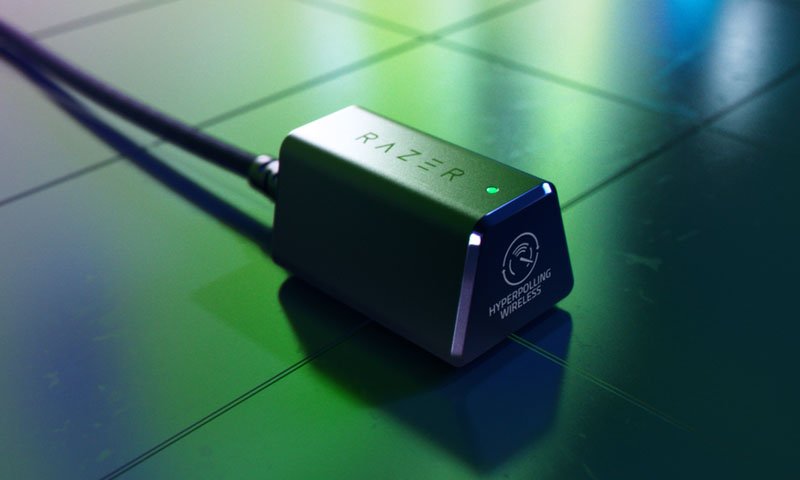
Equipped with HyperSpeed Wireless, Razer’s proprietary wireless technology that is 25% faster than other wireless technologies, the DeathAdder V3 Pro also supports Razer’s new HyperPolying wireless technology. Basically, the DeathAdder V3 Pro supports 1000Hz polling rate at 1ms polling interval. With the Razer HyperPolling Wireless Dongle, the DeathAdder V3 Pro polls wirelessly at polling intervals of 0.25ms, up to 4 times faster than before, up to four times faster than standard polling rates. By combining these 2 class-leading technologies, gamers will experience easier tracking, more consistent updates and lower wireless click latency, enabling them to outperform any rival in competitive gaming where every millisecond counts.
The Razer DeathAdder V3 Pro represents the latest in Razer’s gaming and mouse technologies, combining esports-perfect ergonomics with best-in-class sensors, Gen-3 optical mouse switches and industry-leading wireless technologies in one design. Ultralight, ready to start a new chapter in a mythological story.
hyperpoling wireless dongle
Released on July 22, the Razer HyperPolling Wireless Dongle is the first wireless mouse dongle capable of a true 4000 Hz wireless polling rate. Designed for ultra-responsive competitive gaming, gamers can experience a higher standard of wireless performance with an upgrade to the latest Razer. mice.
Installed on the desktop, for unobstructed wireless signals, the HyperPolling wireless dongle is capable of automatically changing polling rates for a more convenient competitive gaming experience. Compatible with the DeathAdder V3 Pro and Viper V2 Pro as well as future-friendly mice, the HyperPolying wireless dongle is managed through Razer Synapse for ease of use and setting performance-based gaming profiles.
About Razer Deathreader V3 Pro
• Enhanced ergonomic design with ultra-light weight for long hours of gaming
• Focus Pro 30K Optical Sensor
• Broad surface compatibility: sensor tracks on clear glass at least 2 mm thick
• Razer Optical Mouse Switch Gen-3 Tested for 90 Million Clicks
• Scalable up to 4000 Hz with HyperPoling wireless dongle, sold separately
• Five independently programmable buttons and an additional DPI button
• Up to 90 hours of battery life
• USB Type-C charging and SpeedFlex cable for fluid movement
• Weight: 63 grams for the Black model and 64 grams for the White model (without cable)
• Approximate Size: 68 mm / 2.67 in (Width) x 44 mm / 1.73 in (Height) x 128 mm / 5.00 in (Length)
availability
Death Adder V3 Pro
Razer.com and Authorized Reseller – August 11, 2022 Check here for more information.
hyperpoling wireless dongle
Razer.com, Razer Store in select markets, and Authorized Reseller. Check here for more information.
THQ Nordic has its showcase tomorrow morning and rumors started swirling earlier this week that an Alone In The Dark reboot was set to be revealed. This comes after THQ Nordic acquired the rights a few years ago.
Ahead of the expected announcement, information about the reboot, as well as the box art and also several screenshots were posted on Belgian retailer Smartoys, before being posted on Resetera.
It’s said that the game will take place in the 1920s in the deep south of the United States and pay homage to the classic game that originated in the 90s. You’ll be fighting monsters, solving puzzles and uncovering a truth. Similar to that of Resident Evil 2, you will play as two characters, Edward Carnby and Emily Hardwood, who will both have separate campaigns which overlap at certain points in the game.
The first screenshots look quite good and you can see them below.
The THQ Nordic Showcase takes place tomorrow morning at 5am AEST.
ALONE IN THE DARK LEAKED SCREENSHOTS AND FIRST INFO
Again, more properly announced later today.
I maybe teased it a bit too much in this tweet, but in fairness no one quite guessed it: https://t.co/ZJs5VSvMli
— AestheticGamer aka Dusk Golem (@AestheticGamer1) August 12, 2022
Few more misc details: -Two playable characters, Edward Carnby & Emily Hartwood. Both have separate campaigns with overlap. -Set in the deep south in the 1920s. -Survival-Horror, scarce supplies, backtracking, etc.
— AestheticGamer aka Dusk Golem (@AestheticGamer1) August 12, 2022
“Psychological horror and Southern Gothic meet in this revisit of the survival-horror classic Alone in the Dark This love letter to the cult game of the 90s will make you live a story as sinister as memorable through the eyes of one of the two protagonists. As Edward Carnby or Emily Hartwood, explore the various environments, fight monsters, solve puzzles and discover the terrible truth about Derceto’s mansion…”
“In the deep south of the United States during the 1920s, Emily Hartwood’s uncle disappeared. Accompanied by private detective Edward Carnby, she goes in search of him in the mansion of Derceto, a psychiatric asylum where she prowls… Something. You will meet strange occupiers, nightmarish kingdoms, dangerous monsters, and lift the veil on an evil conspiracy. At the confluence between reality, mystery and madness, the adventure that awaits you may undermine your certainties. Who are you going to trust, what are you going to believe and what will you do next??”
Explore Derceto’s mansion in this revisit of Alone in the Dark, a true love letter to the 90s horror classic.
Go back to the roots of psychological horror and experience an atmospheric adventure worthy of the game that founded the genre.
Immerse yourself in a world punctuated by sounds that will give you goosebumps against a backdrop of doom jazz as memorable as it is hypnotic.
?Feel the adrenaline as you desperately try to survive a world where reality is beginning to crumble, evil lurks in every shadow, and ammunition is scarce.
Experience this nightmare from the perspective of Emily Hartwood or Edward Carnby and unearth the dark secrets of a Gothic mansion.
Go beyond imagination through a complex psychological story written by cult screenwriter Mikael Hedberg, author of SOMA and Amnesia.
Google’s mid-range Pixel 6a ships with a 6.1-inch OLED display running at 60Hz, but there’s a method to unlock a 90Hz mode. Twitter user TheLunarixus has created a mod to unlock the 90Hz mode on the Pixel 6a, and they’re working on a custom ROM to make it easy for any Pixel 6a owner to unlock the improved refresh rate.
Verge Senior Editor Sean Hollister has tested the mod on his own Pixel 6a, and has confirmed it works. What we don’t know is whether the display panel truly supports 90Hz, or whether this is effectively overclocking it to get to the faster refresh rate. We’ve reached out to Google to comment on whether 90Hz is simply software locked, or if there are indeed display panel constraints.
Our Pixel 6a running at 90Hz.Screenshot by Sean Hollister / The Verge
The mod exists because many in the Android community noticed that the Samsung display in the Pixel 6a shares some similarities to the larger Pixel 6 display, and curiosity ensued. Google enables 90Hz on its 6.4-inch Pixel 6 panel, but the two displays aren’t exactly identical.
Right now the mod is look and involved. To get the 90Hz option unlocked on the Pixel 6a you have to enable debugging mode and OEM unlock in the settings (which you might not be able to do on a locked carrier handset), and then unlock the bootloader, manually flash an Android 13 beta with some checks disabled, and flash a modified vendor_boot image.
If that all went over your head or you’ve never heard of XDA Developers, it’s probably best to wait on a custom ROM. The result of all these hacks unlocks the Smooth Display option and the ability to force the max refresh rate in the developer settings to 90Hz.
Others in the Android community have also tested this mod and confirmed it’s legit. mishaal rahman noticed a green tint on his handset after applying the mod, and we’ve noticed the same (although some others don’t have the issue).
There are also some concerns around the long term effects on the Pixel 6a display. developer Kuba Wojciechowski warns that Samsung might not rate the Pixel 6a’s display at up to 90Hz, and that this is likely just overclocking. The Lunarixus says we won’t fully know until the mod is run on more than 100 phones.
“We are not pushing the panel any harder in terms of power, all this mod consists of is adding a new frequency mode to the driver with timings from the Pixel 6’s s6e3fc3 driver with modified height and width values,” says The Lunarixus. “No voltages etc were modded here, we use our own gamma table.”
Either way, The Lunarixus tell TheVerge they’re “working on a custom ROM with the ROM side changes to make this fully stable and ready for the public.” We’ll keep an eye on our own handset to see if there are any long term effects of unlocking the 90Hz mode, and here’s hoping Google or Samsung Display comment on why the 90Hz option isn’t officially available on the Pixel 6a.
WHEN WILL MARVEL’S Remastered Spider-Man Arrive on Steam?
Marvel’s Spider-Man Remastered will be available on Friday, August 12, 2022, at 4 PM BST, 8 AM PDT, 11 AM EDT, and 5 PM CEST.
The remastered edition of Marvel’s Spider-Man, which will be offered on both Steam and also the Epic Games Store, is currently available for pre-order for $59.99.
Unfortunately for UK players, PlayStation recently acknowledged that Marvel’s Spider-Man Remastered had been mispriced in the country. As a result, customers would have to withdraw their current pre-order on PC to obtain a full refund and pre-order the game anew to get the updated, lower pricing.
North American players don’t have a problem with the complicated process, and all pre-orders should remain in place without any problems. Even though Marvel’s Spider-Man has indeed been around for a while, the Remastered edition seeks to enhance what was already a great PS4 game.
All the new features that will be added to Steam, as well as the Epic Games Store later this week, have been listed below:
For those with hardware which supports them, ray-traced reflections are present throughout the game. Reflections also come in different quality levels, one of which is a new, better ray-traced option that provides even more city detail when fighting crime in Marvel’s New York while web-swinging.
Using dedicated Tensor Core AI units found only on GeForce RTX GPUs, NVIDIA DLSS (Deep Learning Super Sampling) increases frame rates without sacrificing image quality.
In addition to a variety of output resolutions, we now support ultrawide 21:9, panoramic 32:9, & NVIDIA Surround multi-monitor configurations. We have a game that allows you to show off your three monitors if you have them!
ALSO READ: Qatar WC to start a day earlier to give hosts opening game: Reports
As Google continues the great merger between its Duo and Meet video communications apps, the company today announced that it’s introducing new Apple SharePlay-like live-sharing features to Meet, making it easier for call-participants to engage with content together in real time.
It’s worth noting that Google already introduced some live-sharing features (eg watching YouTube videos together) to Duo back in February, and now it’s bringing them to Meet as the part of the merger.
The live-sharing feature will let users watch YouTube videos together, for example, and listen to songs on Spotify or play games such as Heads Up!, UNO! Mobile or Kahoot!
These new features will be available under a new Activities tab — which also hosts Q&A and polls options — and is accessible through the three-dot menu. From there, users can start a shared activity — for instance, if they want to listen to a Spotify track together, they would tap on the Spotify icon and Meet redirects them to the Spotify app where they can join a group session. Notably, the group session feature is only available for Spotify Premium customers, with support for two to five participants.
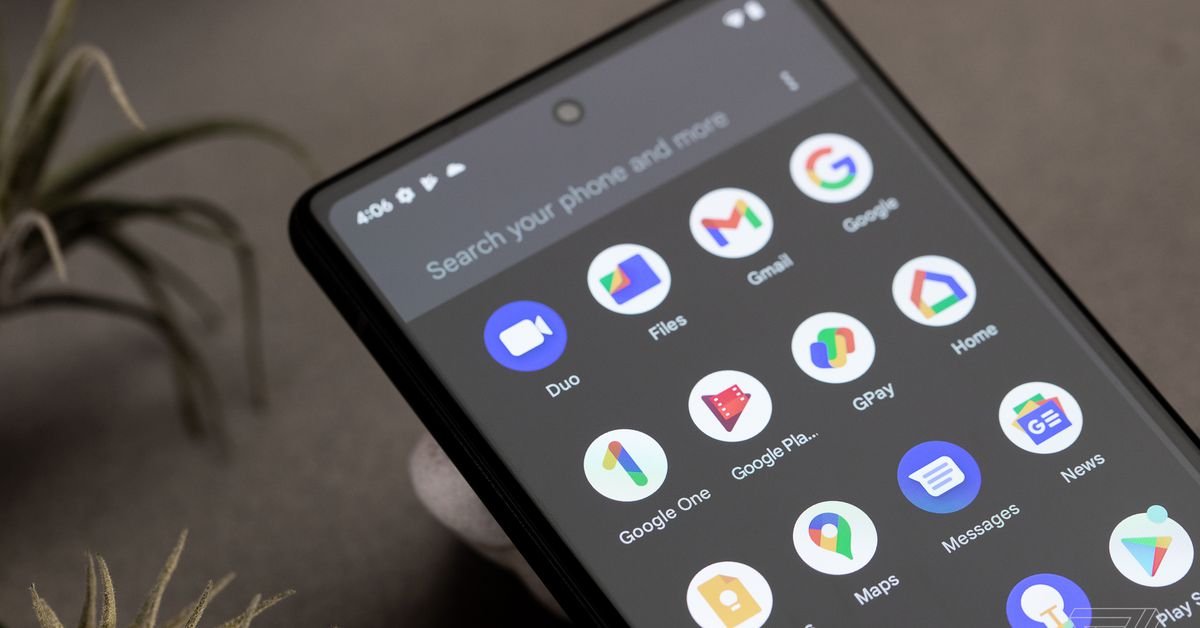
Last week, Google took the next step of merging both video calling apps by updating the icon for Duo and renaming it Google Meet. As for Google Meet, it will now be called “Google Meet (original),” with a green icon — yes, it’s all very confusing. The tech giant has been adding other new features to Meet, too, such as instant and schedule meeting options, in-meeting chat and virtual backgrounds.
While these latest updates work well for Meet calls across different platforms, consumers embedded in Apple’s ecosystem will already be familiar with this type of social content consumption through SharePlay, which works across a broader array of apps such as Apple TV+, TikTok, Disney+, Hulu , HBO Max, NBA, Twitch, TikTok, MasterClass, ESPN+, Paramount+, Pluto TV, Apple Fitness+, and Apple Music.











:format(webp):no_upscale()/cdn.vox-cdn.com/uploads/chorus_asset/file/23940274/Image_from_iOS.jpg)