Categories
Technology

AMD’s Ryzen/Radeon 7000 RDNA3 GPU codenames revealed: “Plum Bonito”, “Wheat Nas”, “Hotpink Bonefish” and “Pink Sardine”

AMD RDNA3 graphics get new codenames

AMD continues to pick colorful fishy codenames for their next-gen GPUs.

While AMD’s internal codenames have no marketing value whatsoever, they can be proven useful for tracking down the development of individual graphics architectures.

Yesterday’s leak revealed two new codenames for the most anticipated Navi 3X GPUs. This information follows the reveal of the AMD Phoenix APU codename. Therefore, we now know the codename of each RDNA3 GPU that should launch in the coming months.

The fact that flagship Navi 31 GPU features a codename “Plum Bonito” was not a surprise to anyone as we know this since May. But the alternative naming for Navi 32 and Navi 33 were something that we have not heard about yet. The 32 is supposedly called “Wheat Nas” while 33 is “Hotpink Bonefish”.

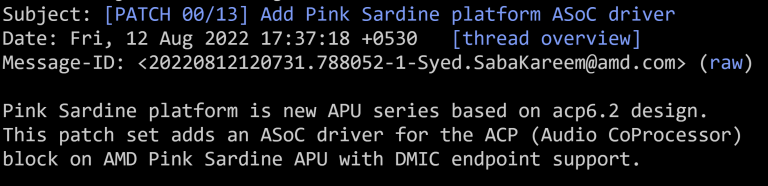
Furthermore, AMD Ryzen 7000 “Phoenix” APU code-name has now been confirmed as “Pink Sardine”. The Sardine is to follow Yellow Carp (Rembrandt) and Green Sardine (Cezanne).

AMD Pink Sardine APU, Source: Freedesktop

Interestingly, Pink Sardine carries the same “0x15E2” PCI Device ID as Raven Ridge, Renoir, Van Gogh and Yellow Carp. Instead of using different IDs for each of those APUs, AMD is distinguishing them by PCI revisions.

These codenames may appear in future leaks, which should help in quick identification of the discrete or integrated GPU. There is so far no trace of any other RDNA3 GPU, such as the next-gen console chips.

AMD RDNA Graphics Chips
VideoCardz.com Architecture GPU code name Product
GFX1200 NAVI 4X TBC RadeonRX8000
GFX1100 NAVI 31 Pretty Plum RadeonRX7900
GFX1101 NAVI 32 Wheat Nas RadeonRX7800/7700
GFX1102 NAVI 33 Hotpink Bonefish RadeonRX7600
GFX1103 iGPU Pink Sardine/Phoenix Ryzen 7000/Radeon 700M
GFX1040 iGPU Van Gogh Lite TBC
GFX1036 iGPU raphael Ryzen 7000/Radeon 700M
GFX1036 iGPU Yellow Carp/Rembrandt Ryzen 6000
GFX10XX iGPU Oberon Playstation 5
GFX1033 iGPU Airth/Van Gogh Steam Deck
GFX1033 NAVI 24 Beige Goby RadeonRX6500
GFX1032 NAVI 23 Dimgrey Cavefish RadeonRX6600
GFX1031 NAVI 22 Navy Flounder RadeonRX6700
GFX1030 NAVI 21 sienna cichlid RadeonRX6900/6800
GFX1020 iGPU burn xbox series
GFX1010 NAVI 10 RX5700/5600
GFX1011 NAVI 12 PRO 5600M (MAC)
GFX1012 NAVI 14 RX550

Source: Phoronix, Coelacant’s Dream, Angstronomics


Categories
Technology

CS:GO Source 2 gets first gameplay footage, but not from Valve

CS:GO Source 2 has been rumored for a while now, with fans of the biggest game on Steam expecting the online shooter to get upgraded imminently to the same engine powering Half-Life: Alyx. Well, CS:GO Source 2 is now a reality, and it even has gameplay footage. It just doesn’t come from Valve.

A team of game-makers and modders, represented by the long-standing Valve content creator channel Gabefollower, has rebuilt CS:GO in Source 2 from the ground up, using the community creation platform and spiritual successor to Garry’s Mod, S&box. The team claims that they have remade CS:GO without using a single line of code from the original game, and has created all the systems and mechanics from scratch. At the moment, the project is still in its infancy, with the first gameplay footage simply demonstrating a “vertical slice” which will be continually updated in the future. However, the team claims to have developed this within six months, suggesting that a full version may not take an enormous amount of time.

youtube thumbnail

In July, an exploit in Discord’s rich presence feature — which allows players to display game data on their profiles such as score, duration, and map — was used to determine that a new version of CS:GO was being played. Its map names used the suffix “s2”, which led some Valve content creators, such as YouTube’s Tyler McVicker, speculating that this signaled the game was being tested at the studio internally. Regardless of Valve’s own progress on CS:GO Source 2, the Gabefollower team says it will eventually release its own version as an open-source game. “Counter-Strike: Source 2 is a community driven, open-source project,” the team says. “We did not use a single line of code from CS:GO and eventually we’ll publish the full C# codebase on github.”

Recently, Steam stats revealed that CS:GO players have collectively been killing one another for the last 50,000 years. There is also a new CS:GO game mode whereby hitboxes are randomized from round to round. If you want to try that out, we recommend our guide to CS:GO ranks and also CS:GO console commands. Alternatively, you might want to try something entirely different, either from our list of the best FPS games, or one of the best multiplayer games, which, of course, also includes CS:GO.

Categories
Technology

SpaceX conducts the physics test of Super Heavy rocket booster

SpaceX tested the engine of the Super Heavy launch vehicle to fly the new Spacecraft. During the previous tests, which took place three months ago, the accelerator broke in.

Source: SpaceX.

SpaceX is starting the first study orbital flight of the Starship system, which consists of a big, heavy upper stage and spacecraft. The total height of this system is 120 meters. According to the available data, Elon Musks company plans to conduct a first orbital flight of the new ship from September 1, 2022 to March 1, 2023. The Super Heavy Booster 7 rocket and the Ship 24 will be used for this purpose.

The test runs were done by the Starbase site, South Texas. This time, only one of the 33 Raptor engines ran, but it ran for more than 20 seconds. The tests were aimed at investigating the engine’s quality. It’s assumed that during further testing SpaceX will gradually increase the number of engines that are launched simultaneously.

Remember that SpaceX plans on using a giant Starship system to fly to the Moon, Mars and more distant space objects. The US National Aeronautics and Space Administration (NASA) tested the possible possibility of the project, using the Starship design as the first lander to deliver astronauts to the lunar surface as part of an Artemis program. As for the next test flight, Booster 7 will splash down in Mexico at a moment, while Ship 24 will fly over the Earth before splashing down in the Pacific on Kauai’s Hawaiian island.

If you notice an error, choose it with the mouse and press the CTRL + ENTER.

Categories
Technology

Lumina takes multi-screen setups to the next level with in-desk display

Lumina Desk Title

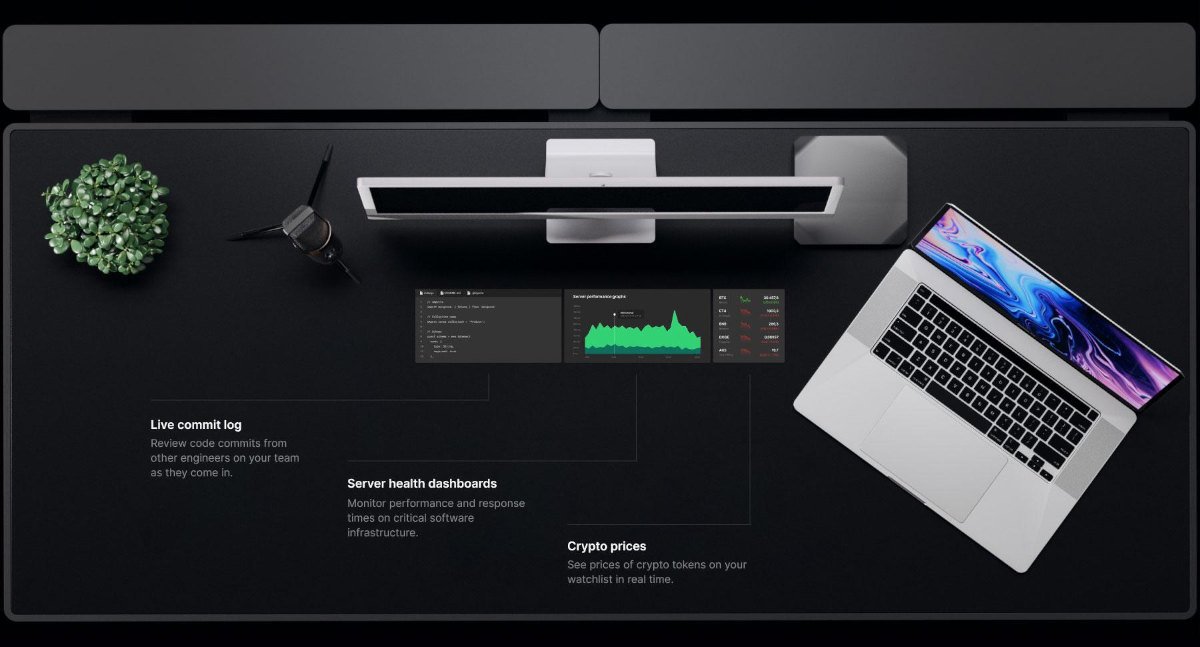
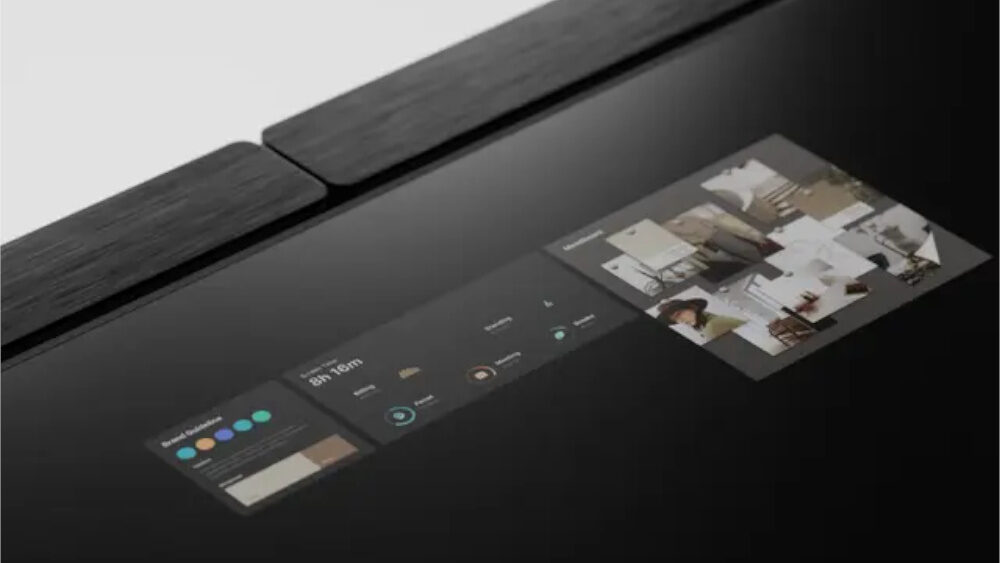
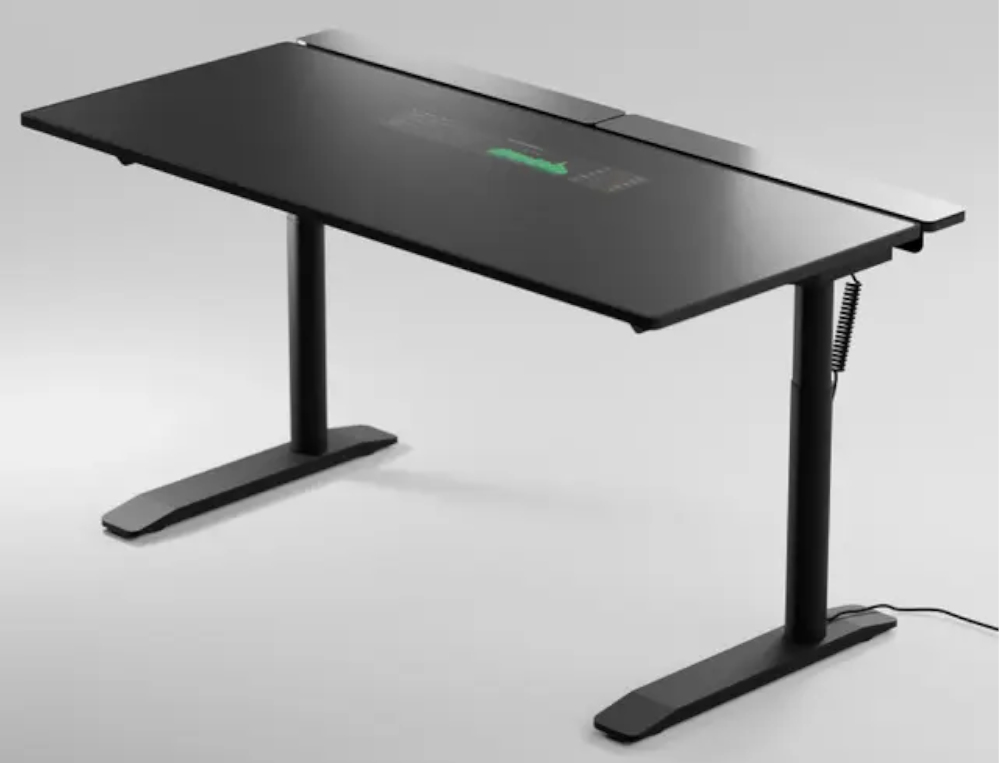
The Lumina Desk doesn’t seem out of the ordinary, akin to many high-end motorized desks you would see at a local retailer, however this one has a catch. The folks at Lumina decided to embed a 24in OLED display right into the surface of the desk.

Capable of functioning as a standalone or secondary display for your desktop or laptop, the company claims it to be “the ultimate workspace for productivity,” and it certainly looks the part. The display rests beneath a sleek black surface and is intended to nestle snuggly between your keyboard and monitor with ample room for a desktop, laptop and a beverage of choice, or anything else for that matter.

Lumina Desk Display

Onto specs, the 24in OLED display features a 60Hz refresh rate with a peak brightness of 1,200nits. No word on resolution and it is not touch capable either, but if the promo images are anything to go by, it does appear of outstanding quality. According to Lumina, the tech is “an always-on, ambient display that passively feeds you information,” the company has also built its own custom Lumina OS and a software development kit is available to developers. For now, the list of software applications includes Google Calendar, Instagram, Zoom, Robinhood, Twitter and more, including task lists and social feeds.

As for desk features, besides it being sit-stand capable with motorized control and supported memory functions, it measures 1500mm x 750mm and height can be adjusted anywhere between 750mm and 1200mm. Expect nothing but premium materials used here. The legs are made with a blend of anodized aluminum and stainless steel, while the dark surface table top is made of anti-glare reinforced glass.

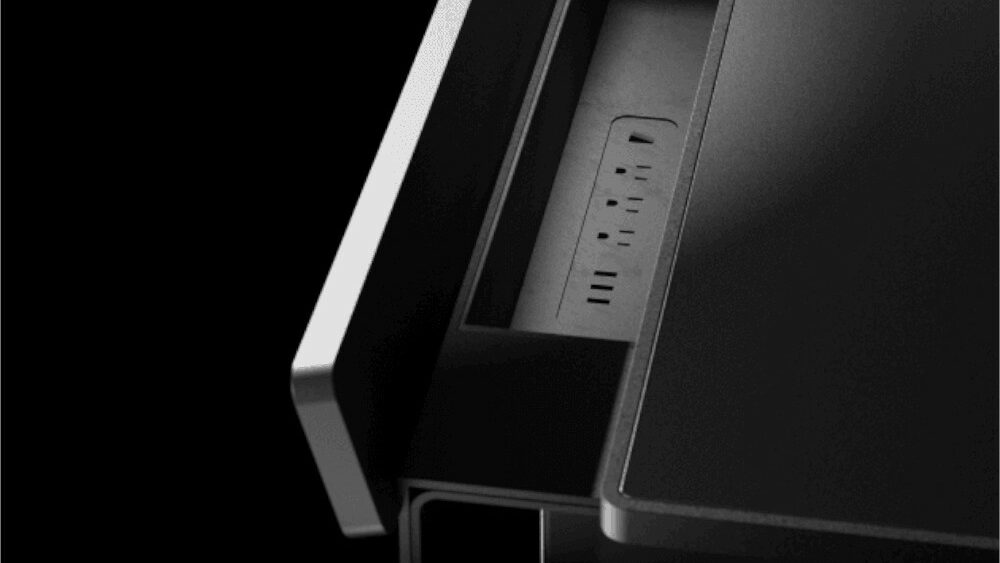
Additional features include two hidden compartments located at the far end, each capable of 826 cubic inches of storage space, making cable management a breeze, and has a total of six built-in power outlets and six USB-C ports. You can also wireless charge any peripherals with Qi-charging support, as the desk features dual 20in wireless charging pads alongside the display, capable of delivering 100W each.

Lumina’s not the first to experiment with imbedded desktop displays, back in the early 2000’s Microsoft brought promise of a future where our tables would resemble the sci-fi flicks we grew up watching – the Surface Table (remember that?) indulged our Blade Runner and Tron-era fantasies and featured a massive fully interactive display, complete with speakers and multi-touch control.

We also saw the release of the Surface Hub and Surface Hub 2S, although these interactive surface computing platforms were reserved for business, retail, and commerce sectors, and the technology is yet to transition to the consumer space in a meaningful way. Many others tried to bring their own versions to market, albeit to limited success.

The 16-year-old PixelSense table does have one up on the Lumina Desk, besides being full-touch capable, it could sense any stationary objects on top of the screen, so you wouldn’t have to worry about accidentally clicking on something. Truly ahead of its time.

No Pricing and availability just yet, though you can expect the Lumina Desk at some point in 2023. Pre-orders aren’t available, but for those interested you can sign up for up-to-date notifications as it moves closer to production. It certainly won’t come cheap, but that shouldn’t deter anyone who fantasizes over Mr Dillinger’s desk…

Categories
Technology

Marvel’s Spider-Man Remastered Mod Adds Black Symbiote Suit

Marvel’s Spider-Man Remastered has only just been released and somehow, there are already mods for the game. Marvel’s Spider-Man was one of the best games released during the PS4 era and it has only continued to grow in popularity due to the fact that it is now available on PC. Marvel’s Spider-Man Remastered brings Insomniac’s beloved Marvel adventure to the first non-PlayStation platform with all kinds of new bells and whistles to basically make it the definitive version. Not only is it playable on PC, but players can even play it on Steam Deck and it runs exceptionally well and helps elevate the hardware even further.

Perhaps one of the most exciting things about Marvel’s Spider-Man finally coming to PC is that it has mod support. YouTuber and modder jedizosh920 released a video of the new Marvel’s Spider-Man Remastered Black Symbiote Suit, which basically turns the main game’s “Advanced Suit” into the iconic black suit from the comics. The suit is one of the most famous Spider-Man suits out there not only because it looks cool, but because it also represents a darker side of Peter Parker and typically introduces Venom. The suit was introduced in the Secret Wars comic run and was featured prominently in Sam Raimi’s Spider man 3. The real deal is also expected to appear in Marvel’s Spider-Man 2 as Venom is confirmed to appear in the game. You can get the mod for Marvel’s Spider-Man Remastered on NexusMods right now for free.

It’s pretty impressive to see a mod like this released so quickly and is likely the first of many to come. With Marvel’s Spider-Man Remastered being one of the biggest games on Steam right now, it’s likely players will have a field day with mods in it. Marvel’s Spider-Man: Miles Morales is also confirmed to be coming to PC later this fall.

Marvel’s Spider-Man Remastered is available now on PC. Are you going to play around with any mods in the game? Let me know in the comments or hit me up on Twitter @Cade_Onder.

[H/T @VideoTech_ on Twitter]

.

Categories
Technology

Svelte VR Headsets Coming? | Hackaday

According to Standford and NVidia researchers, VR adoption is slowed by the bulky headsets required. They want to offer a slim solution. A SIGGRAPH paper earlier this year lays out their plan or you can watch the video below. There’s also a second video, also below, covers some technical questions and answers.

The traditional headset has a display right in front of your eyes. Special lenses can make them skinnier, but this new method provides displays that can be a few millimeters thick. The technology seems pretty intense and appears to create a hologram at different apparent places using a laser, a geometric phase lens, and a pupil-replicating waveguide.

The original method uses a beam splitter to divert light to the eye, but the novel part of this is the use of a waveguide instead of the beamsplitter. Of course, there are drawbacks, many of which you can mitigate using techniques discussed in the paper and video.

Of course, these are a long way from practical, although there are some small glasses that have giant ribbon cables that would get you some raised eyebrows. In fact, they look like comically raised eyebrows themselves.

If you want to build it yourself, you might be better off with something more traditional. We will admit, though, to being fascinated with the whole idea of ​​holograms.

Categories
Technology

Final Fantasy XIV Patch 6.2: Buried Memory Goes Live on 23 August

The wait for the second major post-launch update to Final Fantasy XIV: Endwalker,titled Patch 6.2: Buried Memory is almost upon us. In an early morning Letter from the Producer LIVE broadcast, Producer and Director of final fantasy XIV (and final fantasy xvi) Naoki “YoshiP” Yoshida confirmed that fans will be able to dive into the new content starting 23 August 2022. With the next wave of 8-player raids, a continuation of the new MSQ, continued improvements to older content AND the newly introduced Island Sanctuary, hopefully there will be enough to keep fans casual and hardcore alike, entertained for a while going forward.

Content introduced in Final Fantasy XIV Patch 6.2: Buried Memory includes:

Island Sanctuary: A new type of casual solo content which allows players to build and customize their own personal farm on a deserted island by gathering materials, building facilities, caring for creatures, and more, without the need for prior crafting or gathering experience.

New Main Scenario QuestsThe story continues in this latest chapter.

New Side Story Quests Experience the continuation of Tataru’s Grand Endeavor.

New Dungeon New challenges await in the Fell Court of Troia.

NewTrial Band together with other players in a new trial with Normal and Extreme difficulties.


Latest Final Fantasy XIV Patch 6.2 Screenshots


New 8-Player Raid Pandæmonium: Abyssos will be available in both Normal and Savage difficulties to challenge the most seasoned players. The Savage difficulty raid is planned for release one week following the launch of Patch 6.2.

New Unreal Trial Battle against Sephirot in Containment Bay S1T7 (Unreal).

PvP Updates PvP Series 2 and Crystalline Conflict Season 3 will begin with the release of Patch 6.2. Hidden Gorge will also summarize, along with adjustments to PvP actions and the Crystalline Conflict ranked matching system.

Continued Improvements to the Main Scenario: These include

  • The Duty Support feature will be expanded to include main scenario dungeons from the 2.x series to 3.0 (Snowcloak, The Keeper of the Lake, Sohm Al, The Aery and The Vault).
  • The Steps of Faith trial will be reworked into a solo quest battle.
  • The Thornmarch trial will be revamped.

Miscellaneous Updates Additional content including, updates to adventurer plates and portraits, glamor dresser capacity expansion from 400 to 800 slots, and more.

and who’s a happy little Lalafell with the expansion of the glamor dresser capacity?

Final Fantasy XIV Patch 6.2: Buried Memory Goes Live on 23 August 9
Here’s a happy Lalafell!
Categories
Technology

Things We Wish We Knew Before Starting Tower Of Fantasy

Developed by Hotta Studios and published by Level Infinite, tower of fantasy is an open-world MMORPG that features a beautiful anime art style. There aren’t a lot of anime-themed MMO games on the market, so this one definitely shoots up to the top in this genre.


RELATED: Best MMORPGs For Solo Players

The game starts you on the planet of Aida where the human race has taken shelter because they couldn’t save Earth. But, being greedy and ambitious as humanity is, they tried to abuse the materials on this planet, which lead to disastrous effects. Just like every MMO, this game can be quite overwhelming at the start, even though the developers have done a great job at keeping things simple.

THEGAMER VIDEO OF THE DAY

10 Select Less Busy Servers

While this is a basic tip for people who have experience with MMOs, a lot of players are trying this genre for the first time with Tower Of Fantasy. When you log in to the game, you can customize your own character, and select your region and server from the starting screen.

The choice of server is important, as this can impact your immersion in the game. Try your best to go for the servers with a green colored circle beside them. This means that the server is mostly free. If you join a yellow or red server, there is a high chance that you’ll be waiting in queue for a long time.

There are certain instances where you’d want to go to one of these busy servers. For example, your favorite streamer could be on the server, and you can go meet them.

In any case, be aware that you’ll likely face a long queue every time you try to get in.

9 You Can Interact With Animals

Arguably one of the best decisions made by the developers was to let players interact with stray dogs and cats. They even gave a name to each one of them. While they’re rare to find, you can get close to one of these animals and press the Interact button.

This will take the screen closer to the respective animal. At this point, you can constantly tap on them to get a cute animation while they make cute dog and cat noises to absolutely melt your heart.

8 Look For Hidden Nucleus As You Go

Black, Gold, and Red Nucleus are the currency used for summons in Tower Of Fantasy. The banner for Black Nucleus doesn’t have any mercy/pity system, so they’re very common in the world. On the other hand, Gold Nucleus are harder to find and there’s hardly any way to find Red ones in the open world.

Black Nucleus are spread across the world, and they’re marked with distinct symbols on the map. make sure you claim them all as fast as you can, as some of them actually have a chance to reset. As you’re exploring, you can also come across some Gold Nucleus that are used on the Standard Banner with pity system.


7 There Are Multiple Ways To Prevent Fall Damage

Turns out your character’s legs, are highly vulnerable to fall damage in ToF. You can take damage by falling from a very small height. As minimal as it is, this can be very annoying for people who like to keep things in order. However, there are quite a few ways to avoid fall damage.

  • there is a
    double jump
    in the game, so whenever you reach close to the ground, you can
    simply press the jump button
    to negate all the falling distance and avoid damage.

  • All the weapons can be used to attack in the air, but this requires stamina. If you have some leftover stamina, you can just
    normally attack with your weapon as you get close to the ground
    .

  • You can perform up to three dodges at a time in Tower Of Fantasy.
    Use the dodge when you’re close to the ground
    to avoid fall damage once again.


6 Look Out For Goodies In Open-World

Nucleus puzzles aren’t the only exploration item in the game. there are different kinds of chests scattered all across the map that aren’t marked like the Nucleus puzzles. To find these, you need to rely purely on your exploration skills, or outside help.

Further, there are some lockers, drawers, closets, etc. that can be searched when you get close to them. Usually, these would drop nothing, but they have a chance of dropping rare items.

5 Use Relics Sparingly

Relics are special items that you can equip, and they’ll heavily aid you in battle, exploration, and quests. You have two relic spots at the start, and you unlock a jetpack at the beginning of the game. Most of the relics have a huge cooldown to them.

For example, the jetpack has two charges, and it goes on an almost two-minute cooldown if they’re used up. So, make sure you use your relics only when you need them the most. These can be upgraded using relic crates to make them more viable and easier to use.

4 You Can See The Unclaimed Chests

The developers have made it easier to track your exploration progress, so you don’t have to run around aimlessly without a clue of where you missed that final chest to get 100 percent exploration. When you open the map, you can click on an enemy stronghold to get this information.

Once you do that, a dialog box will appear where you’ll be able to see if you’ve claimed the chest at that stronghold at the bottom. the stronghold mark also grays out when you acquire the chestso that’s another way to keep track.


3 You Can Test Out Different Simulation

Once you reach a certain point in the story, you’ll unlock story quests where you’ll embark on a journey to retrieve the lost data of the SSR Simulacra. The only way to acquire these characters in the game is by summoning them and getting lucky, unless you’re rich.

Thankfully, there is a way you can test out these Simulacra with their weapons, and that’s through the story quests. Head over to the character screen and click on Simulacra. Here, you’ll find an option called Story on the left where you can access their quests.

As you progress in the story, more and more quests unlock allowing you to test out all the SSR characters, possibly including the new ones that will be released over time.

two It’s Possible To Pin Points Of Interest

While pinning a point of interest is a general mechanic in open-world games, it can be extremely easy to miss this in Tower Of Fantasy. Unlike other games, this game doesn’t really tell you how to pin areas on the map, nor does it make it obvious in any way.

To pin a certain location, head over to your map after making sure you’re safe and nothing will attack you. Here, press the arrow on the right side of the screen. When you have this arrow open, press anywhere on the map to open the pin menu.

Here, you can select the kind of pin you want and write a short description for it. The description has to be super small though, as the game only allows a few characters in that box. You can place a total of 99 pins on the map overall.


1 Daily Activities Are Necessary

Upon reaching a certain part of the story, you’ll unlock all the mechanics that you can repeat daily to get a decent amount of rewards. Thankfully, Tower of Fantasy has a lot to do even after you’ve spent the main energy acquiring different items.

Your daily mechanics will usually consist of Sign-in, Mia’s Kitchen, and Daily Bounty. You can also progress in World Exploration and finish ruins, but these aren’t limited, as long as you have enough energy and time for them.

NEXT: The Best MMORPGs With Little To No PvP

Categories
Technology

TwitchCon changes COVID-19 policy following backlash

Twitch has changed its COVID-19 guidelines for TwitchCon, with attendees now required to provide proof of vaccination or a negative test, as well as wearing a face mask while indoors.

TwitchCon is set to take place next month in San Diego, with players able to meet streamers and take part in “legendary cosplay contests, rivals tournaments, meet and greets, rare loot, panels, artist alley” and witness an “epic” musical performance .

However, following criticism from some fans about the lack of COVID-19 safety precautions, Twitch has now updated the entry requirements for the three-day event.

“We’ve heard from many of you that you want a safer TwitchCon, so we’re updating our policy,” said Twitch in a Tweet. “Masks will be required indoors, as well as either proof of vaccination or a negative covid test. Let’s make the ultimate squad up safe and accessible for everyone.”

A statement went on to explain how “many of you – especially those who are immunocompromised and the people who support them – want stricter health measures in place to help you feel safe attending TwitchCon San Diego in person.”

“We agree that we can do more to help keep people safe. We want TwitchCon to be a place where our entire community can come together and celebrate each other. It should be an inclusive event for everyone, and that means taking steps to ensure as many people as possible feel comfortable with the safety precautions we’re taking.”

Twitch is also offering refunds for anyone who is uncomfortable with the new requirements. Earlier this year, Twitch updated its community guidelines to help prevent the spread of COVID-19 misinformation on the platform.

“We’re proud that we can bring people together – but we do not believe that individuals who use online services to spread false, harmful information, have a place in our community. While these individuals are not prevalent on Twitch, they could cause significant harm if allowed on our service,” Twitch said, announcing the changes.

In other news, Twitch streamer Clara ‘Keffals’ Sorrenti woke up to armed police raiding her home last week – which she says is the latest in a campaign of transphobic harassment she has experienced whilst streaming.

Categories
Technology

Marvel’s Spider-Man Remastered – Ray Tracing, DLSS & FSR 2.0 Benchmarks & Comparison Screenshots

Sony has just released Marvel’s Spider-Man Remastered on PC and as we’ve already reported, Nixxes has handled this PC version. Thus, and prior to our PC Performance Analysis, we’ve decided to benchmark the game’s Ray Tracing effects. We’ve also compared native resolution against NVIDIA’s DLSS and AMD’s FSR 2.0 techs.

For these benchmarks and comparison screenshots, we used an Intel i9 9900K with 16GB of DDR4 at 3800Mhz and NVIDIA’s RTX 3080. We also used Windows 10 64-bit, and the GeForce 516.94 driver.

Marvel’s Spider-Man Remastered does not feature any built-in benchmark tool. As such, we’ve decided to test the game in street areas with a large crowd of people. Therefore, consider this a stress benchmark test as other areas can run smoother.

Before continuing, we should mention a bug/issue that made our work difficult. For unknown reasons, performance can go downhill when changing resolutions or upscaling techniques. This issue can appear randomly, and here is a video showing it. At the start of the video, the game runs with DLSS Quality in 4K with 55-60fps on our RTX3080. However, at the end of it and after numerous resolution changes, DLSS Quality runs with 30fps. So keep that in mind in case you encounter bizarre performance issues.

Marvel’s Spider-Man Remastered uses Ray Tracing in order to enhance its reflections. And…well…that’s it. The good news here is that Nixxes is offering a lot of settings to tweak. However, and at their maximum values, these RT effects are really heavy on the CPU.

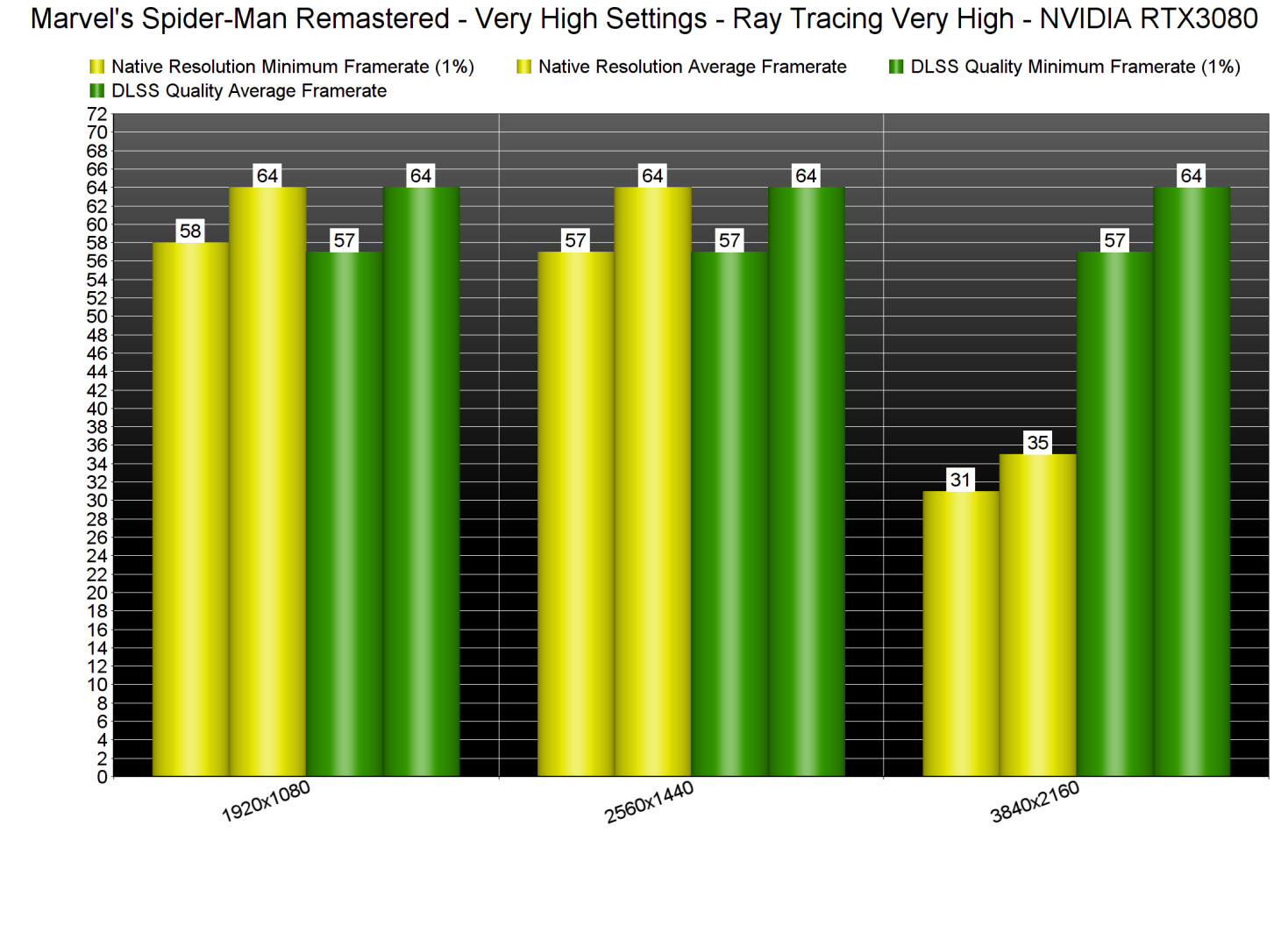
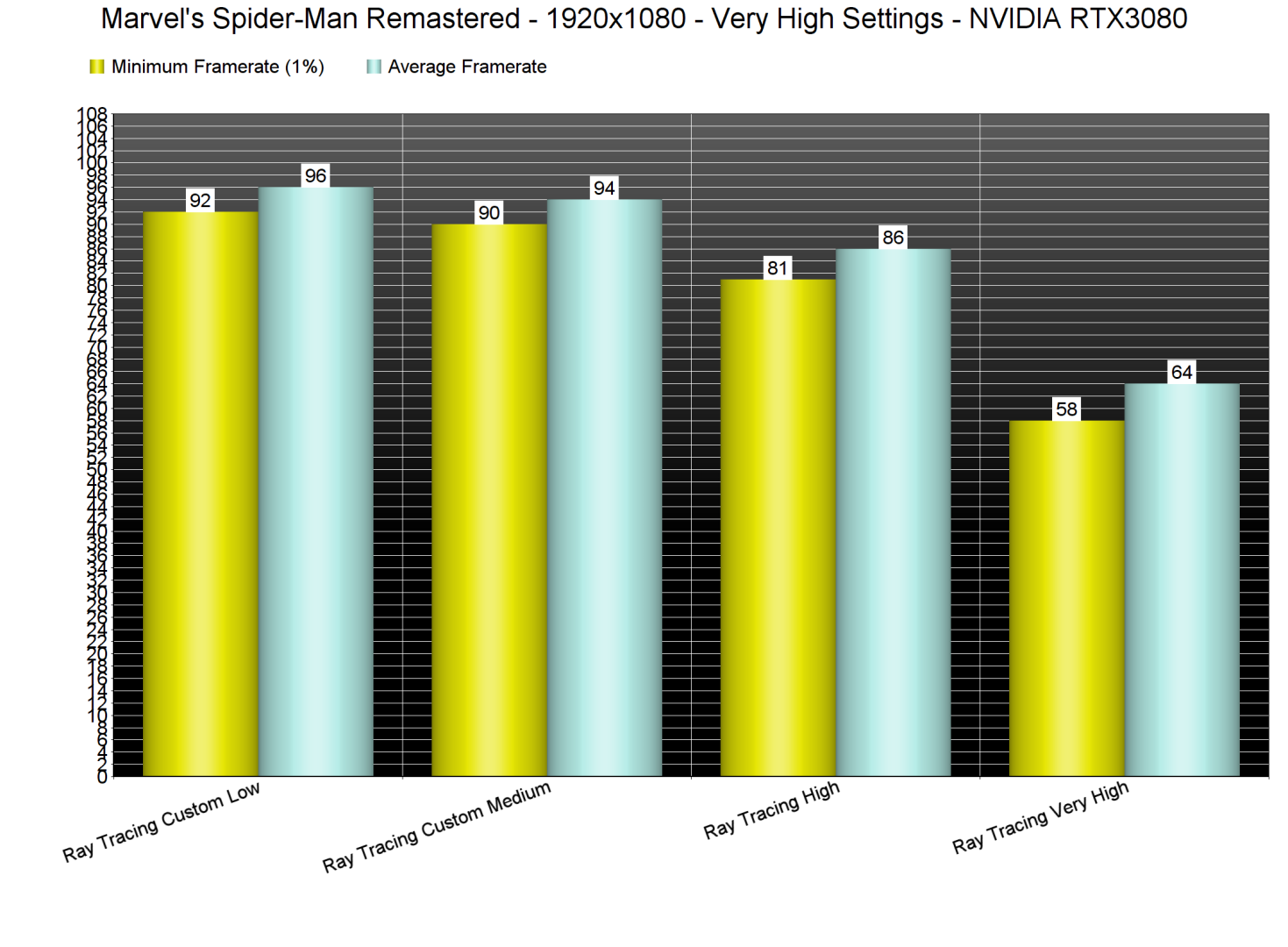
This is the first time we’ve experienced major performance issues with our Intel i9 9900K, even at 1080p (with RT Max). While our CPU was able to push an average of 64fps, it could also drop to 57fps. By disabling RT, we were able to get framerates higher than 100fps at all times.

Marvel's Spider-Man Remastered Ray Tracing benchmarks-1

Thankfully, PC gamers can adjust the RT reflections and improve overall quality. The game features two RT settings, Reflection Resolution and Geometry Detail, and you can set them to either High or Very High. There is also a slider for Object Range. By dropping these settings to High (and Object Range to 8), we were able to get a constant 80fps experience. For Medium settings, we dropped Object Range to 5 and got 90-94fps. And then, for Low settings, we dropped Object Range to 1 which only improved performance by 2fps.

Marvel's Spider-Man Remastered Ray Tracing Benchmarks-2

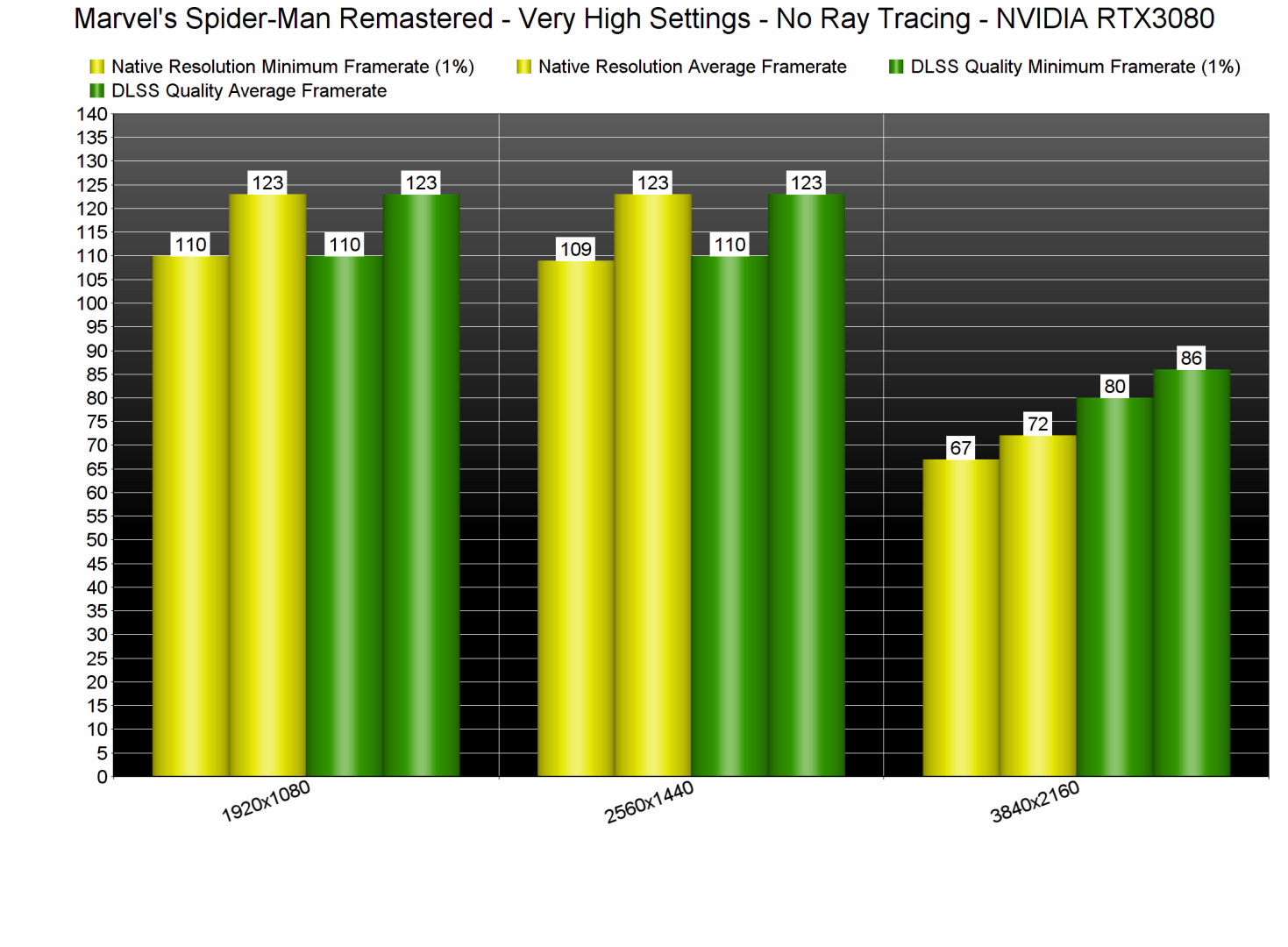
Without Ray Tracing, our PC test system can run the game comfortably. However, and although we were getting above 100fps, we were still CPU-limited at both 1080p and 1440p. At native 4K, we were able to get more than 60fps. Then, by enabling DLSS Quality, we got a constant 80fps experience.

Marvel's Spider-Man Remastered No Ray Tracing benchmarks

Marvel’s Spider-Man Remastered supports NVIDIA’s DLSS, AMD’s FSR 2.0 and Insomniac’s own Temporary Injection tech. The best upscaling tech is DLSS, followed by FSR 2.0 and then IGTI.

Below you can find some comparisons between DLSS Quality (left), FSR 2.0 Quality (middle) and Native 4K (right). Compared to native 4K, DLSS Quality does a better job at reconstructing some distant objects. However, DLSS Quality also suffers from additional aliasing, resulting in a jaggier image compared to native 4K.

Spider-Man DLSS Quality-1Spider-Man FSR 2.0 Quality-1Spider-Man Native 4K Quality-1 Spider-Man DLSS Quality-2Spider-Man FSR 2.0 Quality-2Spider-Man Native 4K Quality-2 Spider-Man DLSS Quality-3Spider-Man FSR 2.0 Quality-3Spider-Man Native 4K Quality-3

Stay tuned for our PC Performance Analysis which will most likely go live this weekend!

John Papadopoulos

John is the founder and Editor in Chief at DSOGaming. He is a PC gaming fan and highly supports the modding and indie communities. Before creating DSOGaming, John worked on numerous gaming websites. While he is a die-hard PC gamer, his gaming roots can be found on consoles. John loved – and still does – the 16-bit consoles, and considers SNES to be one of the best consoles. Still, the PC platform won him over consoles. That was mainly due to 3DFX and its iconic dedicated 3D accelerator graphics card, Voodoo 2. John has also written a higher degree thesis on the “The Evolution of PC graphics cards.”
Contact: Email